You Tweaking Video Generator
RapTwins is a You Tweaking video generator that casts two adult photos in the studio reaction meme: photo 1 asks for the turn and laughs, photo 2 turns and teases, and the 15-second 4:3 MP4 keeps the recorded dialogue. From $9 a month (one video is 28–809 credits), 3 free credits at sign-up. 480p to 1080p, no watermark, no voice cloning.
Updated
Make your You Tweaking video
1. Cast the two roles
Which photos work best
One consenting adult, face and outfit clear. JPG, PNG or WebP, 300–6000 px, up to 10 MB. Photo 2 is the person who turns and teases; use the same photo in both slots to play both roles.
2. Model and quality
480p · 15 s · 4:3 MP4 with the recorded dialogue kept
Add a photo for the laugher and one for the spinner.
New accounts get 3 free sign-up credits right now, fewer than one video costs (from 28 credits).
A finished remake: 15 s with the recorded voices · your video keeps this studio, the alternating shots and the dialogue with your photos in the two roles; expressions and lip timing can vary.
What does the You Tweaking meme template look like?
The You Tweaking meme template alternates between two people in a pale studio: one asks for a turn, the other turns, and the first breaks into a hand-over-mouth laugh before the teasing replies. These three videos show the same action and dialogue with different people, outfits and framing; the generator makes a 15-second 4:3 version. Tap a clip for sound.
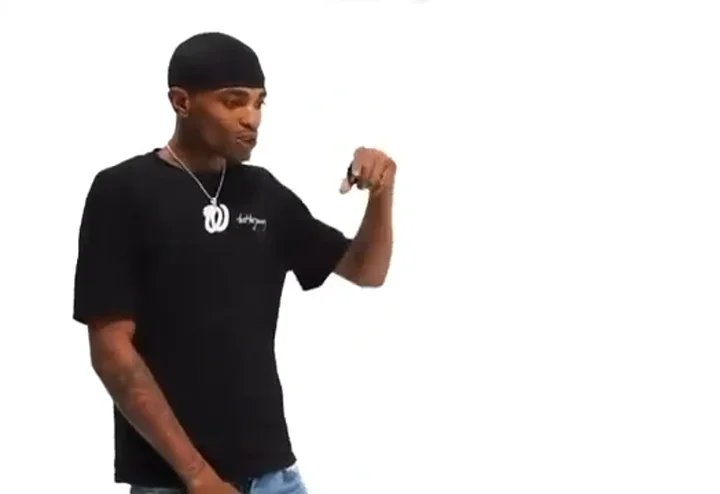
Black tee and red handbag
A full turn, a knuckle-biting laugh and the alternating replies in a white studio, with the recorded dialogue. The same skit your two photos get.
15 s · with sound · landscape
Navy tee and grey dress
A handbag turn and an amused reaction in wider studio framing, with the same spoken exchange and laugh.
14.7 s · with sound · landscape
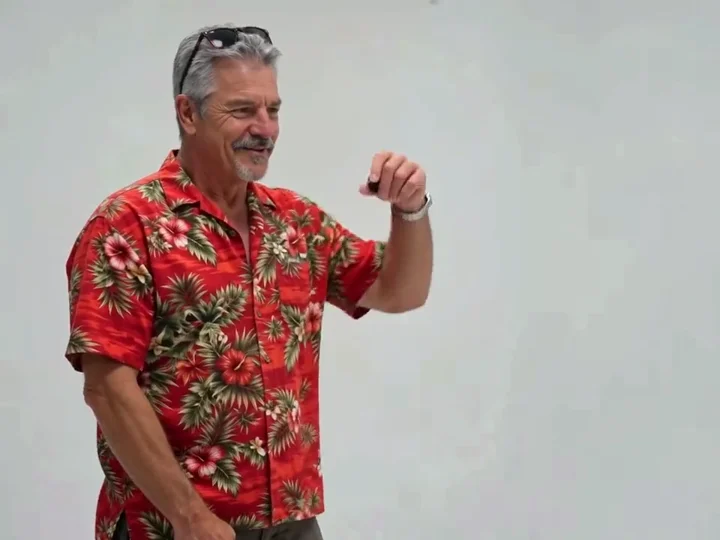
Floral shirt and lavender top
Two men play the turning and laughing roles in the pale studio, with the same dialogue and the same alternating shots.
15 s · with sound · landscape
Who laughs and who turns in the You Tweaking meme?
Photo 1 plays the laugher: the person who asks for the turn, bends over laughing with a hand at the mouth and answers back. Photo 2 plays the spinner: the person who turns all the way round, looks back and delivers the teasing replies. Each photo keeps its own face, hair and clothes in every shot, and Swap the two roles flips them before you start.
| Role | Photo | In the skit |
|---|---|---|
| The laugher | Photo 1 | Asks for the turn, laughs the longest, gives the answering replies |
| The spinner | Photo 2 | Turns 360°, smiles back, says the teasing lines; can carry a plain handbag |
What happens in the 15-second You Tweaking skit, shot by shot?
It is a run of single-person cuts in a plain pale studio with soft light and a small handheld microphone each. Photo 1 asks for the turn, photo 2 turns and looks back, photo 1 breaks into laughter, photo 2 smiles, photo 1 laughs longer, and the two trade teasing and answering lines to the final reaction. The whole 15 seconds play out with no new scene, split screen or captions.
| Order | On screen | What happens |
|---|---|---|
| 1 | Photo 1 · laugher | Asks for the turn |
| 2 | Photo 2 · spinner | Turns all the way round and looks back |
| 3 | Photo 1 · laugher | Brings the free hand and knuckles to the mouth, smiles and bends with laughter |
| 4 | Photo 2 · spinner | A short smiling reaction |
| 5 | Photo 1 · laugher | A longer laughing reaction |
| 6 | Both, in alternating shots | Photo 2 teases, photo 1 answers back, to the final reaction |
Does the You Tweaking video keep the original dialogue?
Yes. The sound people call the You Tweaking meme song is a spoken exchange with laughter, not a separate song, and the finished MP4 carries that recorded dialogue. The model makes the picture only; when it is done, the original recording is laid back under it in time with the cuts. Nothing clones your voice, and you cannot change the words.
| Part of the video | Where it comes from |
|---|---|
| Faces, hair, bodies and clothes | Your two photos |
| Studio, camera cuts, turn and laugh | The original skit |
| Mouth movement | Timed to the recorded lines; can drift where a voice carries over a cut |
| Voices and laughter | The original recording, laid on after |
Some lines carry across a cut, so the person on screen is not always the one speaking; the model is told not to mouth an off-camera line.
How do I make the You Tweaking AI trend with two photos?
Upload one adult portrait for each role, check the labels, pick a model and a resolution, tick the permission box and press the button. Both photos and the scene go to the model in one generation, then the recorded dialogue is laid under the result. It usually takes 3–8 minutes, the price shows before you start, and you can leave the page while it runs.
1Add and assign the photos
Put the laughing person in photo 1 and the turning person in photo 2. Use Swap the two roles if you picked them the wrong way round.
2Pick a model and resolution
Seedance 2.0 Mini at 480p is the default (28 credits); Seedance 2.0 Mini at 720p is 61 credits, and the sharpest option is Seedance 2.5 at 1080p (809 credits). Length and frame stay 15 s and 4:3.
3Confirm permission
Tick the box: both photos show adults who agreed to this fictional skit.
4Download the MP4
A 15-second 4:3 video with the recorded dialogue and no watermark, ready for TikTok, Reels, Shorts or a group chat.
Can one selfie play both roles in the You Tweaking meme?
Yes. Put the same adult selfie in both slots and you are cast twice, laughing at yourself turning round. Each slot is still its own role, and the model is told to keep two separate performers rather than merge the shots or add a third person. Leaving photo 2 empty does not invent a partner: both slots are required.
Friends and couples
One photo each, adults only. A waist-up, front-facing photo with the outfit visible holds up best through the turn.
Group photos
Crop each person out first: one adult per photo, so each role gets the right face.
Which model should you pick for the You Tweaking video?
Seedance 2.0 Mini at 480p is the default and the cheapest (28 credits): fine for a group chat or a quick post. Pick 720p for a sharper upload, Seedance 2.5 for the most faithful faces and up to 1080p (it runs a quick safety review of both photos first), or MiniMax H3 at 768P (145 credits). All five get the same photos, scene, instruction and dialogue.
| Model | Resolution | Length | Credits |
|---|---|---|---|
| Seedance 2.0 Mini | 480p, 720p | 15 s | 28–61 credits |
| Seedance 2.0 Fast | 480p, 720p | 15 s | 60–130 credits |
| Seedance 2.0 Pro | 480p, 720p, 1080p | 15 s | 102–546 credits |
| Seedance 2.5 | 480p, 720p, 1080p | 15 s | 150–809 credits |
| MiniMax H3 | 768P | 15 s | 145 credits |
How much does one You Tweaking video cost?
One 15-second You Tweaking video costs 28 to 809 credits, charged once when it starts and refunded automatically if it fails. The default, Seedance 2.0 Mini at 480p, is 28 credits (about $1.04); Seedance 2.5 is 150 credits at 480p and 809 at 1080p. The Starter plan ($9 a month, 240 credits) covers 8 videos at the default setting. The one-time $5 trial pack (73 credits) covers 2 videos at the default setting.
| Model | Length | Resolution | Credits | About |
|---|---|---|---|---|
| Seedance 2.0 Mini | 15 s | 480p | 28 credits | $1.04 |
| Seedance 2.0 Mini | 15 s | 720p | 61 credits | $2.27 |
| Seedance 2.0 Fast | 15 s | 480p | 60 credits | $2.23 |
| Seedance 2.0 Fast | 15 s | 720p | 130 credits | $4.83 |
| Seedance 2.0 Pro | 15 s | 480p | 102 credits | $3.79 |
| Seedance 2.0 Pro | 15 s | 720p | 217 credits | $8.07 |
| Seedance 2.0 Pro | 15 s | 1080p | 546 credits | $20.30 |
| Seedance 2.5 | 15 s | 480p | 150 credits | $5.58 |
| Seedance 2.5 | 15 s | 720p | 328 credits | $12.19 |
| Seedance 2.5 | 15 s | 1080p | 809 credits | $30.08 |
| MiniMax H3 | 15 s | 768P | 145 credits | $5.39 |
Is a You Tweaking video free, and is there a watermark?
Not fully: a new account gets 3 sign-up credits, fewer than one video costs (from 28 credits, about $1.04), so the rest comes from a plan or credit pack. Every download keeps the recorded dialogue and has no watermark, and a failed video gives the credits back automatically. See plans and credit packs.
| Sign-up credits | Plan or pack credits | |
|---|---|---|
| You Tweaking video | 3 credits, not enough for one | 28–809 credits each |
| Watermark | None | None |
| Download | MP4 with the dialogue | MP4 with the dialogue |
| Failed video | Credits back automatically | Credits back automatically |
How does it compare with MakeViral and Blyth?
They differ in frame, price and what they publish. MakeViral lists a fixed credit price for a 12-second vertical version with sound; Blyth lists a credit price per resolution. Neither template page states a dollar price per video, and a credit is worth a different amount on each service. This page makes the 15-second 4:3 skit across five models.
| Price per video | Free to start | Watermark | Output | |
|---|---|---|---|---|
| MakeViral | 152 credits; dollar cost not listed | Not published | None advertised | 12 s 9:16 with sound |
| Blyth | 480p 3,105 · 720p 6,319 · 1080p 12,569 credits | Not published | Not published | Video, 480p–1080p |
| RapTwins | 28–809 credits | 3 credits, not enough for one | None | 15 s 4:3, 480p–1080p or 768P, with the dialogue |
What can’t this You Tweaking generator do?
It cannot guarantee exact likeness, flawless fingers or perfect lip timing. Covered faces, strong filters, cropped bodies and a hand crossing the mouth can make it less consistent. It does not take a custom script, replace the voices, make a GIF, use pets or change the fixed 15-second 4:3 format. A higher resolution adds detail but does not guarantee better acting.
The laugh
The laugher’s hand comes up to the mouth; a clear, front-facing photo keeps the face steady behind it.
The turn
The spinner is seen from the back for a moment; a photo that shows the outfit helps keep the clothes the same all the way round.
No other audio
The file always carries the recorded exchange; to post with another sound, add it in the app and turn the original audio down.
No edits after
A new take is a new video at the same price, so check both photos and roles first.
What does “you tweaking” mean in this meme?
Here “you tweaking” is a teasing way of saying someone is overreacting or acting strangely. The joke is the oversized laugh after a simple turn, followed by the back-and-forth replies. The same studio skit and its remakes also travel as Oh He Tweakin and Oh You Can Make It Cap; this page uses “you tweaking” for that two-person exchange.
The slang has other uses, so a “you tweaking meaning slang” search can lead to definitions unrelated to this video. This template is the two-person studio exchange, not a Jigsaw reaction image or a general slang dictionary. It is not affiliated with the original performers.
You Tweaking meme: FAQ
Is You Tweaking the same meme as Oh He Tweakin or Oh You Can Make It Cap?
Here, yes: those names refer to the studio exchange with the turn request, the exaggerated laugh and the teasing replies. Other memes also use “tweaking”, so the phrase alone does not always mean this clip.
Can I use one selfie for both people?
Yes. Upload the same adult selfie into both slots to cast yourself twice. Each slot still plays its own role, and consistent likeness is not guaranteed.
Can I choose who laughs and who turns?
Yes. Photo 1 laughs and photo 2 turns and teases; Swap the two roles reverses them before you generate. The recorded voices stay with the roles and do not become the uploaded people’s voices.
Does “nah you tweaking” change what the characters say?
No. There is no script field: every video keeps the same recorded exchange, whatever phrase brought you here.
Can I download a You Tweaking meme GIF?
This tool downloads an MP4 with sound, not a GIF. You can convert the file in another editor, but a GIF loses the spoken exchange that makes the skit recognizable.
Can I use a photo of a friend?
Only with their permission. The box you tick confirms that both photos show adults who agreed to this fictional skit. Ask first, and label the post as AI-made.
Are failed videos refunded, and can I redo a finished one for free?
A refused photo or a failed generation gives the credits back automatically. A finished video with an expression, face or lip timing you do not like is not refunded; another version is a new video at the same price.
Check this answer with an AI assistant
“How do I make the You Tweaking meme video with my own photos?”
Your You Tweaking skit is two photos away.
Make our You Tweaking video