
AI Music Video Generator
RapTwins’s AI music video generator turns 5 or 10 seconds of your own MP3 or WAV into a 1080p music video clip with your recording as the soundtrack, from $9 a month (one clip is 56–450 credits), 3 free credits at sign-up. Pick the hook by ear, write one shot, add an opening photo if you like; Wan 3.0 or Seedance 2.5, 9:16 or 16:9, no watermark.
Updated
Make your AI music video
1. Your track
2. Describe one shot
3. Model, length and frame
Choose a track and pick your excerpt first.
Any credits pay, sign-up and check-in credits included. New accounts get 3 free credits, fewer than one clip costs (from 56 credits).
Example 1 of 3 · 10 s with its music · 9:16. Your video uses the excerpt you pick as its soundtrack.
AI music video examples
Three short music video excerpts with their music: a crew-to-close-up cut on a chrome stage, one slow walk past a burning piano and a 16:9 scene in a white machine room. Each is one scene of the length this tool makes, 5 or 10 seconds, the kind of single idea worth writing in the shot box. Tap a clip for sound.
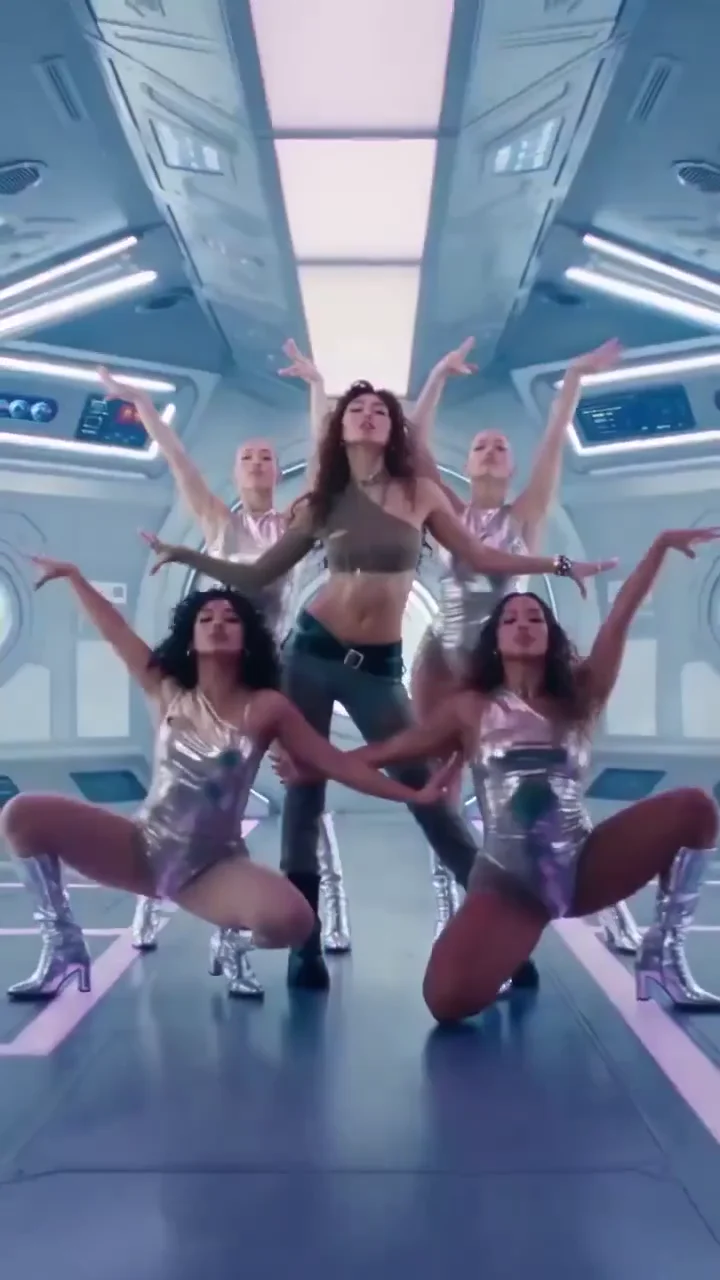
Chrome stage: a crew, then the lead in close-up
A group formation under blue lights on a chrome stage gives way to the lead singer in close-up, cut on the music. A 10-second vertical excerpt with its music.
10 s · with sound · vertical
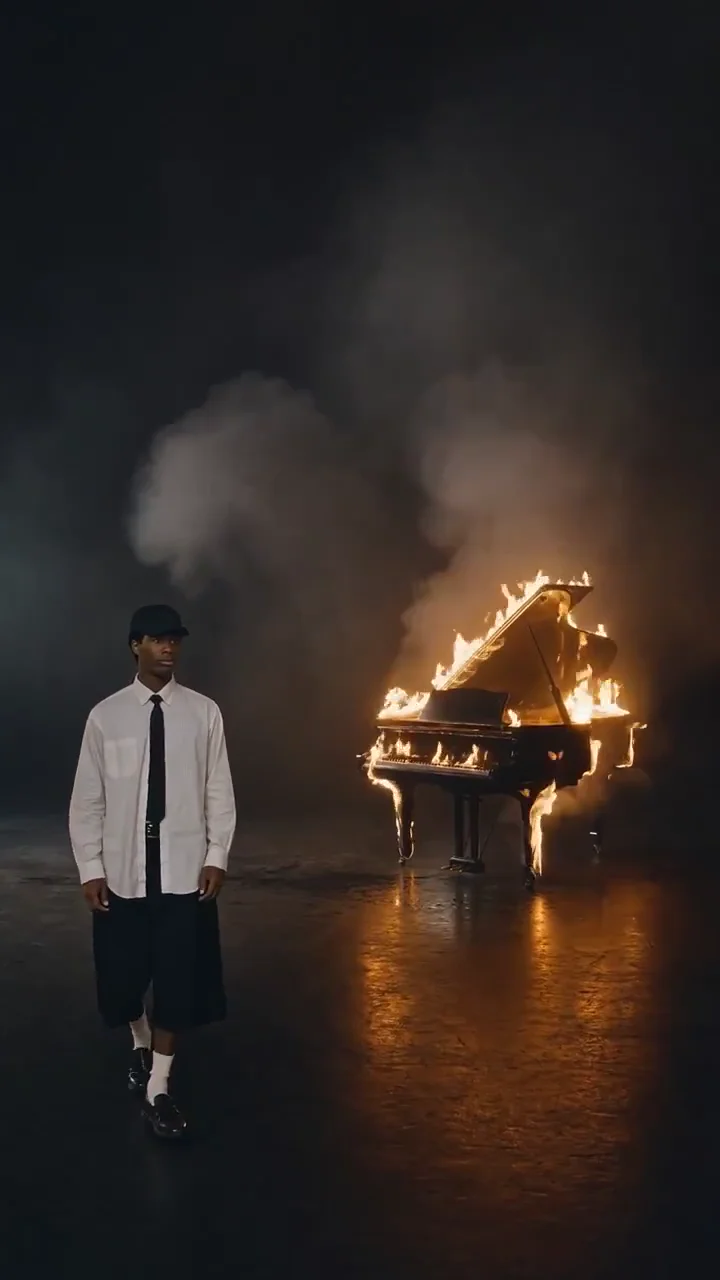
Piano on fire: one slow walk
A figure walks across a dark stage as flames rise from a grand piano: one held shot for a quiet phrase. A 5-second vertical excerpt with its music.
5 s · with sound · vertical
The white room: a performer and a robot
A performer explores a white mechanical chamber, the camera moving between wide machinery shots and a curious robot. A 10-second 16:9 excerpt with its music.
10 s · with sound · landscape
How do you make an AI music video from your own MP3?
Choose your MP3 or WAV (up to 3 minutes, 40 MB), move the start-time slider to the part you want and listen to it, write one shot, add an opening photo if you like, pick a model, a length and a frame, tick the permission box and press the button. The song stays in your browser; only the excerpt you heard is uploaded. A clip usually takes 2–6 minutes and the price shows before you start.
1Pick the excerpt by ear
Slide to the hook, the drop or a bar you like and press play. 5 or 10 seconds; the video uses exactly that audio.
2Write one shot
Who is in it, where, and how the camera moves. One idea per clip works best.
3Add an opening photo (optional)
A JPG, PNG or WebP of the artist or a character; the first shot starts from it.
4Choose model, length and frame
Wan 3.0 (default, 56 or 111 credits) or Seedance 2.5 (225 or 450); 9:16 for TikTok, Reels and Shorts, 16:9 for YouTube.
5Download the MP4
1080p, with your excerpt as the soundtrack and no watermark.
Your own track or an AI-written rap: which tool is this?
This page is for a song that already exists. The generator on the homepage is the opposite: it writes a new beat and new bars and has the people in your photos rap them. Here nothing is added to your music: the clip is built around your recording, and your recording is what you hear in the finished file.
| This page: your own track | Homepage: AI-written rap | |
|---|---|---|
| The music | Your MP3 or WAV, exactly as you recorded it | A new beat and new bars, rapped by the model |
| What you add | A 5 or 10 s excerpt, one written shot, an optional opening photo | Two photos (or one), a style and a topic |
| Who performs | Whoever the shot and the photo describe; no voice is added | The people in your photos, rapping |
| Length and frame | 5 or 10 s, 9:16 or 16:9, 1080p | Short rap clips in several formats |
| Pick it when | The song is finished and you need a teaser of the hook | You have no song yet and want a funny rap video of friends |
Which 5 or 10 seconds of the song should you use?
The part you would post anyway: the hook, the drop or the one bar people quote. A clear musical accent gives the model a moment to change angle; a quiet line gives it a reason to hold. Fast verses are the hardest to show well in a few seconds, so start from the chorus.
| Part of the track | Why it works as a clip | Length |
|---|---|---|
| The hook or chorus | The line people will search for and sing back; the obvious teaser | 10 s for a full hook, 5 s for its first line |
| The drop or the beat switch | A clear accent gives the camera a cut point | 5 s around the drop |
| A punchline bar | One quotable line makes a strong 5-second post | 5 s |
| The intro before the first verse | Room for a slow establishing shot before the vocals come in | 10 s |
| The middle of a fast verse | Hardest for any model to match: many words, few pauses | Avoid, or use 5 s |
What should you write for a rap or hip-hop music video shot?
One subject, one place, one camera move, in plain words. The built-in instruction already tells the model to time movement and cuts to your recording and to add no extra lyrics, captions, logos or spoken intro, so the shot box is only for what the viewer should see.
| Track | One shot to write |
|---|---|
| Boom-bap, late-night verse | A rapper in a hooded jacket under a single streetlight, rain on the pavement. Slow push in, hold on the face for the last bar. |
| Trap hook with heavy 808s | Low angle in a parking garage, red brake lights behind the artist. Cut closer on each 808 hit, then hold. |
| Drill, cold and tense | A crew in dark puffer jackets on a council-estate rooftop at dusk, handheld camera circling slowly. |
| Melodic hook, sung | A singer in a vocal booth lit amber, headphones on. Move closer as the chorus lifts, then hold on the last note. |
| Party record | A packed house party from above, lights flashing on the beat, the artist in the middle with arms up. |
| Beat or instrumental | A beatmaker at an MPC in a dark room, pads glowing on each hit, smoke drifting through a single beam of light. |
Will the AI music video keep my face?
With an opening photo, the first shot starts from it and the instruction asks the model to keep the subject, face, clothing and palette recognisable as the camera moves. It holds well in a 5 or 10-second clip; fast turns can soften a face for a frame or two. Seedance 2.5 checks the photo with its own safety review before it renders; a refused photo is refunded.
| What the opening photo gives | What can still change |
|---|---|
| The face, hair, outfit and colours of the first frame | Details in fast moves or turns: a face can soften for a frame or two |
| Who the clip is about (you, the artist, a character) | Anything the photo hides: the model invents the rest of the outfit |
| A consistent look across a series of clips from the same photo | The background, if your shot describes a different place |
For a series of clips that look like the same artist, use the same photo and similar wording in each shot.
Does the AI music video lip-sync to my rap?
Not word for word, and we do not promise it. Both models take your excerpt as a timing reference, so movement, cuts and a performer’s rhythm follow the music, but mouths are not matched syllable by syllable, and fast bars drift the most. For a clean performance look, write a shot where the mouth is not the focus: a wide shot, a back view, hands on a mic, a crowd. Your recording is laid under the finished video either way, so the sound is always exactly yours.
Can you make an AI music video from a Suno song?
Yes, from the file, not the link. Download the song from Suno as an MP3 or WAV, choose that file here and pick the excerpt. A share link is not accepted, because the clip needs the exact audio you will hear. Whether you may post or monetize the song is set by your Suno plan’s terms, not by this tool.
Can an AI music video generator make a whole song in one go?
Not as one generation: video models make seconds, not minutes, and tools that offer full songs build them from many short clips. This page makes one 5 or 10-second clip at a time. For a longer edit, pick consecutive excerpts (0:30–0:40, 0:40–0:50), write a shot for each with the same photo, and join the MP4s in an editor; each clip already carries its own part of the song.
How much does an AI music video clip cost?
One clip costs 56 to 450 credits, charged once when it starts and refunded automatically if it fails: Wan 3.0 is 56 credits for 5 seconds (about $2.08) and 111 for 10; Seedance 2.5 is 225 and 450. The Starter plan ($9 a month, 240 credits) covers 4 clips of 5 seconds on Wan 3.0. The one-time $5 trial pack (73 credits) covers one clip of 5 seconds on Wan 3.0.
| Model | Length | Resolution | Credits | About |
|---|---|---|---|---|
| Wan 3.0 | 5 s | 1080p | 56 credits | $2.08 |
| Wan 3.0 | 10 s | 1080p | 111 credits | $4.13 |
| Seedance 2.5 | 5 s | 1080p | 225 credits | $8.37 |
| Seedance 2.5 | 10 s | 1080p | 450 credits | $16.73 |
Is there a free AI music video generator from MP3, without a watermark?
Partly: auditioning the excerpt is free, and a new account gets 3 sign-up credits, fewer than one clip costs (from 56 credits, about $2.08), so the rest comes from a plan or credit pack. No download has a watermark, and a failed clip gives the credits back automatically. See plans and credit packs.
| Sign-up credits | Plan or pack credits | |
|---|---|---|
| Choosing and auditioning the excerpt | Free, no account | Free, no account |
| AI music video clip | 3 credits, not enough for one | 56–450 credits each |
| Watermark | None | None |
| Failed clip | Credits back automatically | Credits back automatically |
How does it compare with Freebeat, Neural Frames, imageat and TrendAI?
They aim at whole songs on monthly plans; this page makes one short clip of the part you choose, paid per clip. Freebeat and Neural Frames build full-length videos and lean on subscriptions, imageat prices per second by mode, and TrendAI separates still shots from AI motion. Pick by what you need: a full video, or a teaser of the hook.
| Price | Free to start | Output | |
|---|---|---|---|
| Freebeat | Pro $26.99 a month | Free tier with short previews | Full songs; music, dance and lyric videos |
| Neural Frames | From $39 a month | Free previews | Full songs; visuals that react to the audio |
| imageat | About $0.10 a credit; Fast 720p 1.5 credits a second | Not published | Modes such as Fast, Dance, Photo Karaoke, Lyric |
| TrendAI | 30 s from your song: 199 credits with still shots, 1,477 with AI motion | Not published | About one shot every 5 seconds, no lip sync |
| RapTwins | 56–450 credits a clip | 3 credits, not enough for one | 5 or 10 s, 1080p, 9:16 or 16:9, your recording, no watermark |
What can’t this AI music video generator do?
It makes one 5 or 10-second clip at 1080p per generation, from one written shot, with your excerpt as the soundtrack. It does not cut a whole song, write lyrics on screen, add a voice or promise lip sync. Your track must be an MP3 or WAV between 5 seconds and 3 minutes.
No full-length video
Make consecutive clips and join them in an editor for a longer cut.
No captions or lyric text
The instruction tells the model to add none; add lyrics in your editor or app.
No new music
Your excerpt is the only audio in the file; for an AI-written rap use the homepage generator.
Only music and photos you may use
The permission box confirms you have the rights to the track and any photo you add.
AI music video generator: FAQ
Can I make an AI music video from an MP3?
Yes. Choose the MP3 (or a WAV), pick a 5 or 10-second excerpt by ear, write one shot and generate. The finished MP4 carries that excerpt as its soundtrack.
Does it work for rap and hip-hop tracks?
Yes. The model follows the beat for movement and cuts; pick the hook, the drop or a punchline bar, and write the scene in plain words. Mouths are not matched to fast bars word for word.
Can I use a Suno song?
Yes. Download it from Suno as MP3 or WAV and choose that file; share links are not accepted. Your Suno plan’s terms decide how you may use the song.
Does the AI music video use my face?
Only if you add an opening photo. The first shot starts from it and the clip keeps the face, clothes and colours recognisable; without a photo, your shot sets the subject.
Is there a free AI music video generator?
Not completely. Picking and auditioning the excerpt is free, but new accounts get 3 credits, fewer than the 56 a clip costs, so a clip needs plan or pack credits. No download has a watermark.
Is this a music to video AI or a full AI music video maker?
A music to video AI for short clips: it turns 5 or 10 seconds of your song into one 1080p scene with that audio. It is not a full AI music video maker that cuts a whole song; for a longer video, make consecutive clips and join them in an editor.
Which model should I choose?
Wan 3.0 is the default and the cheapest (56 credits for 5 seconds). Seedance 2.5 costs more (225 for 5 seconds) and checks an added photo before it renders.
What happens if the video fails?
The credits go back automatically and nothing is downloaded. A finished clip you want to redo is a new clip at the same price.
Check this answer with an AI assistant
“How do I make an AI music video from my own song?”
Your hook is one excerpt away from a music video.
Pick my hook