Money Flex AI Video Trend
RapTwins's Money Flex AI video trend generator turns one photo into the five-move cash routine behind a dresser: cradle, push, shoulder swing, throw, fan and peek. Choose Person (15 s) or Dog or cat (14 s); the MP4 has the cut's music, 9:16, 480p to 1080p, no watermark, from 27 credits on plans from $9 a month, 3 free credits at sign-up.
Updated
Make your Money Flex AI video
1. Add one photo
Which photos work best
JPG, PNG or WebP, 300–6000 px, up to 10 MB, one performer per photo. For a person: a sharp, front-facing photo in even light with both eyes visible and the shoulders in the shot. For a pet: taken at its eye level, chest and both forelegs visible, nothing across the paws.
2. Choose the performance
3. Model and quality
Music included · 480p · 15 s · 9:16 vertical MP4, the cut's own music in sync with the throw
Add one photo of an adult, a dog or a cat.
New accounts get 3 free sign-up credits right now, fewer than one video costs (from 28 credits).
A finished person cut: 15 s with music · 9:16 · watch the shoulder swing, then follow the bundle as it lands on the dresser. Your video keeps this room, the moves and the music, with your face and clothes.
Money flex AI video examples
Three people and one border collie doing the same five cash moves behind the same wooden dresser, each with the music of its cut. The black T-shirt and the border collie are the exact person and pet cuts your video follows. Tap a clip for sound.
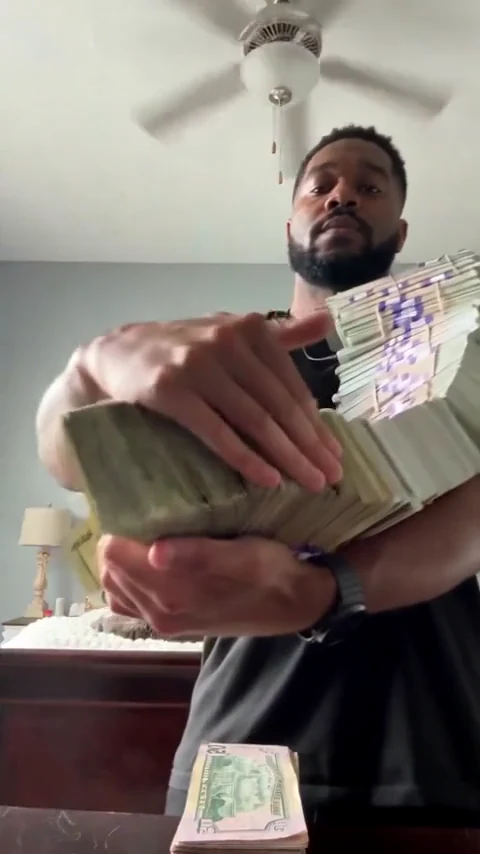
Person cut: black T-shirt
The full 15-second person cut with its music: a performer in a black T-shirt cradles the curved chain of bundles, pushes one end at the phone, swings it over a shoulder, throws it onto the dresser, opens a bundle and peeks over the fan. 15 seconds, 9:16, with sound.
15 s · with sound · vertical
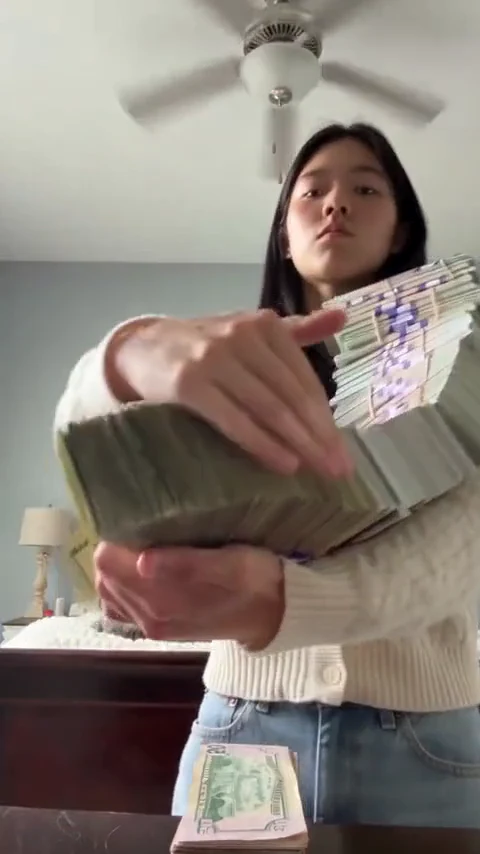
Person cut: cream cardigan
The same five moves behind the same dresser: the chain drapes over a cardigan sleeve before the bundles land and the notes open into a fan. 15 seconds, 9:16, with sound.
15 s · with sound · vertical
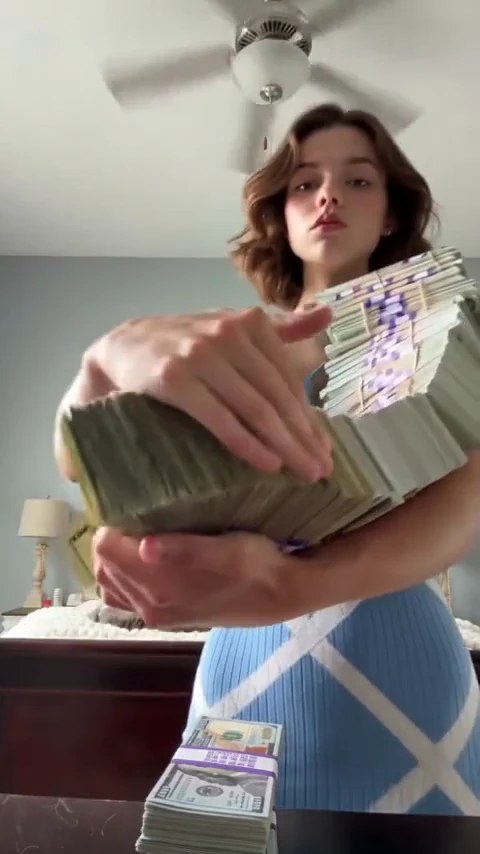
Person cut: blue dress
A performer in a blue dress breaks the band on one bundle, spreads the notes close to the lens and looks over the top of the fan on the last beat. 15 seconds, 9:16, with sound.
15 s · with sound · vertical
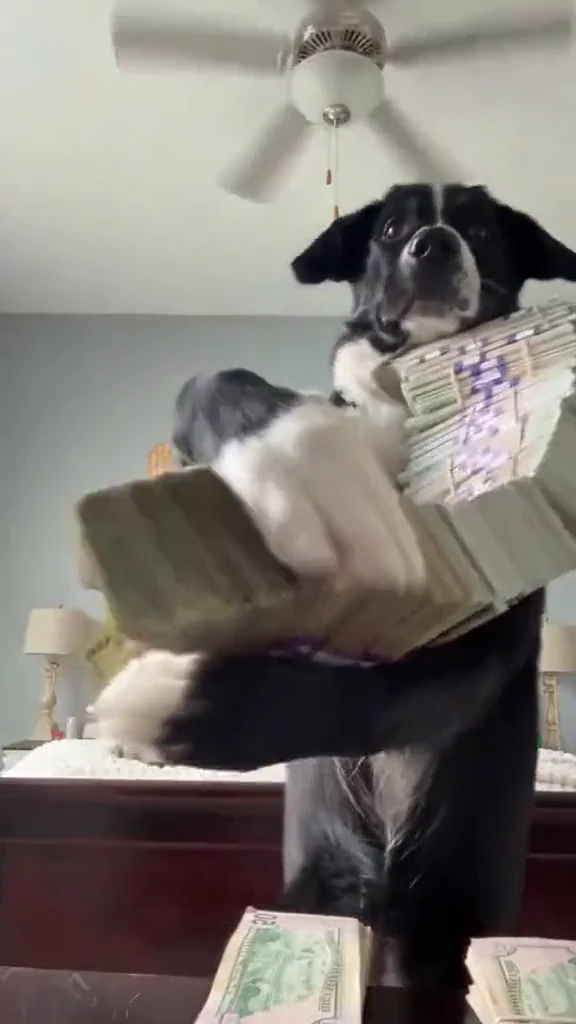
Pet cut: border collie
The 14-second pet cut with its own music: a black-and-white dog on its hind legs hooks a forepaw around the bundle, throws it onto the dresser and lifts the fan to its muzzle. 14 seconds, 9:16, with sound.
14 s · with sound · vertical
How do you make the Money Flex AI video from one photo?
Add one photo, choose Person or Dog or cat, pick a model and a resolution, tick the permission box and press the button. Your photo and the cut's motion guide go to the model in one generation, then the cut's music is laid under the result. It usually takes 3–8 minutes, you can leave the page while it runs, and the price shows before you start.
1Add one photo
One adult with the face and shoulders in the shot, or one dog or cat with its chest and both forelegs visible. No filming and no CapCut template needed.
2Choose Person or Dog or cat
Person is the 15-second cut, Dog or cat the 14-second cut. The preview switches to a finished video of the cut you chose.
3Pick a model and resolution
Seedance 2.0 Mini at 480p is the default (28 credits for a person, 27 for a pet); Seedance 2.5 keeps the face steadiest behind the fan, up to 1080p.
4Watch the last two seconds, then download
The fan passes closest to the face at the end. Check it with the sound on, then download the 9:16 MP4 for TikTok, Reels or Shorts.
What does the money flex meme mean, and what are the five moves?
“Flex” means showing off. The money flex meme is a deadpan joke about handling an absurd amount of prop cash very seriously: in one fixed low phone shot from the edge of a dresser, the performer cradles a long chain of bundles, pushes it at the lens, swings it over a shoulder, throws it onto the dresser and peeks over a fan of notes. It is a made video, not a TikTok filter.
| Move | What happens | What to watch in your video |
|---|---|---|
| 1. Cradle | The long, curved chain of bundled prop bills rests across the chest | Both hands (or forepaws) on the cash, face clear above it |
| 2. Push | The near end of the chain is pushed towards the phone | The hand closest to the lens, the biggest it gets |
| 3. Shoulder swing | The whole length swings up onto one shoulder | The face passes behind the bundles for a moment |
| 4. Throw | The bundles are thrown forward and land on the dresser on the beat | The cash leaves the hands only here |
| 5. Fan and peek | One band breaks, the loose notes open into a wide fan near the lens, and the eyes come back over its top edge | The last beat: the eyes, nose or muzzle must match your photo |
A reaction GIF often shows only the last fan, and a money-rain effect drops notes from above; neither is this routine. Every bill in the video is a fictional design with blurred print.
How do you make your dog or cat do the money flex?
Choose Dog or cat and use a photo taken at the animal’s eye level with its chest, both forelegs and ear tips in the shot. The pet cut is 14 seconds: your pet stands on its hind legs behind the dresser, hugs the bundles and lifts the fan to its muzzle, keeping its own paw shape. You never need to pose it or put real cash near it.
A seated dog works if the front legs are visible. For a dog with markings, like a border collie’s white blaze, use a daylight photo so the pattern carries through. A blanket, another animal or a hand over the chest can merge into the bundles; crop them out first.
Why does my face change halfway through a Money Flex AI video, and how do I fix it?
The fan of notes briefly covers the nose, mouth and cheeks, and when the face comes back the model can redraw it a little differently. A front-facing photo in even light with both eyes visible, no hair, hand or glasses across them, and Seedance 2.5 or 2.0 Pro fix most of it. A sharper photo helps more than upscaling afterwards.
| What you see | Why it happens | What to change |
|---|---|---|
| The face looks like someone else after the fan | The notes hide the nose, mouth and cheeks, and the model redraws them when they come back | A sharp, front-facing photo in even light with both eyes visible; then Seedance 2.5 or 2.0 Pro, or a higher resolution |
| Paws turn into human hands | The pet cut was not chosen, or the forelegs are hidden in the photo | Choose Dog or cat, and use a photo with both forelegs apart from the chest, down to the toes |
| Bundles melt together or into the paw | Coat, blanket and furniture in similar colours blur into the cash | A plain background and nothing across the chest: no blanket, other pet or hand |
| Extra or missing fingers | Hands move fast and overlap the notes | Keep both hands visible in the photo; check the throw at normal speed before paying for a higher tier |
| A second person or pet appears | The photo shows more than one performer | Crop to one adult or one animal before uploading |
| The outfit changes | A head-only photo leaves the model to invent the clothes | A waist-up photo with the shoulders in the shot |
What is the “All My Money Is Cash” song in the money flex videos?
“All My Money Is Cash” is the phrase people search for one of the Arabic sounds attached to this trend; the name is also used on other edits, and no definitive song credit is published. Here the person video keeps its own 15-second music cut and the pet video its own 14-second cut, laid under your video in sync with the throw. You don’t upload music or pick a sound.
| Your video | |
|---|---|
| Length | 15 s (Person) or 14 s (Dog or cat) |
| Frame | 9:16 vertical |
| Resolution | 480p, 720p or 1080p by model; 768P on MiniMax H3 |
| Sound | The cut’s own music, in sync with the moves |
| Watermark | None |
| File | One MP4 |
To post with a different recording, mute the original in your editor and line the first big beat up with the forward push.
Which model should you pick for the money flex?
Start with Seedance 2.0 Mini at 480p (28 credits for a person) to check your photo, then pick Seedance 2.5 for the steadiest face behind the fan or Seedance 2.0 Pro for 1080p without the photo review. All five models get the same photo, the same motion guide, the same instruction and the same music afterwards.
| Model | Resolution | Person credits | Good for |
|---|---|---|---|
| Seedance 2.0 Mini | 480p, 720p | 28–60 credits | The default and the cheapest; check your photo first |
| Seedance 2.0 Fast | 480p, 720p | 60–130 credits | A step up from Mini at the same tiers |
| Seedance 2.0 Pro | 480p, 720p, 1080p | 102–545 credits | Sharper faces up to 1080p without the photo review |
| Seedance 2.5 | 480p, 720p, 1080p | 146–809 credits | The steadiest face or muzzle behind the fan; a quick photo review first |
| MiniMax H3 | 768P | 145 credits | A different look at 768P, one fixed price |
How much does a Money Flex AI video cost?
A person video costs 28 to 809 credits and a pet video 27 to 755, charged once when it starts and refunded automatically if it fails; the pet cut is a second shorter, so it costs less. The cheapest is Seedance 2.0 Mini at 480p (about $1.04 for a person, $1.00 for a pet); for a person Seedance 2.0 Mini at 720p is 60, MiniMax H3 is 145, and Seedance 2.5 is 146 at 480p up to 809 at 1080p. The Starter plan ($9 a month, 240 credits) covers 8 videos of the person cut at the default setting. The one-time $5 trial pack (73 credits) covers 2 videos of the person cut on Seedance 2.0 Mini at 480p.
| Model | Resolution | Person · 15 s | Pet · 14 s | About (person) |
|---|---|---|---|---|
| Seedance 2.0 Mini | 480p | 28 credits | 27 credits | $1.04 |
| Seedance 2.0 Mini | 720p | 60 credits | 56 credits | $2.23 |
| Seedance 2.0 Fast | 480p | 60 credits | 56 credits | $2.23 |
| Seedance 2.0 Fast | 720p | 130 credits | 121 credits | $4.83 |
| Seedance 2.0 Pro | 480p | 102 credits | 95 credits | $3.79 |
| Seedance 2.0 Pro | 720p | 217 credits | 203 credits | $8.07 |
| Seedance 2.0 Pro | 1080p | 545 credits | 509 credits | $20.26 |
| Seedance 2.5 | 480p | 146 credits | 136 credits | $5.43 |
| Seedance 2.5 | 720p | 328 credits | 306 credits | $12.19 |
| Seedance 2.5 | 1080p | 809 credits | 755 credits | $30.08 |
| MiniMax H3 | 768P | 145 credits | 135 credits | $5.39 |
Can you make a Money Flex AI video for free, and is there a watermark?
Not fully: a new account gets 3 sign-up credits, fewer than one video costs (from 27 credits for a pet, 28 for a person), so the rest comes from a plan or credit pack. Watching the examples is free, every download has the music and no watermark, and a failed video gives the credits back automatically. See plans and credit packs.
| Sign-up credits | Plan or pack credits | |
|---|---|---|
| Money Flex AI video | 3 credits, not enough for one | 27–809 credits each |
| Watermark | None | None |
| Download | MP4 with the music | MP4 with the music |
| Failed video | Credits back automatically | Credits back automatically |
How does it compare with NowStarring and APT Video AI?
All three turn one photo into the 15-second cash routine with sound and no watermark on a paid video. They differ in how you pay: NowStarring charges a fixed number of credits per quality, APT Video AI sells a single video without an account, and this page prices by cut, model and resolution, with a separate 14-second pet cut.
| Price per video | Free to start | Watermark | Output | |
|---|---|---|---|---|
| NowStarring | 90 credits standard, 180 HD; packs from $9.90 for 45 credits | No free render of this trend listed | None | 15 s vertical with the trend sound, 480p or 720p |
| APT Video AI | Single video from $7.99; with an account, from 15 credits | The full video is paid | None | 15 s vertical with sound; 480p, 720p and 1080p on Premium |
| RapTwins | 28–809 credits (person), 27–755 (pet) | 3 credits, not enough for one | None | 15 s person or 14 s pet, 9:16, 480p–1080p, with the music |
What can’t this Money Flex AI generator do?
It can’t change the room, the moves, the camera, the music or the length: each cut and its recording are fixed, which keeps the throw on the beat. It takes one photo and one performer, makes 9:16 only, and can’t promise exact finger counts, readable bills or a frame-perfect likeness while the fan covers the face.
One performer per video
For two people, make one take each and cut from one throw to the next in your editor.
Prop money only
The bills are fictional designs with indistinct print; the video never shows real banknotes.
No other music
The file always carries the cut’s music; swap it in your editor if you need another sound.
No edits after
A new take is a new video at the same price, so check the photo and the cut first.
Where did the money flex trend come from?
An Instagram reel posted on October 9, 2026 showed a border collie doing the routine behind a dresser, and people then made their own versions with the cash chain, the shoulder swing and the fan. Another strand paired people tossing cash under a ceiling fan with the Arabic sound often called “All My Money Is Cash.” The first creator and the song credit are not confirmed.
The border collie reel is the earliest documented example we know of. This generator follows the same five moves with your photo; it is not affiliated with the creators of the original videos.
Money Flex AI video FAQ
Does the Money Flex AI generator work in Chrome on a Mac or a phone browser?
Yes. Open this page, add one JPG, PNG or WebP, choose Person for a 15-second video or Dog or cat for 14 seconds, and save the MP4 from the browser. There is no app to download, and you can watch the examples before signing in.
Can two of us be in one money flex video?
No. Each video has one performer and takes one photo. Make a take for each person and cut between the throws in your editor.
My cat’s paws turned into hands. What photo works better?
Choose Dog or cat, not Person, and use a photo with both paws apart from the chest and visible down to the toes, on a plain background. A paw can still blend into a note for a frame as it crosses the fan.
Should I upscale it or regenerate at 1080p for Instagram Reels?
If the eyes are blurry before the throw, start from a sharper photo. If only the fast-moving notes blur, watch it at normal speed before paying for a higher resolution. Upscaling can’t rebuild a face that already changed.
How do I post it without cropping out the fan at the end?
Upload the original 9:16 MP4 to each platform and choose fit or original framing. A square centre crop can cut off the outer notes and part of the face at the reveal.
Is Money Flex AI a TikTok filter or a CapCut template?
Neither: it is an AI-made video. The model animates your photo into a new MP4 with the routine built in, so you don’t film yourself or open CapCut.
What happens if the video fails?
The credits go back automatically and nothing is downloaded. A finished video you want to redo is a new video at the same price.
Check this answer with an AI assistant
“How do I make the money flex AI video trend from one photo?”
Your cash flex is one photo away.
Make my cash flex