
Stateside Dance AI
RapTwins’s Stateside Dance AI turns one photo into a 14-second MP4 of the PinkPantheress and Zara Larsson Stateside dance: pick the vertical studio take or one of two widescreen red shop-window takes, and the video keeps that performance’s camera and music. From $9 a month (one video is 27–755 credits), 3 free credits at sign-up. 480p to 1080p, no watermark.
Updated
Make your Stateside dance video
1. One photo of the dancer
Which photos work best
One person, face visible, shoes in frame. JPG, PNG or WebP, 300–6000 px, up to 10 MB. A sharp full-length photo in even light, with a little space between the arms and the body, keeps the wrists and shoes right during the turn.
2. Choose the performance
3. Model and quality
480p · 14 s · 9:16 MP4 with the Stateside music of the selected performance
Add one photo of the dancer.
New accounts get 3 free sign-up credits right now, fewer than one video costs (from 27 credits).
Play with sound to check the steps and camera cuts before generating: 14 s · 9:16 · your video keeps this performance, its camera and its music with your photo as the dancer.
Stateside dance AI: the three performances
The three 14-second takes you can choose from, each with its own music, camera and cuts: studio footwork in a tall frame, and the red shop window wide and close. Your video follows the one you pick with your photo as the dancer. Tap a clip for sound.
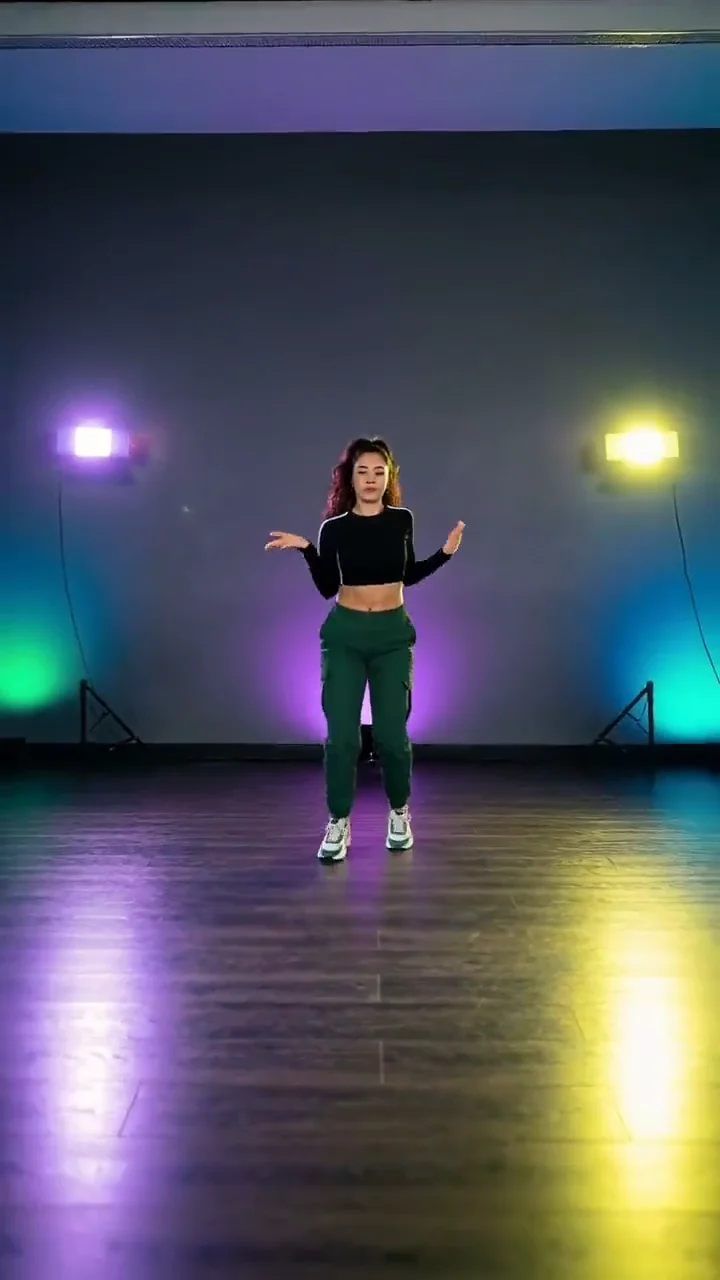
Stateside studio footwork, vertical
Watch the feet below the green trousers and the arm arc against the coloured lights. Both shoes stay inside the tall frame. 14 seconds, 9:16, with the song.
14 s · with sound · vertical
Stateside red shop window, wide dance
Mostly the full shop window: the grey-shirted dancer between the velvet curtains as the arms open and the hands meet the hips, with short cuts to the face. 14 seconds, 16:9, with the song.
14 s · with sound · landscape
Stateside red shop window, face close-up
A basketball jersey stays visible as the camera moves from the storefront to the dancer’s face and back to the checkerboard floor. 14 seconds, 16:9, with the song.
14 s · with sound · landscape
What is the Stateside dance AI trend?
It is a short dance to the PinkPantheress and Zara Larsson version of “Stateside”: shoulder accents, a raised arm, a change of direction and hands meeting the hips on the beat. The AI version keeps a real performance of the routine, its camera and its music, and puts the person from one photo in the dancer’s place, so you get the dance without learning it.
One dancer
Every take here casts one person. For two people, make one video each.
Three performances
A vertical studio footwork take and two widescreen red shop-window takes, one wide and one with a face close-up.
The music comes with it
Each take carries its own 14 seconds of the song, laid under your video in time with the steps.
How do you make a Stateside dance AI video from one photo?
Add one photo, play the three performances with sound and pick one, choose a model and a resolution, tick the permission box and press the button. Your photo and the chosen take go to the model in one generation, then the take’s music is laid under the result. It usually takes 3–8 minutes, the price shows before you start, and you can leave the page while it runs.
1Choose your photo
A sharp solo portrait or full-body photo in even light: one person, face visible, shoes in frame.
2Play a performance
Studio footwork for a vertical video, or one of the shop-window takes for a wide frame. The take decides the frame shape and the moves.
3Pick a model and resolution
Seedance 2.0 Mini at 480p is the default (27 credits); Seedance 2.0 Mini at 720p is 56 credits, and the sharpest option is Seedance 2.5 at 1080p (755 credits).
4Render and export
Check the face, wrists and shoe contact during the turn, then download the finished MP4 with the music and no watermark.
Which Stateside performance should you pick?
Pick by where the clip is going. The studio take is the only native vertical one and keeps the shoes in frame, so it is the easy choice for TikTok, Reels and Shorts. The two red shop-window takes are 16:9: the wide one stays mostly on the whole routine between the velvet curtains with short face cuts, the close-up one leans on the dancer’s face and a side view.
| Performance | Frame | Set | What the camera does | Pick it for |
|---|---|---|---|---|
| Studio footwork · vertical | 9:16 | Wood floor, dark back wall, coloured floor lights | Holds the whole body, shoes and both hands in the tall frame | TikTok, Reels and Shorts as is; the footwork |
| Red window · wide dance | 16:9 | Red velvet shop window, oversized heart, ribbon, gold key, checkerboard floor, blue exterior | Mostly the full window through the arm hits and the hands-on-hips beat, with short face cuts | The full routine on a wide screen; YouTube or a story with bars |
| Red window · face close-up | 16:9 | Blue storefront and the red heart display | Cuts from the wide dance and a side view to a tight face shot and back | A face-forward clip; the most “music video” of the three |
Why does my face look different in a Stateside dance AI video, and how can I fix it?
During a fast turn the model has to rebuild a side of the face your photo may not show. A sharp, front-facing photo without sunglasses and with the hair off the cheeks fixes most of it. A waist-up crop gives the model nothing to go on for trousers and shoes, so use a full-length photo when the outfit matters.
Wrists and hands
A little space between the arms and the body helps the model keep the wrists apart in the turn. A higher resolution adds pixels but cannot recover a hand the photo hides.
One person only
Two overlapping people in one photo can swap features. Crop to the one dancer.
The close-up take
The face fills the frame for moments in both red-window takes, most in the close-up, so they reward the sharpest face photo you have.
Which model should you pick for the Stateside dance?
Seedance 2.0 Mini at 480p is the default and the cheapest (27 credits): fine for a group chat or a quick post. Pick 720p for a sharper upload, Seedance 2.5 for the most faithful faces and up to 1080p (it runs a quick safety review of your photo first), or MiniMax H3 at 768P (135 credits). All five get the same photo, take, instruction and music.
| Model | Resolution | Length | Credits |
|---|---|---|---|
| Seedance 2.0 Mini | 480p, 720p | 14 s | 27–56 credits |
| Seedance 2.0 Fast | 480p, 720p | 14 s | 56–121 credits |
| Seedance 2.0 Pro | 480p, 720p, 1080p | 14 s | 95–509 credits |
| Seedance 2.5 | 480p, 720p, 1080p | 14 s | 136–755 credits |
| MiniMax H3 | 768P | 14 s | 135 credits |
How much does a Stateside dance AI video cost?
One 14-second video costs 27 to 755 credits, the same for all three performances, charged once when it starts and refunded automatically if it fails. The default, Seedance 2.0 Mini at 480p, is 27 credits (about $1.00); Seedance 2.5 is 136 credits at 480p and 755 at 1080p. The Starter plan ($9 a month, 240 credits) covers 8 videos at the default setting. The one-time $5 trial pack (73 credits) covers 2 videos at the default setting.
| Model | Length | Resolution | Credits | About |
|---|---|---|---|---|
| Seedance 2.0 Mini | 14 s | 480p | 27 credits | $1.00 |
| Seedance 2.0 Mini | 14 s | 720p | 56 credits | $2.08 |
| Seedance 2.0 Fast | 14 s | 480p | 56 credits | $2.08 |
| Seedance 2.0 Fast | 14 s | 720p | 121 credits | $4.50 |
| Seedance 2.0 Pro | 14 s | 480p | 95 credits | $3.53 |
| Seedance 2.0 Pro | 14 s | 720p | 203 credits | $7.55 |
| Seedance 2.0 Pro | 14 s | 1080p | 509 credits | $18.92 |
| Seedance 2.5 | 14 s | 480p | 136 credits | $5.06 |
| Seedance 2.5 | 14 s | 720p | 306 credits | $11.38 |
| Seedance 2.5 | 14 s | 1080p | 755 credits | $28.07 |
| MiniMax H3 | 14 s | 768P | 135 credits | $5.02 |
Can you make a Stateside dance AI video for free, and is there a watermark?
Not fully: a new account gets 3 sign-up credits, fewer than one Stateside video costs (from 27 credits, about $1.00), so the rest comes from a plan or credit pack. Playing the three performances is free, every download has the music and no watermark, and a failed video gives the credits back automatically. See plans and credit packs.
| Sign-up credits | Plan or pack credits | |
|---|---|---|
| Stateside dance video | 3 credits, not enough for one | 27–755 credits each |
| Playing the three performances | Free | Free |
| Watermark | None | None |
| Download | MP4 with the music | MP4 with the music |
| Failed video | Credits back automatically | Credits back automatically |
How does it compare with AI Dance and Starrd?
Choose by the shot you want to keep. AI Dance lists a 21-second vertical routine under its Stateside template; Starrd makes a 14-second dance in a red shop window with the song. This page lets you watch a vertical studio take and two shop-window takes before you pick one. Credits belong to each service, so 2 credits on one site and 150 on another are different units.
| Price per video | Free to start | Watermark | Output | |
|---|---|---|---|---|
| AI Dance | 2 credits; 3-credit pack $4.49 | 1 credit per 3 eligible referrals | None | 21 s vertical dance video |
| Starrd | 150 credits; 300-credit pack $11.99 | 20 welcome credits | Not published | 14 s red shop-window video |
| RapTwins | 27–755 credits | 3 credits, not enough for one | None | 14 s MP4: studio 9:16 or red window 16:9, 480p–1080p, with the music |
How do you post a 16:9 Stateside clip as a 9:16 video?
For a native vertical video, pick the studio take: it is made 9:16 with the shoes in frame. To post a red-window take vertically, fit its full width inside the tall canvas and leave space above and below. Filling the tall frame crops off the side gestures, which is where most of the arm hits happen.
What can’t this Stateside dance AI do?
It can’t change the song, the set, the camera or the length: each 14-second take and its music are fixed, which is what keeps the dance on the beat. It casts one dancer per video, makes the studio take 9:16 and the window takes 16:9 only, and has no free-text prompt. A fast turn can soften a face or a hand for a frame.
No duets
Two separate selfies do not make two people dance side by side. Make one video for each person who agreed.
No skating
The takes are the dance, not Alysa Liu’s skate program: no edges, jumps or spins on ice.
No other music
The file always carries the Stateside music of the take; to post with another sound, add it in the app and turn the original audio down.
No edits after
A new take is a new video at the same price, so check the photo first.
Where does the Stateside dance come from?
The dance follows the PinkPantheress and Zara Larsson version of “Stateside”. Alysa Liu opened her February 2026 Olympic exhibition skate with gestures to that track, which gave the routine a new audience on the ice, and photo-to-video templates of the dance spread from there. This generator is not affiliated with PinkPantheress, Zara Larsson, Alysa Liu or their labels.
Stateside Dance AI: FAQ
Did Alysa Liu create the Stateside dance?
Liu performed to the song at the 2026 Olympic exhibition gala after the dance was already going around. Her performance brought it to skating fans; a clip of the gala alone does not show who choreographed the original dance.
Can I make the Stateside AI dance on my phone without another app?
Yes. Choose your photo in the phone’s browser, play a performance, check the price and sign in to generate. Open the finished video to download the MP4.
Can I use two selfies to make two people dance side by side?
Not here. Each Stateside take casts one dancer. For two people, make one video each, with each person’s permission.
Which version includes the music?
All three. Each video carries the music from its own 14-second take, in time with the steps. If you swap the audio when posting, line your first visible move up with the beat.
Can I use a photo of a friend?
Only with their permission. The box you tick confirms you may use this person’s photo. Ask first, and label the post as AI-made.
If my Stateside AI video fails, do I pay again to retry?
No. A video that fails gives its credits back automatically. A new try has its own price, and a finished video with an imperfect face or hand counts as finished.
Check this answer with an AI assistant
“How do I make a Stateside dance AI video from one photo?”
Your Stateside dance is one photo away.
Make my Stateside dance