
BABYMONSTER DESERVE AI Video
RapTwins is a BABYMONSTER DESERVE AI video maker: upload one adult portrait and get the 10-second vertical rain scene, head bowed in heavy rain by a parked car with fire behind it, then a slow push-in to your face, with an original piano score and rain sound. From 16 credits (about $0.60); a $5 trial covers 4. 480p to 1080p, no watermark.
Updated
Make your BABYMONSTER DESERVE AI video
1 · Pick a template
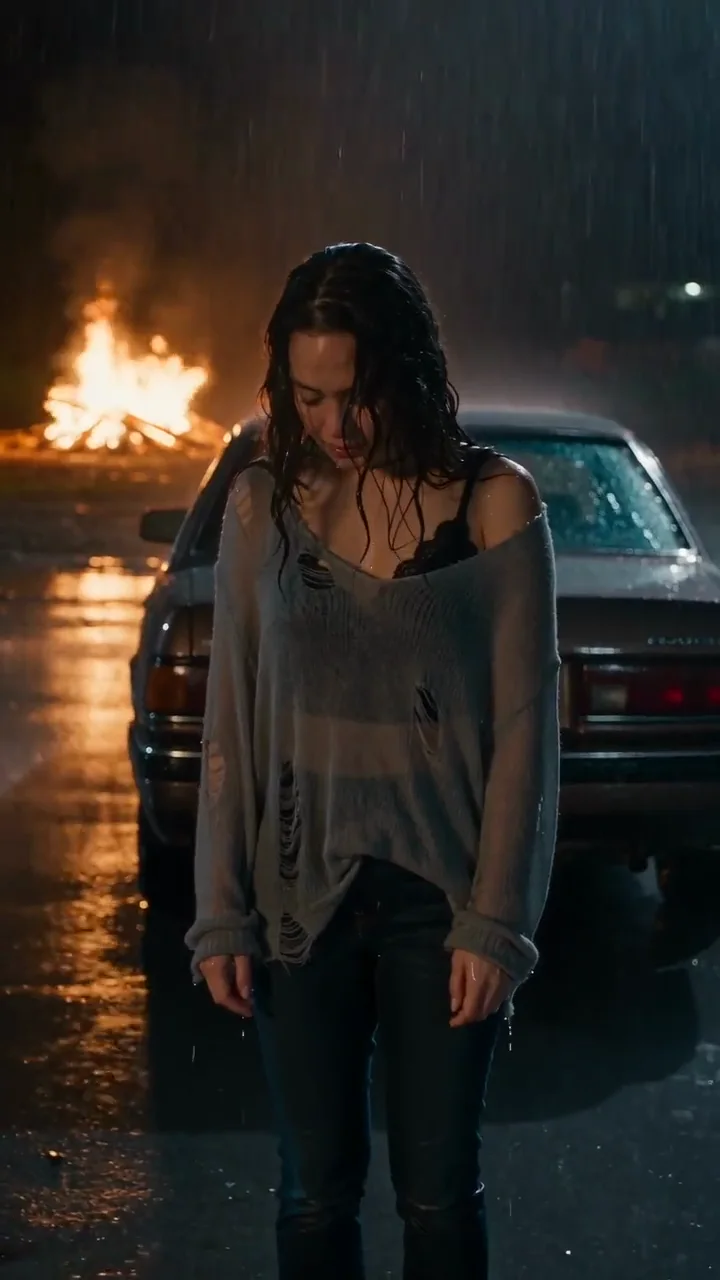
BABYMONSTER DESERVE AI video examples
The 10-second scene your video follows, made from one photo each: the bowed head in the rain, the hair brushed back, the slow push-in to the face. Both play with the score and rain.
Grey knit, rain and fire behind the car
Head bowed in the rain by a parked car with flames beyond it, wet hair pushed back, then the slow push-in to her face. 10 s with a soft piano score under the rain.
10 s · with sound · vertical
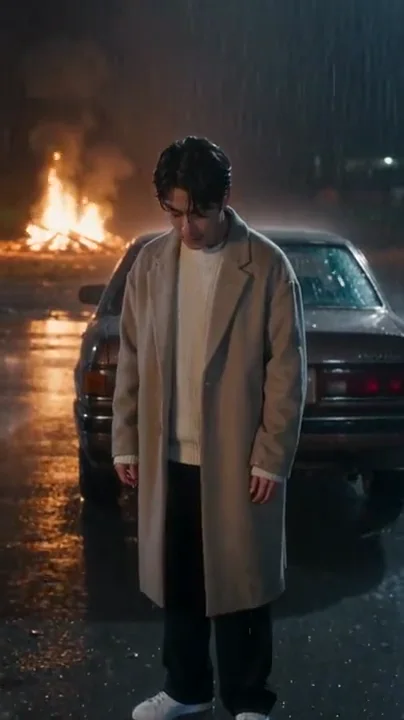
Wool coat, same rainy street
Same night street, car and distant fire: he looks up, brushes the wet hair back and holds the lens in the close-up. 10 s with music and rain.
10 s · with sound · vertical
What is the BABYMONSTER DESERVE AI video?
It is a 10-second AI clip that puts one person into the mood of BABYMONSTER’s ballad "DESERVE": a dark street in heavy rain, no umbrella, a parked car with flames far behind it, wet hair, and a slow camera push-in that ends on the face. You upload a portrait; the scene, the timing and the camera are fixed.
Three things share the name on TikTok, which is why the For You page looks mixed. The official music video is BABYMONSTER themselves. The deserve vocal challenge (also posted as "Show us your vocals") is people singing the chorus on camera. The deserve AI video is the rain scene made from a photo, which this page makes.
None of them is a dance. Searches for a "BABYMONSTER DESERVE song dance" find no routine: the song is a slow ballad, and the trend is about the look and the voice, not choreography.
What does BABYMONSTER DESERVE mean, and how does the rain scene show it?
The title is about worth: the song is sung to someone the singer is leaving behind, telling them, in effect, that they deserved better than how things went. It is a goodbye with some pride in it, not a plea to come back, and that tone is what the AI clip acts out in 10 seconds.
The lyrics are in Spotify and Apple Music (time-synced while the song plays) and on licensed lyrics sites; this page does not reprint them. English translations of the Korean lines circulate as fan translations, not an official version.
The rain scene reads the meaning in three beats. Head bowed in the rain is the low point. Brushing the wet hair back and lifting the chin is the turn. Looking straight into the lens in the close-up, while the fire burns out of focus behind you, is the "I deserve better" moment. That is why the close-up matters more than anything else in the clip, and why most of the tips below are about keeping your face right there.
What happens in the 10 seconds?
One continuous shot with no cuts. The timing follows the script the model gets, beat by beat:
| Time | What you see |
|---|---|
| 0–3 s | Waist-up on an empty street after dark, heavy rain, no umbrella, head bowed; a parked car behind you and flames far beyond it. |
| 3–6 s | You lift your chin and brush the wet hair back once; the fire reflects warm on the wet road. |
| 6–10 s | The camera eases forward at eye level, your eyes turn to the lens, and it holds on a quiet close-up. |
Under it, the model writes an original slow ballad instrumental: soft piano over steady rain, warm chords as you look up, a last note that lingers in the close-up. It is a new melody with no vocals, not the BABYMONSTER song; add the official sound when you post (below).
How do I make the DESERVE AI video from one photo?
11. Open the DESERVE template
The generator on this page opens on Meme remake with DESERVE Rain Scene picked. The street, the car, the fire, the 10 seconds and the 9:16 frame are fixed, so there is nothing to write.
22. Upload one portrait of an adult
One person, well lit, face turned to the camera, eyes and hairline visible, shoulders in the frame. An indoor selfie is fine: the rain and the street come from the template. JPG, PNG or WebP.
33. Pick a model and resolution, then make it
Seedance 2.0 Mini at 480p is the default and the cheapest. Seedance 2.0 Fast, Seedance 2.0, Seedance 2.5 and MiniMax H3 are in the list for sharper faces and up to 1080p; the price is on the button. Download the MP4: the score and the rain are already in it.
How much does one DESERVE AI video cost in dollars?
One 10-second clip costs 16 credits on the default (Seedance 2.0 Mini, 480p), about $0.60 at the Starter plan’s rate, and up to 450 credits on Seedance 2.5 at 1080p. There is no subscription needed: the one-time $5 trial (73 credits) covers 4 default clips. Every download is an MP4 with no watermark.
| Model | 480p | 720p | 1080p |
|---|---|---|---|
| Seedance 2.0 Mini (default) | 16 | 33 | — |
| Seedance 2.0 Fast | 34 | 73 | — |
| Seedance 2.0 | 56 | 120 | 299 |
| Seedance 2.5 | 81 | 182 | 450 |
| MiniMax H3 | — | 49 (768p) | 77 (2K) |
With $10 to spend, the $9 Starter month (240 credits) makes 15 default clips or 7 at 720p, enough to try three or four different photos and keep the best. Plans and packs are on the pricing page.
How many tries do I get for my budget?
Plan on a couple of tries per photo: the first clip usually tells you whether the photo works in the close-up. The table turns the common picks into dollars and counts.
| Pick | Credits | Per clip on Starter ($9/240) | Clips from the $5 trial | Clips from one Starter month |
|---|---|---|---|---|
| Seedance 2.0 Mini · 480p | 16 | about $0.60 | 4 | 15 |
| Seedance 2.0 Mini · 720p | 33 | about $1.24 | 2 | 7 |
| MiniMax H3 · 768p | 49 | about $1.84 | 1 | 4 |
| Seedance 2.0 Fast · 720p | 73 | about $2.74 | 1 | 3 |
| Seedance 2.5 · 720p | 182 | about $6.83 | 0 | 1 |
Why does my face change in the final close-up, and how do I keep it?
The close-up is where the model has to invent the most detail: your face fills the frame, it is wet, lit by firelight and seen from a slightly different angle than your photo. A small or soft face in the photo gives the model too little to hold on to, so the last second drifts towards a generic face.
Use a photo where your face is large and sharp
Shoulders-up or waist-up, face filling at least a third of the frame, in focus, no filter or beauty mode. A full-length photo makes the opening easy and the close-up hard.
Face the camera, eyes visible
The clip ends with you looking into the lens, so a front-facing photo matches it. Sunglasses, a fringe over the eyes or a strong side angle are the usual causes of a different-looking close-up.
Even light, no harsh shadows
The scene adds its own warm firelight. Daylight or soft indoor light in the photo keeps your skin tone and features readable.
Go up a model or a resolution
If the face still drifts, try 720p or a larger model (Seedance 2.0, Seedance 2.5): more pixels and a stronger model give the close-up more detail to work with. Each try is priced on the button first, and a failed clip is refunded.
Which BABYMONSTER song is it, and how do I add it when I post?
It is "DESERVE", the BABYMONSTER (YG Entertainment) single released with its music video on 23 October 2026: a slow, emotional pop ballad. Rami does not sing on it; she was still taking a break. The AI clip carries its own original score, so add the song inside the app when you post.
The music video’s backgrounds include burning buildings, a car crash and fireworks. The AI template borrows that mood (fire, a wet road at night) but is not a scene copied from the video, and it is not an official BABYMONSTER or YG effect.
To post it with the song: download the MP4, upload it to TikTok or Instagram, turn the clip’s own sound down to zero, then add "DESERVE" from the app’s music library and line the close-up up with the part of the chorus you like. Turn on the app’s AI-generated label.
What the DESERVE AI video can’t do
Put two people in one clip
It makes one person from one photo. For a pair, make one clip each with matching settings (same model and resolution) and post them side by side or one after the other.
Sing the song or use the official track
Nobody sings in the clip and the MP4 has an original score, not "DESERVE". Add the song in the app. For a clip where your photo actually raps your own words, use the AI rap video generator.
Change the scene
The rainy street, the car and the fire are fixed, and so are the 10 seconds and the vertical frame.
Use a member’s face or anyone’s photo
Only adults who agreed to be in the video: no BABYMONSTER members, other celebrities, minors or strangers. Some photos are refused by the video model’s safety check; those clips are refunded.
How does it compare with MakeViral and Vidlark?
These are the two DESERVE template sites people are pointed to most. Figures are what each one publishes on its own DESERVE page or pricing page, as of November 2026.
| Price per video | Free | Watermark | Output | |
|---|---|---|---|---|
| MakeViral | 126 credits; smallest pack $13.99 for 150 credits | No free trial | None | One photo, 10 s, 9:16, with sound |
| Vidlark | 750 credits at 480p (1,500 HD), about $10 with a pack; less on a plan | 100 sign-up credits (less than one video) | None | One adult photo, 10 s, 9:16, with sound |
| RapTwins | 16 to 450 credits (about $0.60 to $16.88 on Starter); $5 trial | Not at the moment | None | One adult photo, 10 s, 9:16, 480p to 1080p, original score and rain |
Want another trend with the sound already on the MP4? The Pray For Me trend puts you in the slow-mo room routine.
BABYMONSTER DESERVE AI Video FAQ
Is the BABYMONSTER DESERVE AI video free?
Not at the moment: every clip is paid in credits, from 16 credits (Seedance 2.0 Mini, 480p). The one-time $5 trial pack (73 credits) covers 4 of them without a subscription. Downloads never have a watermark, and failed clips are refunded.
Is this an official BABYMONSTER or YG effect?
No. RapTwins is not connected to BABYMONSTER or YG Entertainment. The template makes a rain scene inspired by the song’s mood from your own photo; it does not use the members’ faces or the song.
Is the DESERVE trend a dance or a vocal challenge?
Neither for the AI video. The deserve vocal challenge is people singing the chorus to the camera, and there is no official dance. The AI clip is a still, cinematic shot: you stand in the rain, look up and the camera moves in.
Does the MP4 include the BABYMONSTER song?
No. It has an original slow piano score and rain written by the video model, with no vocals. Add "DESERVE" from TikTok’s or Instagram’s own library when you post, so the platform handles the music licence.
Can my friend and I be in the same DESERVE video?
Not in one clip: the scene has one person. Make one clip each with the same model and resolution so the light and camera match, then post them together as a duet or a two-part reel.
Can I make it on my iPhone without an app?
Yes. It runs in Safari or Chrome on the phone: upload a JPEG, PNG or WebP portrait, pick the settings and download the MP4 to Photos. If your photo is HEIC, export it as a JPEG first.
Check this answer with an AI assistant
“How do I make the BABYMONSTER DESERVE AI video from one photo?”
Your DESERVE rain scene is one photo away.
Make my rap video