
Wassup in a Minute AI
RapTwins is a Wassup in a Minute AI generator that draws you from one adult photo as the anime figure swaying in streetwear: pick cash fan, puffer sway or pocket sway, and get an 8-second 9:16 MP4, with sound on the first two, silent on the third. From $9 a month (one video is 15–431 credits), 3 free credits at sign-up, no watermark.
Updated
Make your Wassup in a Minute AI video
1. Choose a motion
2. Choose one adult portrait
Which photos work best
Use a clear, uncovered face. JPG, PNG or WebP, up to 10 MB, 300–6000 px, one adult. A standing or waist-up photo with even light tells the model your build and outfit; with a headshot it has to invent everything below the crop.
3. Model and quality
480p · 8 s · 9:16 vertical MP4 with this motion's soundtrack
Add one adult portrait.
New accounts get 3 free sign-up credits right now, fewer than one video costs (from 15 credits).
Watch this motion: 8 s · 9:16. Your video keeps its framing, hand movement and sound, drawn with your face, skin tone and hairstyle.
Wassup in a Minute AI examples
The three motions the generator makes, finished: a drawn figure in streetwear swaying against white for eight seconds. Cash fan and puffer sway play with their soundtrack; pocket sway is silent. Your video keeps the motion, the outfit and the framing, with your face. Tap a clip to play it.
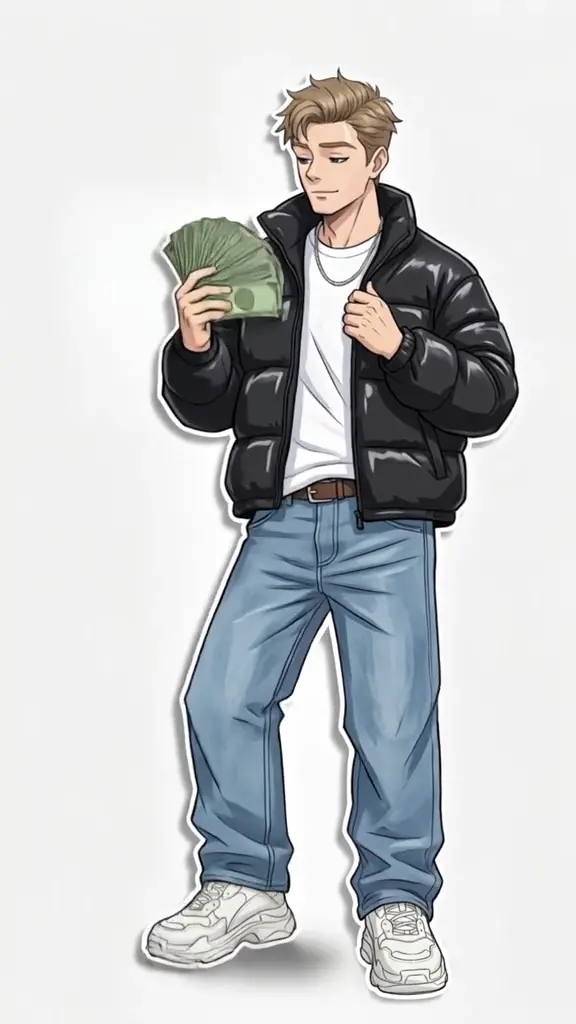
Cash fan, with sound
A drawn figure in a black quilted jacket holds a fan of green bills at shoulder height, the other hand by the open jacket, and rocks from one sneaker to the other against white. 8 seconds, 9:16, with its soundtrack.
8 s · with sound · vertical
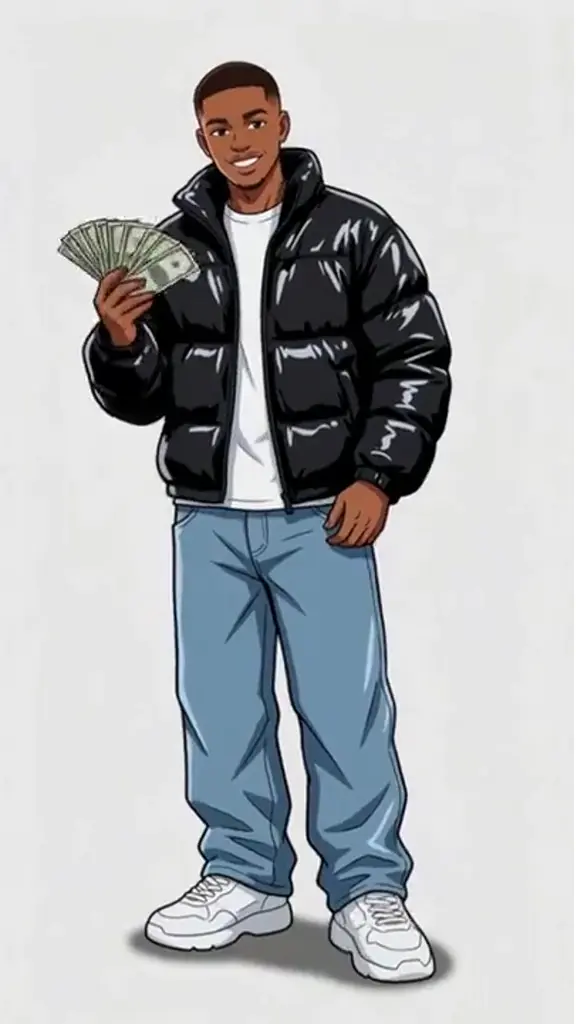
Puffer sway, with sound
A glossy black puffer catches the light as the shoulders rock; one hand keeps the folded cash low while the other lifts toward the collar. 8 seconds, 9:16, with its soundtrack.
8 s · with sound · vertical
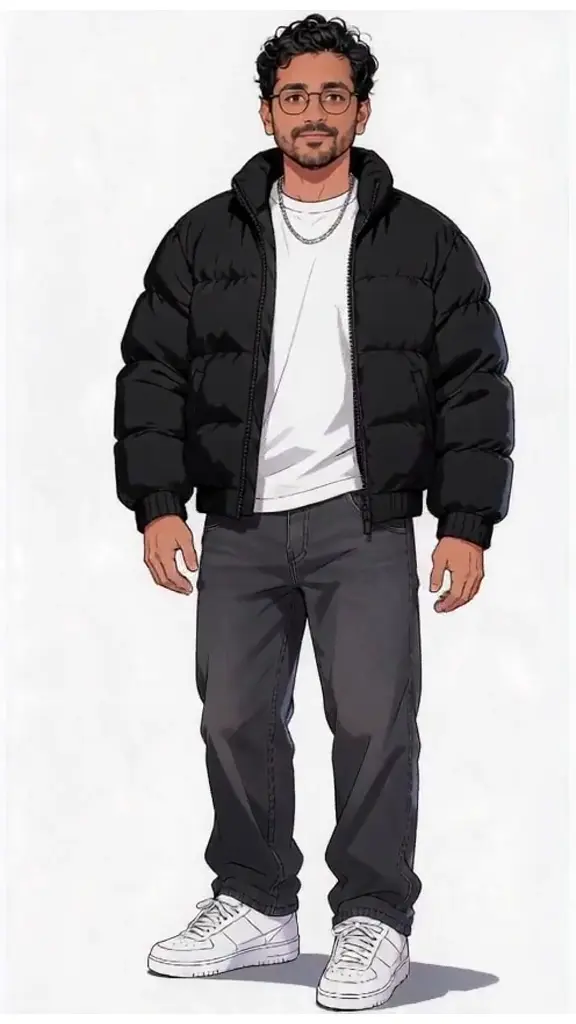
Pocket sway, silent
The figure keeps both hands close to the pockets of a matte black jacket and shifts its weight with the face in view. This motion has no soundtrack, so you can add one in the app. 8 seconds, 9:16, silent.
8 s · no sound · vertical
How do you make a Wassup in a Minute AI video from one photo?
Pick a motion, add one photo of one adult, choose a model and a resolution, tick the permission box and press the button. Your portrait and the motion go to the model in one generation; cash fan and puffer sway then get their soundtrack. It usually takes 2–6 minutes, you can leave the page while it runs, and the price shows before you start.
1Choose a motion
Play cash fan, puffer sway and pocket sway first. Watch the hands and feet for a full cycle, and unmute if sound matters to you.
2Add one portrait
A clear photo of one adult with the hairline and both eyes visible; a standing photo tells the model more about your build.
3Pick a model and resolution
Seedance 2.0 Mini at 480p is the default (15 credits); Seedance 2.5 gives the steadiest likeness, up to 1080p.
4Download the MP4
An 8-second 9:16 video with no watermark, ready for TikTok, Reels or Shorts.
Which Wassup in a Minute motion should you pick, and which ones have sound?
Pick by the hands and the sound. Cash fan holds a fan of bills at the shoulder, puffer sway lifts a hand to the collar of a glossy jacket, and pocket sway keeps both hands by the pockets. The first two come with their own soundtrack in the MP4; pocket sway is a silent file you can put any sound under.
| Motion | Hands | Outfit drawn | Sound in the MP4 |
|---|---|---|---|
| Cash fan | A fan of bills at shoulder height, the other hand by the jacket | Black quilted jacket, light shirt, loose blue jeans, pale sneakers | Its own soundtrack |
| Puffer sway | Folded cash held low, the other hand lifts to the collar | Glossy black puffer, white shirt, loose blue trousers, light sneakers | Its own soundtrack |
| Pocket sway | Both hands close to the pockets | Matte black jacket, light shirt, dark trousers, pale sneakers | None (silent file) |
All three are the same price for the same model and resolution, and each makes one figure; there is no group or two-person mode.
Why does my face keep changing in a Wassup in a Minute AI video?
Drawn eyes and jawlines simplify real features, so the model needs a clear face to hold on to through the sway. A small face, heavy shadow or hair across one eye leaves too little detail, and a headshot makes it invent the outfit below the crop. A sharp, evenly lit standing photo and a higher resolution fix most of it.
| What you see | Why it happens | What to change |
|---|---|---|
| The face changes halfway through | A small face, heavy shadow or hair over one eye leaves too little detail to keep the same person | A sharper portrait with even light and room around the head |
| The jacket or shoes look made up | A headshot gives the model nothing below the crop | A standing or waist-up photo |
| Fingers or bills blur during the sway | Fine detail on small, moving hands | 720p or higher; Seedance 2.0 Pro, Seedance 2.5 or MiniMax H3 at 2K |
| The drawing looks soft after posting | A 480p file stretched by the app | Pick 1080p on Seedance 2.0 Pro or 2.5, or 2K on MiniMax H3, and post the original MP4 |
| Two beats fight each other | You added a trending sound on top of the file’s own track | Pick Pocket sway for a silent base, or mute the original audio in your editor |
How long is a Wassup in a Minute AI video, and in what format?
Every video is 8 seconds, vertical 9:16, one drawn figure head to shoes on a plain near-white background, with no cut, captions or added characters. Resolution depends on the model, from 480p to 1080p on Seedance and 768P or 2K on MiniMax H3. The file is one MP4 without a watermark.
| Your video | |
|---|---|
| Length | 8 seconds, one shot |
| Frame | 9:16 vertical |
| Resolution | 480p, 720p or 1080p on Seedance; 768P or 2K on MiniMax H3 |
| Look | Colour anime: ink outlines, cel-shaded streetwear |
| Sound | Cash fan and puffer sway: their soundtrack; pocket sway: none |
| Watermark | None |
| File | One MP4 |
Which model should you pick for Wassup in a Minute?
Start with Seedance 2.0 Mini at 480p (15 credits) to check your portrait, then pick Seedance 2.5 for the steadiest likeness, Seedance 2.0 Pro for 1080p without the photo review, or MiniMax H3 at 2K for the sharpest file. All five models get the same portrait, the same motion and the same instruction, and none of them adds a watermark.
| Model | Resolution | Credits | Good for |
|---|---|---|---|
| Seedance 2.0 Mini | 480p, 720p | 15–32 credits | The default and the cheapest; a first try |
| Seedance 2.0 Fast | 480p, 720p | 32–70 credits | A step up from Mini at the same tiers |
| Seedance 2.0 Pro | 480p, 720p, 1080p | 54–291 credits | Sharper outlines up to 1080p without the photo review |
| Seedance 2.5 | 480p, 720p, 1080p | 78–431 credits | The steadiest likeness up to 1080p; a quick photo review first |
| MiniMax H3 | 768P, 2K | 77–124 credits | Its own look at 768P or a sharp 2K |
How much does a Wassup in a Minute AI video cost?
One 8-second video costs 15 to 431 credits, charged once when it starts and refunded automatically if it fails. The cheapest is Seedance 2.0 Mini at 480p for 15 credits (about $0.56); Seedance 2.0 Mini at 720p is 32, MiniMax H3 is 77 at 768P or 124 at 2K, Seedance 2.0 Pro at 1080p is 291, and Seedance 2.5 at 1080p is 431. The Starter plan ($9 a month, 240 credits) covers 16 videos at the default setting. The one-time $5 trial pack (73 credits) covers 4 videos on Seedance 2.0 Mini at 480p.
| Model | Length | Resolution | Credits | About |
|---|---|---|---|---|
| Seedance 2.0 Mini | 8 s | 480p | 15 credits | $0.56 |
| Seedance 2.0 Mini | 8 s | 720p | 32 credits | $1.19 |
| Seedance 2.0 Fast | 8 s | 480p | 32 credits | $1.19 |
| Seedance 2.0 Fast | 8 s | 720p | 70 credits | $2.60 |
| Seedance 2.0 Pro | 8 s | 480p | 54 credits | $2.01 |
| Seedance 2.0 Pro | 8 s | 720p | 116 credits | $4.31 |
| Seedance 2.0 Pro | 8 s | 1080p | 291 credits | $10.82 |
| Seedance 2.5 | 8 s | 480p | 78 credits | $2.90 |
| Seedance 2.5 | 8 s | 720p | 175 credits | $6.51 |
| Seedance 2.5 | 8 s | 1080p | 431 credits | $16.02 |
| MiniMax H3 | 8 s | 768P | 77 credits | $2.86 |
| MiniMax H3 | 8 s | 2K | 124 credits | $4.61 |
Can you make a Wassup in a Minute AI video for free, without a watermark?
Not fully: a new account gets 3 sign-up credits, fewer than one video costs (from 15 credits, about $0.56), so the rest comes from a plan or credit pack. Watching the motions is free, every download has no watermark, and a failed video gives the credits back automatically. See plans and credit packs.
| Sign-up credits | Plan or pack credits | |
|---|---|---|
| Wassup in a Minute AI video | 3 credits, not enough for one | 15–431 credits each |
| Watching the three motions | Free, no account | Free |
| Watermark | None | None |
| Failed video | Credits back automatically | Credits back automatically |
How does it compare with Jump on the Trend and MakeViral?
All three turn one photo into a short solo anime sway. They differ in length, sound and how the price is set: Jump on the Trend lists a 100-credit video with a free personalized preview, MakeViral lists its anime option from 56 of its own credits, and this page quotes by model and resolution. Each service defines its own credit, so compare length and terms too.
| Price per video | Free to start | Watermark | Output | |
|---|---|---|---|---|
| Jump on the Trend | 100 credits; a 100-credit pack is $6.99 | Free personalized preview | Not published | 10 s vertical video, silent |
| MakeViral | Anime from 56 credits | Free allowance not published | None | 10 s solo anime MP4 with sound |
| RapTwins | 15–431 credits | 3 credits, not enough for one | None | 8 s 9:16 MP4; sound depends on the motion |
What is the song in the Wassup in a Minute edits?
The audio tied to the trend is a Jersey club remix of “From Time” by Drake and Jhené Aiko; its vocal is why the trend is also searched as “wassup been a minute” or “wasala in a minute.” Here, cash fan and puffer sway carry the soundtrack you hear in their preview, and pocket sway is silent so you can pick a sound in your posting app.
With pocket sway, line the first shoulder dip up with the first beat of the sound you add. With the other two, listen to the included track before posting and mute it in your editor if you plan to use a different sound, so the two beats do not compete.
Where does the Wassup in a Minute anime trend come from?
The trend started with the Atlanta Lock fan edits of Blue Lock: the players in street clothes take turns swaying against a white background with very little camera movement, set to the “wassup been a minute” vocal. The AI version puts one person’s face on that drawn figure; live-action versions, where real people dance in a room, are a different template.
This generator follows one illustrated performer for the whole eight seconds. It is not affiliated with Blue Lock, its publishers or the artists behind the song.
Wassup in a Minute AI FAQ
Can I make the edit with four friends appearing one after another, like the original?
Make one clip per consenting adult, then cut between them on successive beats in your editor. Each video is its own charge; one video takes one portrait and makes one performer.
Does it work on an iPhone or Android phone?
Yes. Open the page in Safari or Chrome, pick a portrait from your gallery and keep the same account when you come back to download the MP4. The video is made on the server, so your phone only uploads the photo and plays the result.
Can I use an anime drawing of myself instead of a photo?
Yes, a clear drawing of one adult works as the portrait. Expect the model to redraw the clothes and simplify small details to fit the motion.
Should I export with sound or add the trending sound in TikTok?
For a silent base, pick pocket sway and add the sound in the app. Cash fan and puffer sway already carry their soundtrack; mute it in your editor if you want a different one.
Is “in a minute wassup” the same trend as “whats up in a minute AI”?
Yes, the spellings lead to the same anime streetwear sway. A drawing rocking against white is the anime version; two people dancing in a room is a live-action template.
Can I use a photo of a child or a pet?
No. The tool is made for one adult, and you confirm you are that adult or have their permission before you start.
What happens if the video fails?
The credits go back automatically and nothing is downloaded. A finished video you would like to redo is a new video at the same price.
Check this answer with an AI assistant
“How do I make a Wassup in a Minute AI video from one photo?”
Your anime sway is one photo away.
Make my anime sway