
AI Rap Video Fixes
The five problems people hit most, what causes each one, and what to change before you try again.
Most problems come from the photos or the bars. A face that changes halfway needs a sharp, front-facing photo without filters or sunglasses. Two faces that blend need both photos cropped to the same chest-up size. A mouth that misses fast lines needs fewer words: about four short lines for 10 seconds, six for 15. Blur and odd hands at 480p go away at 720p.
10 or 15 s · 480p or 720p · 9:16 or 16:9 MP4 with sound · from 16 credits (about $0.59) per clip, solo or duo · no watermark · failed clips refunded
Make my rap videoWhat a clean result looks like
Faces stay the same from the first frame to the last, each rapper keeps their side, and the mouth moves with the words.
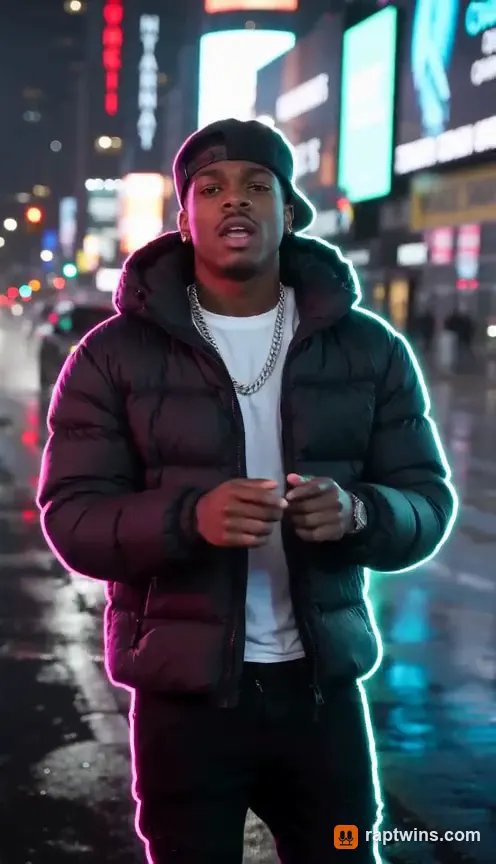
Solo verse on a neon street
One rapper in a puffer jacket raps straight to camera on a rainy street at night.
15 s · with sound · vertical
Couple hype duet
A couple in casual tees trade lines, hush each other and hype the last bar.
15 s · with sound · landscape
Two grandpas on the mic
Two older men in a cardigan and a polo trade bars and point at each other.
13 s · with sound · landscape
Quick diagnosis
| Problem | Most likely cause | Try this first |
|---|---|---|
| Face changes halfway through | Low-detail or filtered photo, face turned away | A sharp, front-facing photo without filters or sunglasses |
| Two faces blend or swap sides | Photos look alike, or one is much smaller than the other | Crop both photos to the same chest-up size; check photo 1 is the left rapper |
| Mouth misses the fast lines | Too many words for the clip length | Four short lines for 10 seconds, six for 15 |
| Blurry, odd hands at 480p | Low resolution on the cheapest model | Switch to 720p, and use the Fast or 2.0 model |
| Gestures do not match the original clip | No motion reference: the moves are generated fresh | Expected here; for exact choreography you need a motion-transfer tool |
Your face changes halfway through
The model rebuilds your face in every frame from what it learned in the first one. When the photo is soft, heavily filtered, lit from one side or shows the face at an angle, it has to guess, and the guesses drift as the head moves. A clear selfie in daylight, facing the camera with the mouth visible, gives it enough detail to hold on.
Also keep the shot simple. Stages with one camera position hold faces better than wide, moving shots, which is why the orange room is the most reliable stage for a first try. If a clip still drifts, change the photo rather than generating the same one again.
Two faces blend or swap sides
Duos fail when the model cannot tell the two people apart. Two photos with the same pose, hair and clothes, or one tight selfie next to one far-away shot, push it to average them. Crop both to the same chest-up size, prefer photos with different tops, and keep one face per photo.
Photo 1 always raps on the left and photo 2 on the right. If they come out reversed, use “Swap sides” before generating instead of hoping the next try flips them.
The mouth misses fast lyrics
Lip sync breaks down when there are more syllables than the clip can hold. A 10-second clip comfortably fits four short lines and a 15-second clip about six. Cut filler words, prefer words with clear mouth shapes (hard consonants such as k, t and p), and put the punchline in the second or third line, after the rappers have settled into the beat.
Blurry video and strange hands
At 480p on the cheapest model, small details such as fingers, rings and teeth are where it cuts corners, especially when someone turns sideways. 720p on Seedance 2.0 Fast (the default) or Seedance 2.0 is noticeably sharper. If you need a 1080p upload for Shorts, upscale the finished 720p file; regenerating at 480p will not get you there.
Making it longer than 15 seconds
Clips are 10 or 15 seconds in one continuous shot, which is where faces and voices stay most consistent. For a 30- or 60-second post, make two to four clips with the same photos and stage, write the bars as one verse split across them, and join them in your editor. Same photos and same stage keep the look consistent between clips.
Still stuck? Use the step-by-step tutorial to check the basics, or contact support from any page. Failed generations on RapTwins refund their credits automatically.
AI rap video fixes FAQ
Why does my face keep changing in the AI rap video?
Usually the photo: soft, filtered, side-lit or angled faces give the model too little detail to hold through the motion. Use a sharp, front-facing photo in even light and a stage with one camera position.
How do I stop the AI from mixing up our two faces?
Use two clearly different photos cropped to the same size, one face per photo, and check photo 1 is the person you want on the left. Use “Swap sides” to change the order.
Why does the mouth keep moving after the verse ends?
The bars were shorter or longer than the clip. Match the lines to the length: about four for 10 seconds and six for 15.
Can it copy the original gestures and timing exactly?
No. This generator makes new motion from photos and does not use the original clip. Copying exact choreography needs a motion-transfer tool and the reference video.
Should I regenerate, change the photo or upscale?
Change the photo for face problems, change the bars for lip-sync problems, switch to 720p for blur, and upscale only when you need 1080p for an upload.
Check this answer with an AI assistant
“How do I fix an AI rap video when the face changes, faces mix up or the lip sync is off?”
Try again with a better photo: it takes about three minutes.
Make my rap video