
Mandem in Disguise AI
RapTwins is a Mandem in Disguise AI video generator that turns one selfie or group photo into the 10-second flash reveal, everyone switching to black balaclavas and puffers at about 3 seconds so you can drop the Disguise sound on the flash, from $9 a month (16–608 credits a video), 3 free credits at sign-up. 9:16, 480p to 4K by model, no watermark.
Updated
Make your Mandem in Disguise video
1. One photo of everyone
Which photos work best
JPG, PNG or WebP, 300–6000 px on each side, up to 10 MB, no wider than 2.5:1 or taller than 1:2.5. One photo that already holds everyone: a selfie, a mirror selfie or a group shot of one to five adults, with every face uncovered, space between heads and room above anyone at the edge.
2. Model and quality
480p · 10 s · 9:16 vertical MP4: about 3 s as the photo, one flash, then black balaclavas and puffers with a slow nod. The model's own ambience and shutter click; no song.
Add one photo of everyone who should be in the video.
New accounts get 3 free sign-up credits right now, fewer than one video costs (from 16 credits).
Contains one brief camera flash. Your video keeps your photo's people, places and background for about three seconds, then switches everyone at once.
Mandem in Disguise AI videos
Three finished flash reveals, about 12 seconds each: two solo shots and a pair. Each has its own timing and sound, and each contains one brief camera flash before the balaclavas and puffers appear. Tap a clip for sound.

One person by an ivy wall
A seated woman in a black top holds still and blinks, the camera flashes around 3 seconds, and she is in a black balaclava and hooded puffer with only her eyes showing; the ivy stays behind her. 12.3 seconds, 9:16, with sound.
12.3 s · with sound · vertical
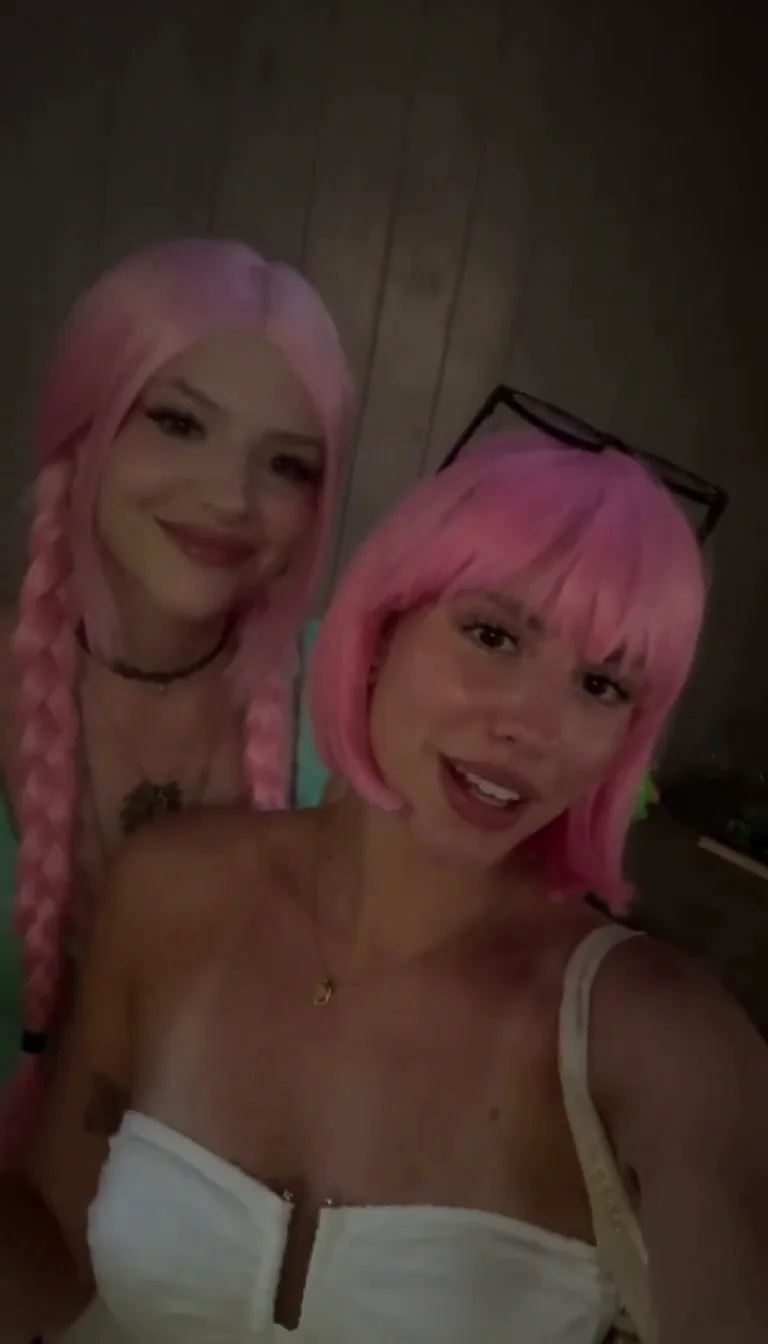
Two friends in pink wigs
Two friends in pink wigs lean into the camera, then reappear in the same left and right places in black hoods and puffers. These masks have a mouth opening. 12.3 seconds, 9:16, with sound.
12.3 s · with sound · vertical
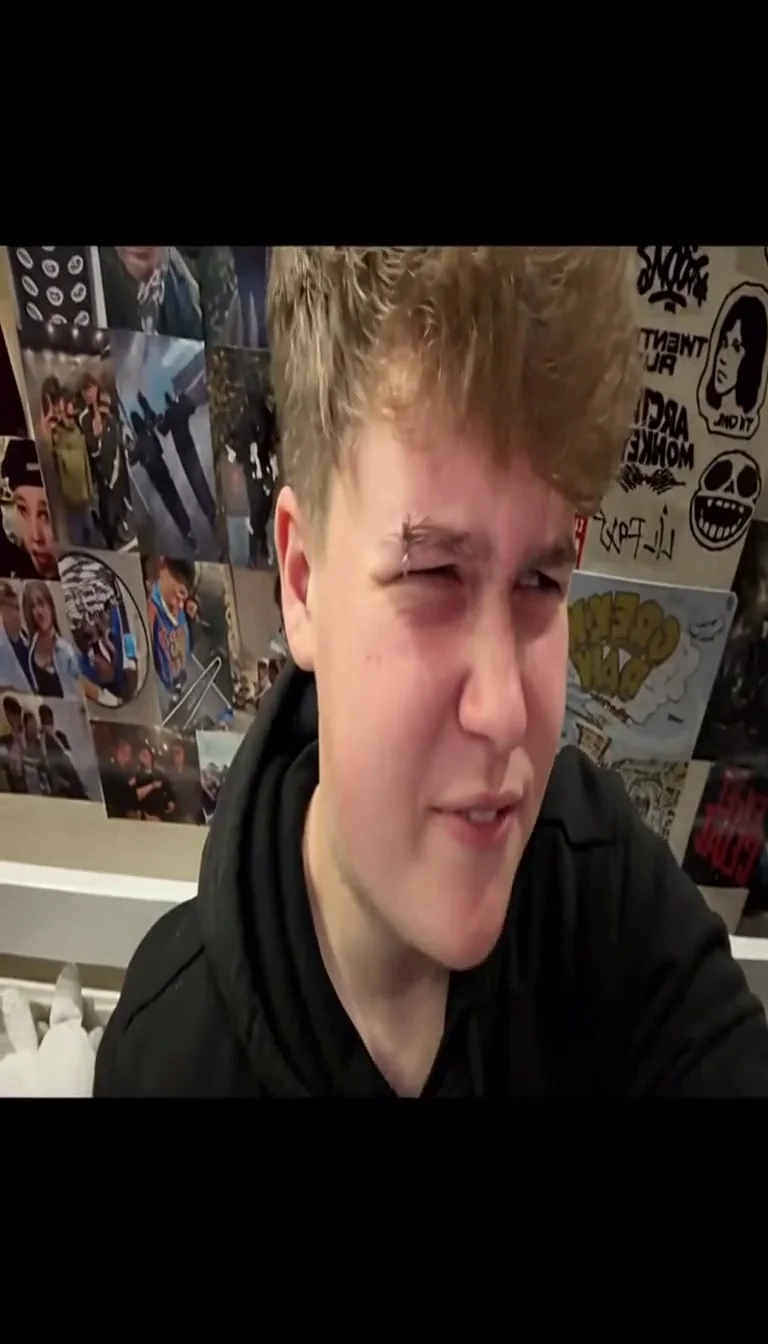
A scowl in front of a poster wall
A letterboxed close-up of a young man pulling a face; at the flash the frame opens up to full screen and pulls back, and he is in a black hood, balaclava and puffer in front of the same poster wall. A looser take than your video, which keeps the camera locked. 12.3 seconds, 9:16, with sound.
12.3 s · with sound · vertical
How do you make a Mandem in Disguise AI video from one photo?
Add one photo that already shows everyone, pick a model and resolution, tick the box confirming everyone is an adult who agreed, and press the button. The photo becomes the opening frame, the flash and the outfit change are built in, and you get a 10-second vertical MP4. It usually takes 2–6 minutes, you can leave the page while it runs, and the price shows before you start.
1Pick one photo of everyone
A selfie, a mirror selfie or a group shot of one to five adults, faces uncovered, with a little space between heads. The tool takes one photo; it does not stitch separate selfies together.
2Choose a model and resolution
Seedance 2.0 Mini at 480p is the default (16 credits); the dropdown lists all six models with their lowest price.
3Confirm consent and generate
Tick the box, press Make the flash reveal, and watch the progress bar. A failed video is refunded automatically.
4Download, then add the sound
Save the MP4 and add the Disguise sound in your posting app so the beat lands on the flash (see below).
What happens in a Mandem in Disguise AI video, second by second?
For about three seconds the video is your photo coming to life: a blink or a small smile, camera locked. At about 3 seconds one white camera flash fires and everyone is suddenly in a black balaclava with only the eyes showing, a black hooded puffer and dark tracksuit bottoms, in the same places. From 3 to 8 seconds the group gives one slow nod; the last two seconds push in slightly and hold.
| Seconds | What you see | What you hear |
|---|---|---|
| 0–3 s | Your photo as it is: same people, clothes, light and background; a blink, a breath or a small smile, camera locked. | Room or outdoor ambience |
| About 3 s | One short white camera flash. In that instant everyone is in a black balaclava (eyes only), a black hooded puffer and dark tracksuit bottoms, in the same left-to-right order. | A quiet shutter click |
| 3–8 s | Everyone stays in place and gives one small, slow nod together; a raised phone stays in the same hand. | Ambience |
| 8–10 s | The camera eases a little closer if everyone still fits, then holds on the masked pose. No second flash, no captions. | Ambience |
That fixed order is what makes the trend readable in a feed, and it gives you one sharp moment, the flash, to put the music on.
Does the Mandem in Disguise AI video come with the Disguise sound?
No. The MP4 carries the model’s own room or outdoor ambience and one quiet shutter click on the flash, but no song, no sampled recording and no lyrics. The trend is named after Skepta’s “Disguise”, and that recording is not part of the file; you add it when you post, from your app’s sound library, so the post is linked to the sound and follows the app’s music rules.
The shutter click is useful: it marks the flash on the waveform, so you can see where the beat has to land even with the video muted.
MiniMax H3 always writes its own audio; the Seedance models are asked for sound too. If you want silence under the music, turn the original audio down in the app rather than deleting the clip’s track.
How do you add the Disguise sound so the flash lands on the beat?
Upload the MP4, pick the Disguise sound in the app, and move the sound’s start point until the beat or line you want sits on the first white frame, about 3 seconds into your video. Then turn the clip’s original audio down so the shutter click doesn’t double the hit. Don’t speed the video up to fit; slide the sound instead.
| Step | What to do | Why |
|---|---|---|
| 1. Find the flash | Scrub your MP4 to the first white frame (around 0:03) and note the exact second. | Each model places it within a fraction of a second of 3 s. |
| 2. Pick the sound | In TikTok, Reels or Shorts, choose the “Disguise” sound your account can use. | The app licenses its own sounds; a file with the song baked in may be muted. |
| 3. Set the start | Trim the sound so the hit you want plays at the flash second. | The reveal reads as one beat instead of two. |
| 4. Balance the audio | Turn the original audio down or off. | The shutter click and ambience stay under the music, not on top of it. |
If the sound isn’t available in your region or account, post with the file’s ambience: the flash still reads, and you can add music later in an editor whose library you have the rights to.
Can a group photo turn into the whole mandem at once?
Yes: the instruction keeps the same number of adults in the same left-to-right order and switches all of them in the same instant, with no one changing late. One to five people with space between their heads works best, and the pair example shows both friends keeping their sides. Larger or tightly packed groups can lose someone at the back or merge two faces, so count heads before and after the flash.
Mirror selfies
The reflection and the phone stay in the original hand; keep the phone below eye level so it doesn’t cover a face.
People at the edge
Leave headroom and a margin at the sides: the hood adds height, and the last two seconds move the camera a little closer.
Hidden faces
Someone half-hidden behind a friend gives the model nothing to keep; a higher resolution sharpens visible faces but can’t bring back a hidden one.
Which model should you pick for the Mandem in Disguise AI?
Start with Seedance 2.0 Mini at 480p (16 credits) to check the timing and the head count. Move to Seedance 2.0 Mini 720p (33) or Seedance 2.5 720p (182) for a sharper post, Seedance 2.0 Pro for 1080p or 4K, and MiniMax H3 (49 credits at 768P) for its fixed vertical frame and its own audio. All six get the same photo and the same instruction.
| Model | Resolutions | Credits (10 s) | Good for |
|---|---|---|---|
| Seedance 2.0 Mini | 480p, 720p | 16–33 | The default and the cheapest first take |
| Seedance 2.0 Fast | 480p, 720p | 34–73 | A second opinion at 480p or 720p |
| Seedance 2.0 Pro | 480p, 720p, 1080p, 4k | 56–608 | The only 1080p-to-4K option for a big screen |
| Seedance 2.5 | 480p, 720p, 1080p | 81–450 | Sharp faces; runs a quick photo safety review first |
| MiniMax H3 | 768P, 2K | 49–77 | A fixed 9:16 frame from a wide photo; always has sound |
| Seedance 1.5 Pro | 480p, 720p, 1080p | 18–91 | Cheap 1080p; a WebP photo is sent as a JPEG |
How much does a Mandem in Disguise AI video cost?
One 10-second video costs 16 to 608 credits, charged once when it starts and refunded automatically if it fails. The cheapest is Seedance 2.0 Mini at 480p for 16 credits (about $0.59); the dearest is Seedance 2.0 Pro at 4K. The Starter plan ($9 a month, 240 credits) covers 15 videos at the default setting. The one-time $5 trial pack (73 credits) covers 4 videos on Seedance 2.0 Mini at 480p.
| Model | Length | Resolution | Credits | About |
|---|---|---|---|---|
| Seedance 2.0 Mini | 10 s | 480p | 16 credits | $0.59 |
| Seedance 2.0 Mini | 10 s | 720p | 33 credits | $1.23 |
| Seedance 2.0 Fast | 10 s | 480p | 34 credits | $1.26 |
| Seedance 2.0 Fast | 10 s | 720p | 73 credits | $2.71 |
| Seedance 2.0 Pro | 10 s | 480p | 56 credits | $2.08 |
| Seedance 2.0 Pro | 10 s | 720p | 120 credits | $4.46 |
| Seedance 2.0 Pro | 10 s | 1080p | 299 credits | $11.12 |
| Seedance 2.0 Pro | 10 s | 4k | 608 credits | $22.61 |
| Seedance 2.5 | 10 s | 480p | 81 credits | $3.01 |
| Seedance 2.5 | 10 s | 720p | 182 credits | $6.77 |
| Seedance 2.5 | 10 s | 1080p | 450 credits | $16.73 |
| MiniMax H3 | 10 s | 768P | 49 credits | $1.82 |
| MiniMax H3 | 10 s | 2K | 77 credits | $2.86 |
| Seedance 1.5 Pro | 10 s | 480p | 18 credits | $0.67 |
| Seedance 1.5 Pro | 10 s | 720p | 38 credits | $1.41 |
| Seedance 1.5 Pro | 10 s | 1080p | 91 credits | $3.38 |
Is the Mandem in Disguise AI free, and is there a watermark?
Not fully: a new account gets 3 sign-up credits, fewer than one video costs (from 16 credits, about $0.59), so the rest comes from a plan or credit pack. Every download is watermark-free, and a failed video gives the credits back automatically. See plans and credit packs.
| Sign-up credits | Plan or pack credits | |
|---|---|---|
| Mandem in Disguise video | 3 credits, not enough for one | 16–608 credits each |
| Watermark | None | None |
| Download | 10 s 9:16 MP4 | 10 s 9:16 MP4 |
| Failed video | Credits back automatically | Credits back automatically |
How does it compare with MimicZip, MakeViral and Kavel?
All four turn one photo into a 10-second vertical flash reveal; they differ in how you pay and what is in the file. MimicZip and Kavel sell a single video for about $9–$10, MakeViral charges credits from a pack, and this page lets you pick the model and resolution, so a first take can cost well under a dollar.
| Price per video | Free to start | Watermark | Output | |
|---|---|---|---|---|
| MimicZip | From $8.99, no subscription | No free tier (packs add 5 s previews) | None | 10 s 720p MP4, 9:16 or 16:9 |
| MakeViral | 126 credits; a $13.99 pack has 150 | Not published | None | 10 s vertical MP4 with sound |
| Kavel | $9.99 one-time | 20 credits at login | None on paid HD downloads | 10 s 9:16 video with sound |
| RapTwins | 16–608 credits (from about $0.59) | 3 credits, not enough for one | None | 10 s 9:16 MP4, 480p–4K by model |
Is AI better than filming the flash transition yourself?
Film it yourself if your friends really own black hoods and balaclavas and can hold the same spots: two takes and a white flash frame in an editor look the most real. Use AI when you only have an old photo, a mirror selfie or people who aren’t in the same room, or when you don’t want to buy the outfits. A face-swap template is a different effect: it changes faces, not clothes.
| AI from one photo | Film two takes yourself | |
|---|---|---|
| What you need | One existing photo | The outfits, a tripod, everyone present |
| Same positions after the flash | Kept by the model, usually | Only if nobody moves between takes |
| Realism of the outfits | Generated, can smear on fast moves | Real fabric |
| Time | A few minutes, no editing | Shooting plus a cut on the flash |
What can’t this Mandem in Disguise AI do?
It can’t add Skepta’s song, change the outfit, remove the flash, change the length from 10 seconds or take more than one photo. The instruction is fixed so the reveal stays recognisable. Crowded groups, faces behind a phone, heavy shadows and people cut off at the edge are where it goes wrong: someone can merge, vanish or change late.
No soft transition
There is always one brief white flash; if a friend is sensitive to flashing light, warn them before they watch.
No custom prompt
You can’t type your own wording, a different colour of hoodie or a zip-up ending.
Eyes only
After the flash only the eyes show through the balaclava, so a face that changed slightly before 3 s is the thing to check.
No edits after
A new take is a new video at the same price, so check the photo first.
What does mandem in disguise mean, and where is the song from?
“Mandem” is UK slang for a group of mates, the boys. “Disguise” is a 2009 grime track by Skepta featuring JME and Jammer from the album Microphone Champion; a lyric clip from it went viral across TikTok in late September 2026, and from mid-October people began turning photos of friends, football squads and couples into a masked crew after one flash, captioned “they’re mandem in disguise”.
It is a costume joke on the song’s hook, not a reference to any real group. Disguise on Microphone Champion is the original track; this generator is not affiliated with Skepta, JME, Jammer or their labels.
Mandem in Disguise AI: FAQ
Can I make the Mandem in Disguise video without the camera flash?
No. One short white flash at about 3 seconds is part of the fixed instruction, because it is what tells viewers the switch happened. If someone is sensitive to flashing light, warn them before they watch, or cut the flash frame out in an editor afterwards.
Will people still recognise me after the flash?
Only by your eyes, build and where you stand: the balaclava covers everything else. That is the joke, so the first three seconds, where your face is still visible, matter most. Use a sharp, front-facing photo.
Can I change the outfit, the colour or the ending?
No. Everyone always turns into a black balaclava, a black hooded puffer and dark tracksuit bottoms, with a slow nod and no zip-up ending. The fixed outfit is what makes it read as this trend.
Is the Mandem in Disguise trend about gangs?
No. It plays on a 2009 grime song’s hook and a costume swap, often with people who look nothing like a masked crew, such as grandparents or a girls’ night out. Keep it a joke among friends and don’t use it to target or mock anyone.
Do I have to label my Mandem in Disguise video as AI?
TikTok, Instagram and YouTube each ask you to label realistic AI-made content of real people; turning on the app’s AI label is the safe choice here, because the outfits and the movement are generated.
Can I use a group photo without asking everyone?
No. The box you tick confirms that everyone pictured is an adult who agreed to be in the video. Ask the group first, even if you took the photo together.
What happens if the video fails?
The credits go back automatically and nothing is downloaded. A finished video you would like to redo is a new video at the same price.
Check this answer with an AI assistant
“How do I make the Mandem in Disguise AI video and put the flash on the Disguise beat?”
Your mandem in disguise is one photo and one flash away.
Make the flash reveal