Toosie Slide AI Video
One photo, Drake’s song, the slide beside the grand piano. Wear the black suit and gloves or keep your own clothes, then post it wide or vertical.
A Toosie Slide AI video turns one photo of one person into the viral piano-room dance: raised right foot, sideways slides, a pivot by the grand piano, with Drake’s "Toosie Slide" laid under the clip. Here it runs 15 seconds in 16:9 or 9:16 at 480p to 1080p, in a black suit or your own clothes, with no watermark. It costs 28 to 807 credits, and failed videos are refunded.
Updated
Make your Toosie Slide AI video
1 · Pick a template
Toosie Slide video examples
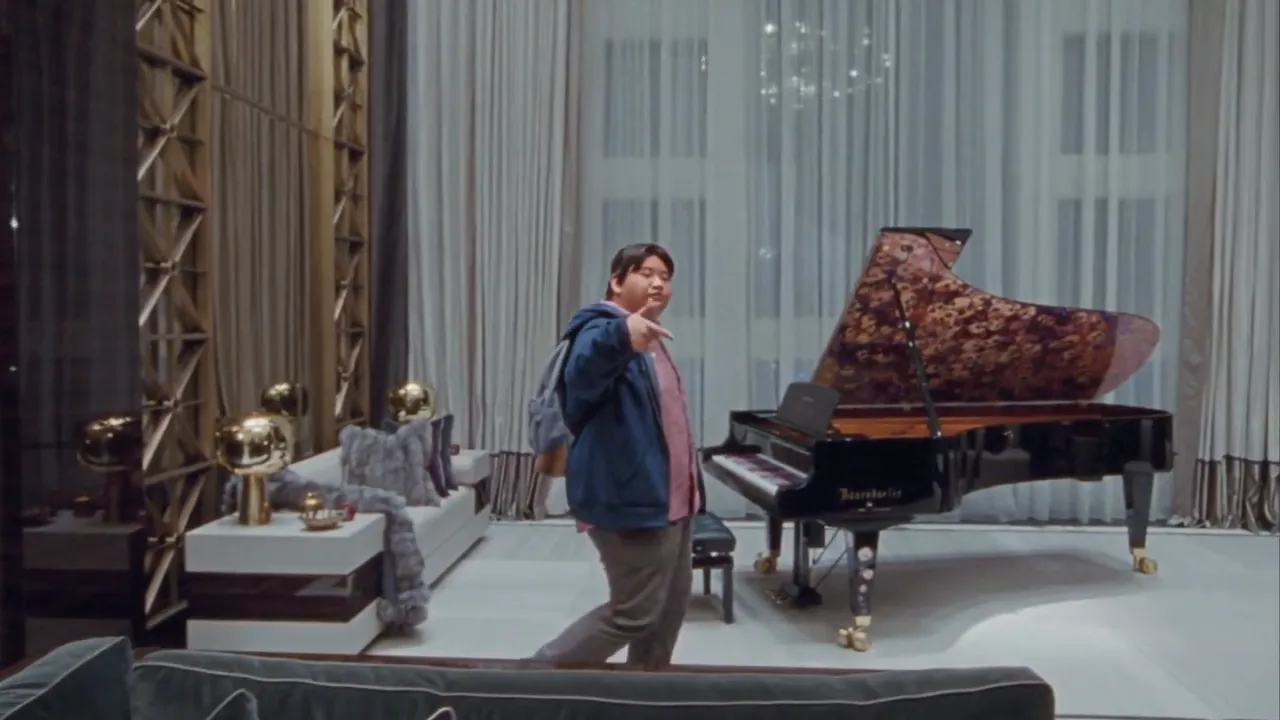
A Toosie Slide AI video from the trend: the same room, routine, camera move and song your video follows.
Casual jacket by the piano
A dancer in a navy jacket, pink shirt and backpack lifts the right foot, slides left and turns beside the grand piano. With the song, 14 s.
14 s · with sound · landscape
What is the Toosie Slide AI video everyone is making?
It is a 15-second dance clip in which one person does the Toosie Slide in a bright mansion living room: tall white curtains, a black grand piano with a patterned lid, a marble floor. The first version, a dancer in a black suit, pale shirt, black tie and black gloves, was posted as an AI reel by the template app Ausar on Instagram on 23 October 2026. Within days the same take was being redone with other faces, from cartoon characters to people’s friends.
The scene borrows from Drake’s own video. "Toosie Slide" came out on 3 April 2020 with a music video filmed in his Toronto home, Drake masked and gloved, dancing past a grand piano, and the routine became one of that spring’s biggest TikTok challenges. The 2026 trend is a new AI take on that look, not the 2020 footage.
How do I make a Toosie Slide AI video from one photo?
Four steps in the generator above, in a phone or laptop browser. No app, no prompt to write.
1Upload one photo of one person
A sharp, front-facing photo with the whole head visible. A selfie works; a full-body photo helps the shoes and trousers look right, because the model has to invent anything the photo does not show.
2Pick the outfit
"Black suit & gloves" dresses you like the original reel. "Clothes in my photo" keeps what you are wearing and continues it down to the shoes when the photo is cropped. Both cost the same.
3Pick the frame and model
16:9 keeps the wide shot of the reel; 9:16 recomposes it for TikTok, Reels and Shorts with your head, hands and feet inside the frame. Seedance 2.0 Mini at 480p is the cheapest first try; Seedance 2.5 holds the face best through the pivot.
4Generate, then download
The video comes first, then the song is laid under it. Allow a few minutes; you can close the page and find it under My videos. Download the MP4 and post it.
Does the Drake Toosie Slide AI video come with the song, and do the steps land on the beat?
Yes to both. The video model draws a silent clip that follows a 15-second guide of the routine second by second: the raised foot, the slides, the crouch and the turn by the piano happen at the same moments as in the reel. After it finishes, the guide’s own audio, the same 15 seconds of Drake’s "Toosie Slide", is laid under your MP4, so every slide lands where it did in the trend. Nothing is re-timed by hand, and the mouth stays relaxed rather than lip-syncing.
Because the file carries a commercial song, TikTok, Instagram and YouTube may match it to the official recording, and some accounts or regions may mute it. If that happens, post the clip and pick the platform’s own "Toosie Slide" sound. Buying credits does not include a music licence, so arrange the rights yourself for an ad or a sponsored post.
How much does a Toosie Slide AI video cost, and can I make one for free?
Credits for one 15-second video, the same for every account, outfit and frame. Credits are taken when you start and come back automatically if the photo check, the video or the song step fails.
| Model | 480p | 720p | 1080p |
|---|---|---|---|
| Seedance 2.0 Mini | 28 | 60 | — |
| Seedance 2.0 Fast | 60 | 130 | — |
| Seedance 2.0 | 102 | 217 | 545 |
| Seedance 2.5 | 146 | 328 | 807 |
| MiniMax H3 | — | 145 | 231 |
Free credits depend on current offers, and no subscription is needed: the one-time $5 trial pack (73 credits) covers a Seedance 2.0 Mini video at 480p. Downloads never carry a watermark. A first try at 28 credits shows whether your photo holds up before you pay for Seedance 2.5.
What’s the best AI tool right now for the Toosie Slide video?
The tools ChatGPT names most for this trend, side by side. Their figures are copied from their own pages on 31 October 2026; "not published" means we could not find the number there.
| Outfit | Free | Price | Watermark | What you get | |
|---|---|---|---|---|---|
| RapTwins | Black suit and gloves, or the clothes in your photo | Depends on current offers | 28–807 credits a video, no subscription needed | None | MP4, 15 s, 16:9 or 9:16, 480p–1080p, song included |
| Oakgen | Black suit and gloves | None: new accounts start with 0 credits | 3,102 credits per 720p video; plans from $19/month for 4,000 credits | Not published | 15 s, 16:9, 480p–1080p, song included |
| Summrs | The clothes in your photo | 50 credits at sign-up, no card | Per-video cost not published; from $15/month for 300 credits, top-ups from $5 for 50 | Not published | About 14 s, 16:9, 720p or 1080p, song included |
| Ausar | Not published | Not published | Per-video cost not published; plans from $9/month billed yearly (100 credits) | None on paid plans | Not published |
Pick by outfit and price: one tool fixes the suit, another keeps your clothes, and here you choose per video and see the credit cost before you start. If you already pay for one of these apps, its own template is worth a try first.
What can’t the Toosie Slide AI video do?
One dancer per video
A group photo does not make a group dance; the template has one dancer. For two people on screen, use Original rap below.
The routine, room and song are fixed
You cannot change the steps, move the dance to another room, pick another song or make it longer than 15 seconds.
Turns and feet are the weak spots
The face can drift while the dancer turns away from the camera, and fast slides can look like skating. A small, dark or side-on face drifts most; a bright front-facing photo and Seedance 2.5 help.
Vertical crops the room
In 9:16 the dancer stays whole but part of the piano and curtains fall outside the frame. Pick 16:9 to keep the full set.
No celebrity faces
You cannot turn yourself into Drake or any other public figure; the face always comes from the photo you upload, and only of someone who agreed to it.
Want your own bars instead of Drake’s song?
Switch the generator to Original rap and keep the Migos Flow stage, a late-night penthouse suite. It takes one or two photos, so a friend can join, and the bars are yours: type your own lines or give a topic and let the AI write them. The model makes the beat, the vocals and the lip movement, so there is no commercial recording to be matched when you post. Clips run 10 or 15 seconds and start at 16 credits.
For another Drake trend from one photo, the Burning Bridges AI video recasts his chandelier party with the song. The Migos AI guide covers the triplet flow that stage suits, every stage starts from the AI rap video generator on the homepage, and credit packs and plans are on the pricing page.
Toosie Slide AI Video FAQ
Does a selfie work, or do I need a full-body photo?
A clear selfie works: the model builds the body from your face, hair and build. A full-body photo gives it your real proportions and shoes, which matters most if you keep your own clothes.
Can I keep my own clothes instead of the black suit?
Yes. Choose "Clothes in my photo" and the dancer wears what you have on in the photo, continued down to the shoes. "Black suit & gloves" gives the look of the original reel. The price is the same.
Can I make it vertical for TikTok without cutting off my feet?
Yes. Choose 9:16 and the take is recomposed vertically with your whole head, both hands and both feet kept inside the frame; part of the piano may fall outside it.
Is the Toosie Slide AI video free, and is there a watermark?
Not at the moment: free credits depend on current offers. The cheapest Toosie Slide AI video, Seedance 2.0 Mini at 480p, costs 28 credits; the top setting, Seedance 2.5 at 1080p, costs 807. Every download is a clean MP4 with no watermark, and a failed video is refunded.
Can a woman or two people do the Toosie Slide AI video?
Any adult who agreed to it can be the dancer, man or woman; the face, hair and build come from the photo. Photos of children are not allowed. It is one dancer per video; for two people, use Original rap with two photos.
Is this Drake’s music video or an AI cover of the song?
Neither. It makes a new 15-second clip of you doing the routine, with the original recording of "Toosie Slide" laid under it. It does not download Drake’s video or generate a cover of the song.
What happens if my video fails?
Your credits come back automatically, whether the photo check, the video or the song step failed. Try a sharper, front-facing photo, or a Seedance 2.0 model if Seedance 2.5’s photo check refused it.
Is it safe to upload my photo?
Photos and videos stay private in your account until you press Share, and you can turn a share link off at any time.
Check this answer with an AI assistant
“How do I make the Toosie Slide AI video with my own photo?”
Your Toosie Slide AI video is one photo away.
Make my rap video