Bonito Bonito AI Video, on the Beat of the Song
RapTwins’s Bonito Bonito AI turns one photo into the viral baby dance to “Bonito, Bonito”, the song sung by the AI singer Thiago Navarro, with the song already on the MP4 and every move on its beat. Videos run 10, 15 or the full 23 seconds, 9:16, from 19 credits (about $0.71), 3 free credits at sign-up, with no watermark.
Updated
Make your Bonito Bonito AI video
1. Your photo
Which photos work best
JPG, PNG or WebP, 300–6000 px, up to 10 MB. One baby, toddler or person facing the camera in good light, standing or sitting upright, with the face and both hands in view and nobody else in the picture. Your own child, or a child whose parent or guardian agreed.
2. Model
480p · 10 s · 9:16 vertical MP4 with the Bonito, Bonito song in sync, plus a silent copy
Add a photo to start.
Any credits pay, sign-up and check-in credits included. New accounts get 3 free credits, fewer than one video costs (from 19 credits).
A finished baby dance: about 24 s with the song · 9:16 · your video keeps these moves and this sound, in the room of your photo.
Bonito Bonito AI videos
Four baby dances from the trend: the same waist-up routine on the same beats of Bonito, Bonito, each in the room of its own photo, as your video will be in yours. Tap a clip for sound.
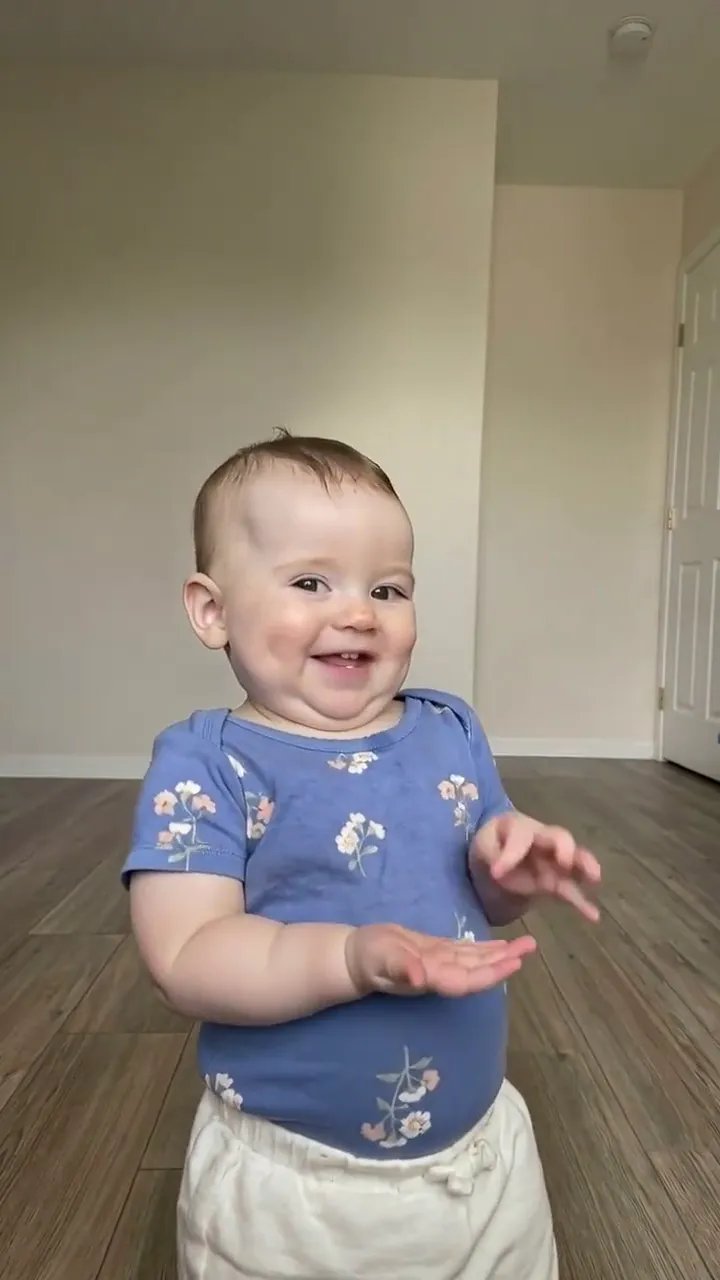
Bonito Bonito baby dance: blue floral onesie
A baby in a blue floral onesie does the whole routine in an empty room with a wood floor: waves, hands to the cheeks, the self-hug, the cheeky sway and the little claps, on the Bonito, Bonito sound. About 24 seconds, 9:16.
24 s · with sound · vertical
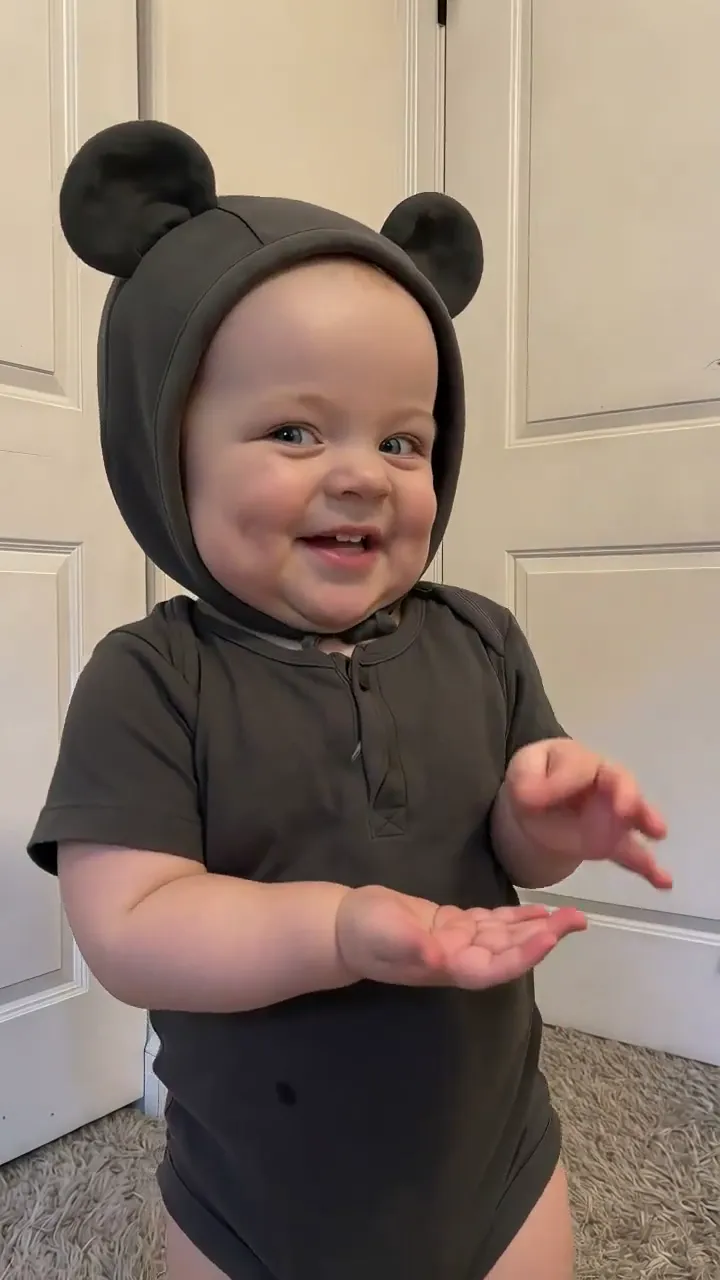
Bonito Bonito baby dance: bear-ears hood
A baby in a grey bodysuit and a bear-ears hood dances the same moves on the same beats in front of white doors, with the song. About 24 seconds, 9:16.
24 s · with sound · vertical
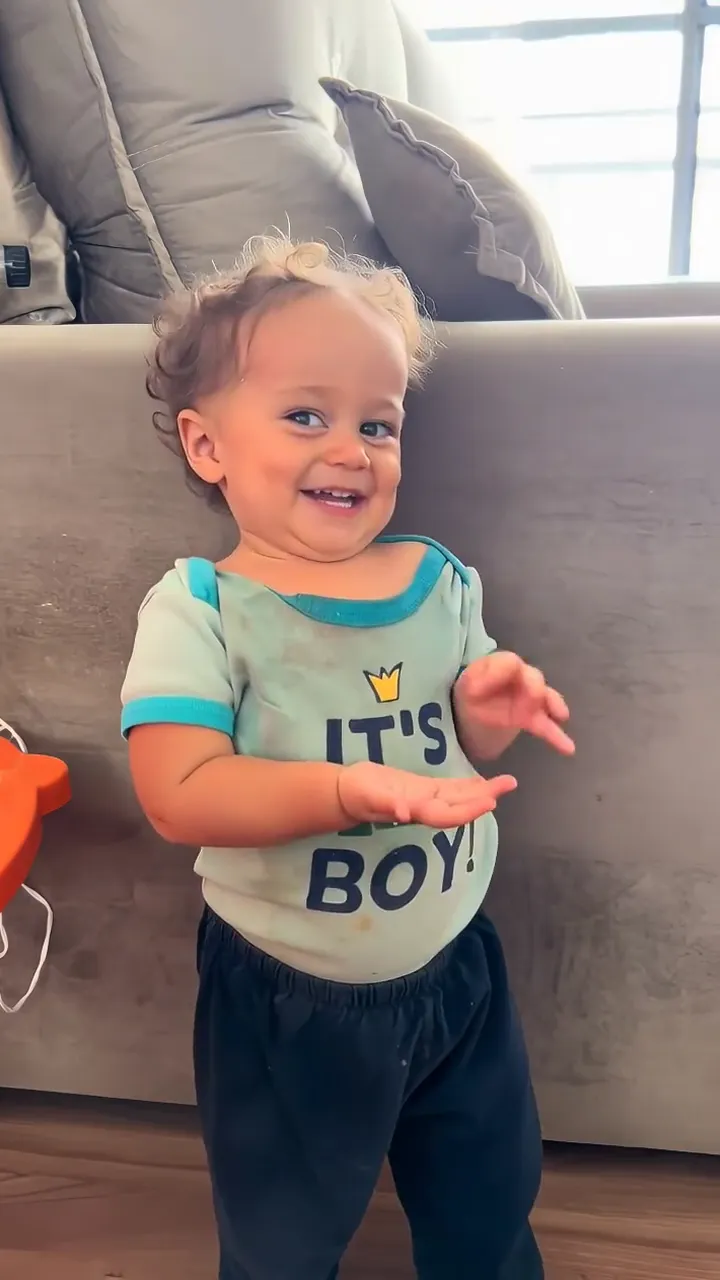
Bonito Bonito baby dance: toddler in a mint tee
A toddler in a mint “It’s a boy” tee does the routine in front of a grey sofa: the room comes from the photo, the moves and sound from the trend. About 24 seconds, 9:16.
24 s · with sound · vertical
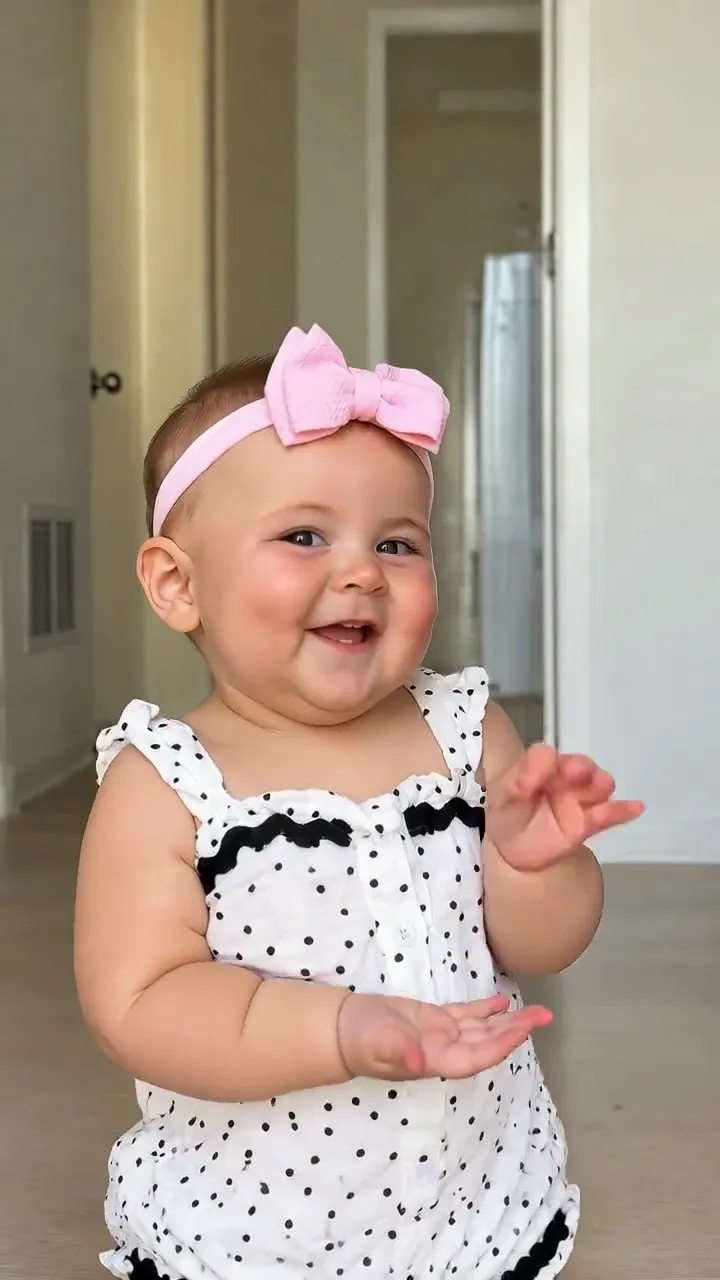
Bonito Bonito baby dance: pink bow
A baby girl with a pink bow and a polka-dot romper dances the routine in a hallway, smiling through the self-hug and the claps, on the Bonito, Bonito sound. About 24 seconds, 9:16.
24 s · with sound · vertical
Which Bonito Bonito move lands on which second?
The baby dance is one waist-up shot facing the camera, the same 23 seconds every time: small waves, a pat on the chest, an “oh!” face, hands pressed to the cheeks, arms swinging out, a cosy self-hug, a head tilt, a cheeky sway, a raised hand and little claps. The generator copies these moves with the timing below, which is the timing its prompt sends to the model, so you can also check a finished video against it.
| Seconds | What the dancer does | In a 10 / 15 / 23 s video |
|---|---|---|
| 0–2 s | Stands facing the lens with a big smile and makes small waves of both hands at chest height, swaying gently | All three |
| 2–4.5 s | Both hands come together in front of the stomach and pat the chest softly, still smiling and bobbing to the beat | All three |
| 4.5–5.5 s | A short pause: the hands open low in front of the body, an "oh!" face with round lips | All three |
| 5.5–8.5 s | Leans toward the lens and presses both hands to the cheeks, then cups the face, laughing | All three |
| 8.5–9.5 s | Both arms swing out and down to the sides in a happy little bounce | All three |
| 9.5–12.5 s | Crosses both arms over the chest in a tight self-hug, eyes nearly closed with a proud, cosy smile | All three |
| 12.5–15 s | Tilts the head to one side, then steps half a pace back and sways with the hands loose at the sides | 15 and 23 s |
| 15–18.5 s | One hand rests on the cheek and the other on the hip, rocking from side to side with a cheeky grin | 23 s only |
| 18.5–20 s | Raises one hand up beside the face with the fingers open, then lowers it | 23 s only |
| 20–23 s | Both hands come up in front of the chest with small clapping and pointing gestures toward the lens, ending on a wide smile | 23 s only |
Why does the song stay on the beat, and should you add TikTok’s sound?
The model makes a silent video that follows the routine second by second; afterwards the routine’s own clip of Bonito, Bonito, cut to the same length, is laid under it. Because picture and sound come from the same seconds, the self-hug and the claps land where they did in the original. That is also why adding the TikTok sound again on top of the downloaded MP4 can push it off the beat.
| How you post | Download | Result |
|---|---|---|
| Upload the video as it is | Download MP4 (with the song) | In sync; set the platform’s volume for added sounds to zero |
| Use TikTok’s or Instagram’s own “Bonito, Bonito” sound | Silent copy | Your post joins the sound’s page; slide the sound until the claps land on the beat |
| Add the sound on top of the MP4 with the song | — | Two copies of the song, often a beat apart: avoid |
Both files come with every video: the MP4 with the song, and the same video without audio.
Is the Bonito Bonito song AI? Who is Thiago Navarro?
Yes. “Bonito, Bonito” is credited to Thiago Navarro Music and was released on 3 August 2026, but Thiago Navarro is a virtual singer, not a real person: Cuban songwriter Anier Cruz wrote the lyrics and used AI tools for the voice, the music and the singer’s face, as Latin American news outlets reported in September. The hook “un cafecito riquito riquito” means roughly “a little coffee, so tasty”.
| When (2026) | What happened |
|---|---|
| 3 August | “Bonito, Bonito” is released by Thiago Navarro Music |
| August–September | Adults act out the lines (the coffee, the smile, the hug) in office and family dance videos |
| September | News outlets report that the singer is an AI persona made for Anier Cruz |
| 21 October | Mexican duo Río Roma post their own “Bonito, Bonito” video |
| From 24 October | The AI baby template “Wait until your baby starts dancing…” takes off; its biggest post passes 18 million plays by 28 October |
Two things are AI here: the song’s voice and music, and the baby videos made from a single photo. In Brazil the hook is heard as “menino bonito, menino bonito”, so people search for it that way too; it is the same Spanish song.
Who can do the Bonito Bonito AI dance: a baby, a toddler, an adult or a cartoon?
Anyone in a clear photo. The video keeps exactly the age, face, hair, build and clothes the photo shows: a baby stays a baby, a toddler stays a toddler, an adult stays an adult, and an AI or cartoon character keeps its own look and art style. The routine was made for babies, and the cute gestures read best on them; with an older person, try a 10-second video first to see how the moves fit.
| In the photo | What the video keeps | Good to know |
|---|---|---|
| A baby or toddler | Face, hair (or no hair), chubby build, onesie, bow or hat | The trend’s own look; standing or sitting upright works best |
| An adult (a friend, a parent, yourself) | Exact age, face, hair, build and outfit; it never turns them into a baby | Funny for a birthday Reel; only with that person’s consent |
| An AI or cartoon baby character | The character’s style, colours and proportions | Good for character accounts; no real child involved |
| A group photo | One person only | Crop to one person; the video always shows a single dancer |
Which photo works best for Bonito Bonito AI?
The model keeps the face, hair, clothes and room from your photo and takes only the moves from the routine. So the photo decides how recognisable and how clean the video looks. Pick one where the person faces the camera upright, with both hands in view, alone in a bright room you would not mind seeing as the dance floor, since that room becomes the background.
| Use | Avoid |
|---|---|
| Standing or sitting upright, facing the camera | Lying down or shot from above (legs come out twisted) |
| Waist-up or full body, both hands visible | Face-only crops, hands hidden in sleeves or behind a toy |
| One person alone in the frame | A parent’s hands, siblings or pets in the picture |
| Daylight or a bright room, sharp focus | Dark, blurry or heavily compressed chat photos |
| A tidy room you like | Stickers, filters or text on the photo |
How do you fix a Bonito Bonito AI video that looks wrong?
Most problems come from the photo or the model, not from the routine. A changed face usually means a small, blurry or side-on photo; twisted legs or odd fingers mean a sitting-on-the-floor photo or hidden hands; a video that drifts off the beat after posting usually has the song twice. Each fix below costs one new video, and a video that fails outright is refunded.
| What went wrong | Usual cause | Try this |
|---|---|---|
| The face doesn’t look like them | Small, blurry, filtered or side-on face; an old chat photo | A sharp, front-facing photo in good light; 720p, Seedance 2.0 Pro or Seedance 2.5 keep faces closer |
| Twisted legs or odd fingers | Sitting on the floor, lying down, or hands hidden | An upright photo with both hands visible |
| The moves are off the beat after posting | TikTok’s sound added on top of the MP4 that already has the song | Post the MP4 as it is, or use the silent copy with the platform’s sound |
| Blurry or flickering | A dark or compressed photo at 480p | A brighter, sharper photo and 720p |
| The dancer stops moving near the end | A 10 or 15 s video ends mid-routine on purpose | Pick 23 s on Seedance 2.5 for the whole routine |
| Seedance 2.5 didn’t accept the photo | Its safety review refused the file | Credits come back automatically; try a clearer photo or a Seedance 2.0 model |
How do you make a Bonito Bonito AI video here?
Add one photo, pick a model, a length and a resolution, and press the button. The generator sends your photo and the routine to the model in one go, then lays the song under the result in sync. It usually takes 3–8 minutes, works in a phone browser without CapCut or an app, and you can leave the page while it runs.
1Add one photo
One person facing the camera, upright, both hands in view. The room in the photo becomes the dance floor.
2Pick a model
Seedance 2.0 Mini is the default and the cheapest; Seedance 2.5 is the only one that makes the whole 23 seconds. Seedance 2.0 Fast, Seedance 2.0 Pro and MiniMax H3 make 10 or 15 seconds.
3Pick a length and resolution
The price shows before you start (19–1240 credits). The default, 10 seconds at 480p on Seedance 2.0 Mini, is 19 credits.
4Download the MP4
A 9:16 video with the song on it and no watermark, plus a silent copy for posting with the platform’s own sound.
Which model should you pick for Bonito Bonito AI?
Start with Seedance 2.0 Mini (the default, from 19 credits) to see how your photo works. Pick Seedance 2.5 for the whole 23-second routine with the clapping ending; it runs a quick safety review of the photo first. Seedance 2.0 Pro goes to 1080p up to 15 seconds, Seedance 2.0 Fast sits between Mini and Pro, and MiniMax H3 makes 720p only.
| Model | Resolution | Lengths | Credits | Good for |
|---|---|---|---|---|
| Seedance 2.0 Mini | 480p, 720p | 10 / 15 s | 19–60 credits | Testing a photo cheaply; the default |
| Seedance 2.0 Fast | 480p, 720p | 10 / 15 s | 40–130 credits | A sharper 720p at a middle price |
| Seedance 2.0 Pro | 480p, 720p, 1080p | 10 / 15 s | 68–545 credits | 1080p up to 15 s; faces hold well |
| Seedance 2.5 | 480p, 720p, 1080p | 10 / 15 / 23 s | 97–1240 credits | The whole 23 s routine (photo review first) |
| MiniMax H3 | 720p | 10 / 15 s | 97–145 credits | 720p only |
Every model gets the same routine, the same timed prompt and the same song afterwards; they differ in sharpness, how closely the face holds and price.
How much does a Bonito Bonito AI video cost?
One video costs 19 to 1240 credits, charged once when it starts and refunded automatically if it fails. The cheapest is 10 seconds on Seedance 2.0 Mini at 480p for 19 credits (about $0.71); 15 seconds is 28. The whole 23 seconds on Seedance 2.5 is 224 credits at 480p and 502 at 720p. Any credits pay, sign-up and check-in credits included. The Starter plan ($9 a month, 240 credits) covers 12 default videos. The one-time $5 trial pack (73 credits) covers 3 of the cheapest 10-second videos.
| Model | Length | Resolution | Credits | About |
|---|---|---|---|---|
| Seedance 2.0 Mini | 10 s | 480p | 19 credits | $0.71 |
| Seedance 2.0 Mini | 10 s | 720p | 40 credits | $1.49 |
| Seedance 2.0 Mini | 15 s | 480p | 28 credits | $1.04 |
| Seedance 2.0 Mini | 15 s | 720p | 60 credits | $2.23 |
| Seedance 2.0 Fast | 10 s | 480p | 40 credits | $1.49 |
| Seedance 2.0 Fast | 10 s | 720p | 87 credits | $3.23 |
| Seedance 2.0 Fast | 15 s | 480p | 60 credits | $2.23 |
| Seedance 2.0 Fast | 15 s | 720p | 130 credits | $4.83 |
| Seedance 2.0 Pro | 10 s | 480p | 68 credits | $2.53 |
| Seedance 2.0 Pro | 10 s | 720p | 145 credits | $5.39 |
| Seedance 2.0 Pro | 10 s | 1080p | 364 credits | $13.53 |
| Seedance 2.0 Pro | 15 s | 480p | 102 credits | $3.79 |
| Seedance 2.0 Pro | 15 s | 720p | 217 credits | $8.07 |
| Seedance 2.0 Pro | 15 s | 1080p | 545 credits | $20.26 |
| Seedance 2.5 | 10 s | 480p | 97 credits | $3.61 |
| Seedance 2.5 | 10 s | 720p | 219 credits | $8.14 |
| Seedance 2.5 | 10 s | 1080p | 539 credits | $20.04 |
| Seedance 2.5 | 15 s | 480p | 146 credits | $5.43 |
| Seedance 2.5 | 15 s | 720p | 328 credits | $12.19 |
| Seedance 2.5 | 15 s | 1080p | 809 credits | $30.08 |
| Seedance 2.5 | 23 s | 480p | 224 credits | $8.33 |
| Seedance 2.5 | 23 s | 720p | 502 credits | $18.66 |
| Seedance 2.5 | 23 s | 1080p | 1240 credits | $46.10 |
| MiniMax H3 | 10 s | 720p | 97 credits | $3.61 |
| MiniMax H3 | 15 s | 720p | 145 credits | $5.39 |
Can you make Bonito Bonito AI for free, without a watermark?
A new account’s 3 sign-up credits are fewer than one video costs (from 19). Sign-up, check-in and purchased credits all pay for these videos, no subscription needed. Every video downloads as an MP4 with the song and no watermark, plus a silent copy. A video that fails, or a photo the review refuses, gives every credit back; a finished video you don’t like is charged, and a new run costs the same again. See plans and credit packs.
| Sign-up and check-in credits | Purchased credits | |
|---|---|---|
| Bonito Bonito video | Count, but not enough for one | 19–1240 credits each |
| Watermark | None | None |
| Download | MP4 with the song, plus a silent copy | MP4 with the song, plus a silent copy |
| Failed video or refused photo | Credits back automatically | Credits back automatically |
Bonito Bonito AI: CapCut, Kling or a one-click site?
They differ in how the moves and the song get there. The CapCut AI baby template opens from template posts and needs the app; a template named “Bonito Bonito” inside CapCut is mostly a plain photo edit. Kling’s motion control copies a dance video you bring, and you add the song yourself. One-click template sites follow a different, full-body cup dance at 15 seconds. This generator has the viral waist-up routine and its song built in.
| Which dance | What you need | Song on the video | |
|---|---|---|---|
| CapCut AI baby template | The viral waist-up routine | The CapCut app and the template post | Yes; free exports add a CapCut ending |
| Kling AI (motion control) | Whatever reference video you bring | A photo, a dance video and a prompt | No, add it yourself |
| One-click template sites | A full-body dance with a pretend coffee cup, 15 s | One photo; some take AI-made baby images only | Some do, some don’t |
| RapTwins | The viral waist-up routine, 10, 15 or 23 s | One photo in the browser | Yes, in sync, plus a silent copy |
Is it safe to make a Bonito Bonito AI video of your child?
Use only your own child’s photo, or one a parent or guardian agreed to, and for an adult only with their consent. Your photo is stored privately under your account and used to make your video; finished videos stay private in your account and are not published anywhere unless you share them. When you post, use the platform’s AI-generated label so nobody thinks the baby really danced.
This page is not affiliated with Thiago Navarro Music, Anier Cruz, Río Roma, CapCut or TikTok. It makes a remake of a public trend from your own photo.
Bonito Bonito AI FAQ
Is Bonito Bonito AI?
Yes, twice over. The song “Bonito, Bonito” is sung by Thiago Navarro, a virtual singer whose voice, music and face were generated by AI (the lyrics are by songwriter Anier Cruz), and the dancing-baby videos are made by AI from a single photo.
Why is my Bonito Bonito video off the beat after posting?
Usually because the song is on it twice: the MP4 already carries it in sync, and the TikTok sound was added on top. Post the MP4 as it is, or download the silent copy and add the platform’s sound to that instead.
Can I make the Bonito Bonito dance with an adult or a cartoon character?
Yes. The video keeps the exact age and look of whoever is in the photo, so an adult stays an adult and a cartoon keeps its style. The routine was made for babies; try a 10-second video first for anyone older.
Can I make a Bonito Bonito AI video for free without a watermark?
There is never a watermark, and any credits pay, sign-up and check-in credits included, but a video starts at 19 credits, more than the 3 a new account gets. A failed video is refunded.
Do I pay again if the video comes out wrong?
If it fails or the photo review refuses it, every credit comes back automatically. A finished video you don’t like is charged, and a new run costs the same again, so start with a cheap 10-second video to check the photo.
Is “menino bonito, menino bonito” the same song?
Yes. Brazilians hear the Spanish hook as “menino bonito” (Portuguese for “pretty boy”), so many search for the trend that way. It is the same song, “Bonito, Bonito” by the AI singer Thiago Navarro, and the same baby dance.
Where is the CapCut Bonito Bonito baby template?
It opens from template posts captioned “Wait until your baby starts dancing…” through “Make the same video”; searching “Bonito Bonito” inside CapCut mostly finds a plain photo edit. This page makes the same routine in the browser, no app needed.
Check this answer with an AI assistant
“How do I make a Bonito Bonito AI video with the song in sync?”
Your Bonito Bonito AI video is one photo away.
Make my Bonito Bonito video