
Tecktonik Dance AI Prompt
RapTwins’s Tecktonik dance AI is a one-photo video generator that puts you on Cheba Man’s red-lit Tecktonik stage, copying his arm routine second by second with the original track, from 10 credits (about $0.37) and 3 free credits at sign-up. You don’t write a prompt: the timed one is built in. Videos run 5–16 seconds, 9:16, 480p to 1080p, with no watermark.
Updated
Make your Tecktonik dance AI video
1. Your photo
Which photos work best
JPG, PNG or WebP, 300–6000 px, up to 10 MB. Use a sharp, front-facing, full-body photo of one person with both arms visible. The video dresses you in the clothes and shoes from the photo.
2. Model
480p · 16 s · 9:16 vertical MP4 with the reel's original track, plus a silent copy
Add a photo of yourself first.
Any credits pay, sign-up and check-in credits included. New accounts get 3 free credits, fewer than one video costs (from 10 credits).
A finished remake: 16 s with the original track · 9:16 · your video keeps this stage, these moves and this sound with your face and outfit.
Tecktonik dance AI video examples
Five remakes of the red-stage routine: each keeps the same stage, festoon lights, filming crowd, arm moves and track, and swaps in another person’s face and outfit, as your video does with yours. Tap a clip for sound.
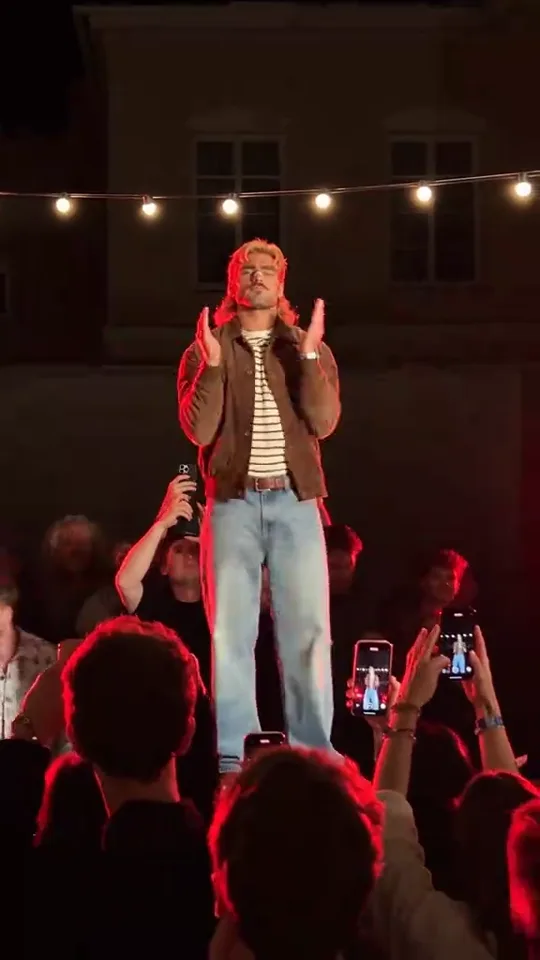
Red stage, 16 s: striped tee and brown jacket
A long-haired dancer in a striped tee, brown jacket and light jeans takes the red-lit stage: the same arm wraps, points and sweeps on the same beats, the crowd filming on phones, the original track. 16 seconds, 9:16.
16 s · with sound · vertical
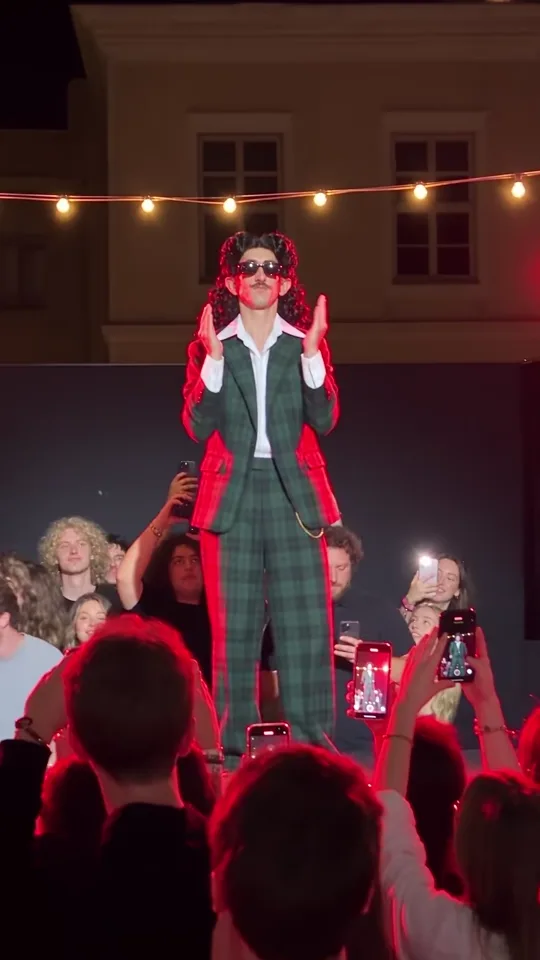
Red stage, 16 s: green plaid suit and curls
A dancer in a green plaid suit, white shirt and dark glasses with long curls does the whole routine on the same stage and festoon lights, to the same track. 16 seconds, 9:16.
16 s · with sound · vertical
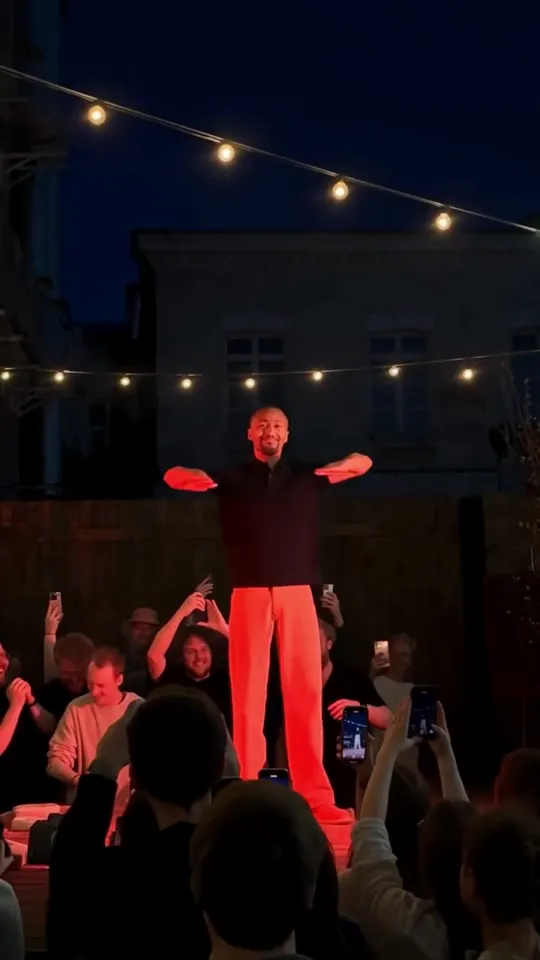
Red stage, 19 s: black tee and red trousers
A bearded man in a black tee and red trousers dances the routine on the red stage with the crowd below; the post runs on for a few extra seconds after the 16-second routine. 19 seconds, 9:16, with the track.
19 s · with sound · vertical
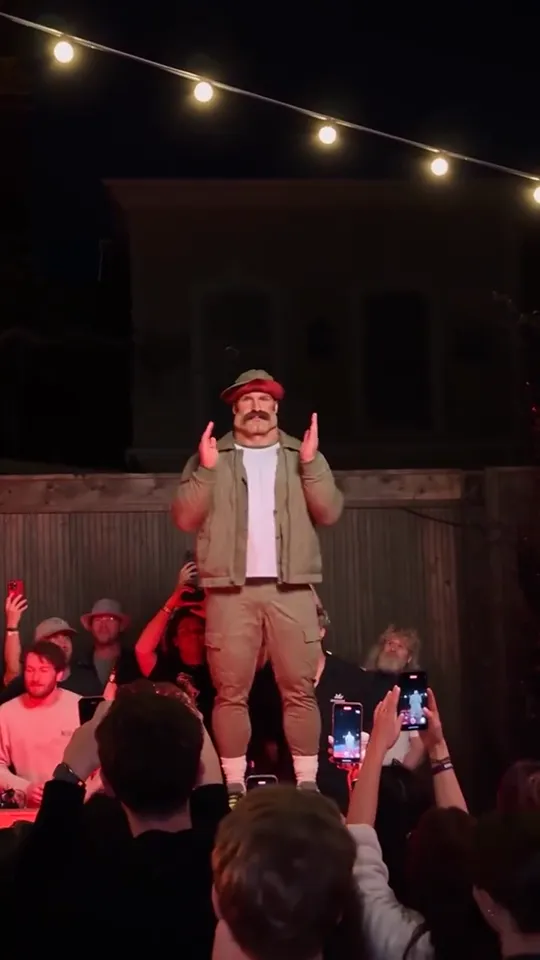
Red stage, 17 s: hat, moustache and khaki jacket
A moustached man in a red cap, khaki jacket, white tee and shorts throws the same arm moves on the stage, a hat that stays on through every head wrap. 17 seconds, 9:16, with the track.
17 s · with sound · vertical
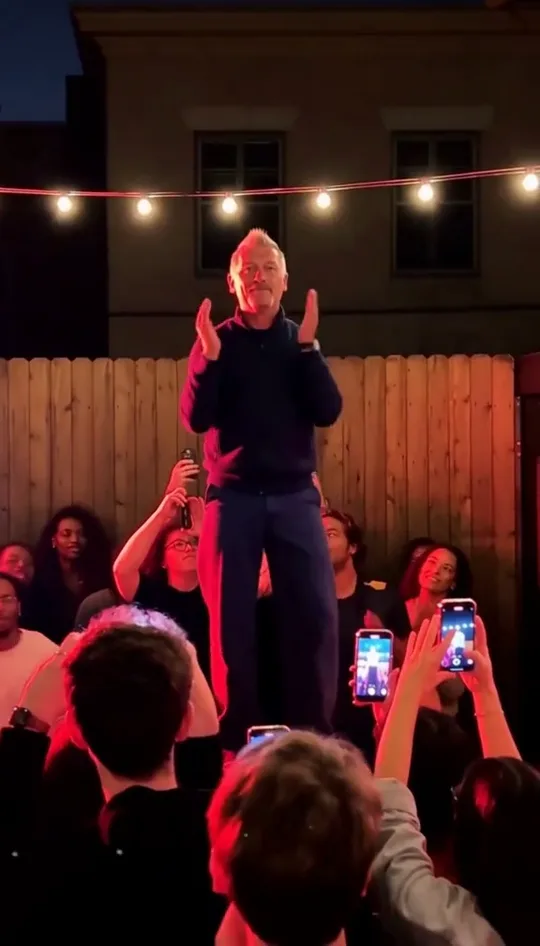
Red stage, 15 s: an older dancer in navy
A grey-haired man in a navy sweater and dark trousers dances the opening 15 seconds of the routine: the T-pose, the wraps, the points and the turn, with the track. 15 seconds, 9:16.
15 s · with sound · vertical
Can a text prompt make a Tecktonik dance AI video?
No, not the one in your feed. A text prompt such as “a man doing an energetic 2007 French Tecktonik dance under neon club lights” names a style, but the trend is one specific 16-second routine: Cheba Man’s arm wraps, points and sweeps, each on its own beat, on a red-lit party stage. An image-to-video model has no way to guess those moves from words, so it invents generic club dancing on an invented stage.
What copies the routine is a motion reference: the real clip goes in next to your photo, and the prompt tells the model whom to replace and what to keep. That is how this page’s generator works, and how the motion-control or reference-video modes of general tools work too.
Writing a longer prompt does not close the gap. Words like “fast arms” or “robotic” change how energetic the invented dance looks, not which moves it makes or when.
What does a working Tecktonik dance AI prompt need?
Seven things, in this order: the clip as the motion source, exactly which dancer to replace, your photo as the only source of the new look, what of the original must not carry over, every move with its seconds, what happens to the crowd, and what stays fixed (stage, light, camera). Then ask for a silent video and lay the original track back on afterwards, so the model never invents music.
1. The clip is the motion source
Name the reference video and say it supplies the moves, timing and camera only.
2. Who is replaced
Describe the original dancer by what they wear (dark sunglasses, a striped short-sleeve shirt, light trousers), so the model swaps the right person and only that person.
3. The photo decides the look
Face, hair, skin tone, build, clothes, shoes and glasses come from your photo in every frame; if the photo stops at the shoulders, the same outfit continues down to the feet.
4. What must not carry over
Say it plainly: no sunglasses, striped shirt or light trousers unless the photo has them, and never the original dancer’s face.
5. The moves, second by second
List each move with its start and end (see the table below). This is what keeps the arms on the beat.
6. The crowd
Ask for invented, ordinary-looking people doing the same things (cheering, filming), so no real guest stays recognisable.
7. What stays
The raised stage, the red light, the festoon bulbs, the building, the handheld phone camera, one continuous vertical shot, no cuts, the same speed; then a silent output with no captions or logos.
This generator sends a prompt built exactly this way with every video, timed to the reel, so there is nothing to type here: you add a photo and pick a model, a length and a resolution.
What should you type in a reference-video tool?
If you use a general tool with a reference-video or motion-control mode, give it the clip and your photo, then a prompt in this shape. Replace the brackets; keep the order. It works because every line either names a source or pins something down, and none of it asks the model to invent dance moves.
“Use [the video] for motion, timing and camera only. Replace only the dancer on the raised stage — [what the original dancer wears] — with the person in [your photo], for the whole clip. The photo is the only source of the face, hair, skin tone, body, clothes and shoes; nothing of the original dancer remains. Keep every arm move and its timing: [paste the moves with their seconds]. Redraw the crowd as invented people doing the same things. Keep the stage, the red stage light, the string lights, the building and the shaky handheld phone camera: one vertical shot, no cuts, same speed. One dancer only, natural hands. Silent video, no text, logos or watermarks.”
Two things this cannot do for you: find the clip, and put the track back on in sync. Both are already done in this page’s generator.
Which Tecktonik moves happen at which second?
The red-stage routine is 16 seconds of arm work with one turn and one knee lift. Here is the move list the generator’s prompt uses, beat by beat; paste it into any reference prompt, or use it to check a finished video against the original timing.
| Seconds | Move |
|---|---|
| 0–1 s | Arms stretched straight out to the sides like a T, then both hands come in to the sides of the head |
| 1–2 s | Both hands up by the head, then one arm shoots straight up to the sky |
| 2–4.5 s | Fast arm wraps in front of the face and chest: forearms crossing, wrists rolling, one forearm sweeping across the face, forearms stacked flat at the chest |
| 4.5–6.5 s | Both arms snap out to the sides with the fingers pointing |
| 6.5–7.5 s | One arm loops over the head while the body turns |
| 7.5–9 s | A wide horizontal arm sweep with the arms out, leaning to the side |
| 9–10 s | Forearms cross again in front of the face |
| 10–12 s | Both elbows up with the hands by the head, then one arm wraps over the head while the other reaches out |
| 12–13 s | A lean to the side with a knee lift, one arm over the head |
| 13–16 s | Bending forward into fast sweeps and head wraps, the weight dropping low, ending with an arm wrapped around the head |
Do “neon lights”, “2007 club” or “fast arms” help a Tecktonik prompt?
Mostly not. Style words change the look of an invented scene, but with a reference clip the stage and moves already come from the clip, and the extra words compete with it. Two kinds of words do help: what the original dancer wears (so the right person is swapped) and the move list with seconds. For a 2007 fluo look, wear it in the photo instead of typing it.
| Prompt add-on | What it does | Use it? |
|---|---|---|
| “neon club lighting”, “laser lights” | Repaints the stage light; the trend’s look is a strong red light with warm festoon bulbs | No: the light comes from the clip |
| “2007 French Tecktonik”, “electro dance” | Tells a text-only model the style; with a reference it adds nothing | Only in text-only tools |
| “fast arms”, “energetic”, “robotic” | Speeds up or stiffens an invented dance; can blur hands in a reference video | No |
| What the original dancer wears | Pins down which person is replaced | Yes |
| Moves with start and end seconds | Keeps each move on its beat | Yes |
| “Silent video, no text or logos” | Stops invented music, captions and watermarks; add the real track afterwards | Yes |
How do you fix a Tecktonik dance AI video that looks wrong?
Most failures come from the photo or the length, not the prompt. A changed face means the photo was small, filtered or turned away; twisted arms mean the arms were hidden in the photo or the model is too light for fast wraps; missing legs mean a head-and-shoulders photo; a new background means the tool had no reference clip. Each fix below costs one new video.
| What went wrong | Usual cause | Fix |
|---|---|---|
| The face looks like someone else | Small, blurry, filtered or side-on face in the photo; sunglasses or a hat | A sharp, front-facing photo in even light, no filter; leave glasses out unless you want them |
| Arms twist, melt or blur in the wraps | Arms hidden in the photo (pockets, behind the back, cropped); the lightest model at low resolution | A photo with both arms visible; try Seedance 2.5 or Seedance 2.0 Pro at 720p |
| Legs vanish or the body is cut off | A head-and-shoulders photo, so the model has to invent the lower body | A full-body photo, head to shoes; otherwise the outfit is continued and may look plain |
| The stage or crowd changes | A text-only tool or an image-to-video mode with no reference clip | Use a reference clip (this generator always does); the crowd is redrawn on purpose |
| The original dancer’s sunglasses or shirt show up | The prompt did not say what must not carry over | Name the outfit to drop (already in this generator’s prompt) |
| The moves drift off the beat or slow down | No timings in the prompt, or the clip was re-timed | Moves with seconds, same playback speed; a 16-second video keeps the whole routine on the beat |
| Two people end up on stage | A group photo | One person per photo; crop a group photo to one person |
If Seedance 2.5’s safety review refuses a photo, the credits come back and you can try another photo or a Seedance 2.0 model, which skips that review.
How do you make the Tecktonik dance AI video here?
Add one photo, pick a model, a length and a resolution, and press the button. The generator sends your photo, the red-stage reel and its timed prompt in one go, then lays the original track under the result. It usually takes 3–8 minutes, and you can leave the page while it runs.
1Add your photo
One person, standing, head to toe if you can, both arms visible, face front-on. Your clothes and shoes are the ones you dance in.
2Pick a model
Seedance 2.5 is the default and the only one that makes the whole 16 seconds; Seedance 2.0 Mini, Seedance 2.0 Fast, Seedance 2.0 Pro and MiniMax H3 make 5, 10 or 15 seconds.
3Pick a length and resolution
The price shows before you start (10–862 credits). The default, 16 seconds at 480p on Seedance 2.5, is 156 credits.
4Download the MP4
A 9:16 video with the original track and no watermark, plus a silent copy for adding the sound inside TikTok or Instagram.
Which model should you pick for the Tecktonik dance?
Pick Seedance 2.5 (the default) for the whole 16-second routine; it runs a quick safety review of your photo first. Pick Seedance 2.0 Mini to test a photo cheaply (from 10 credits). Seedance 2.0 Pro goes to 1080p up to 15 seconds, Seedance 2.0 Fast sits between Mini and Pro, and MiniMax H3 makes 720p only.
| Model | Resolution | Lengths | Credits | Good for |
|---|---|---|---|---|
| Seedance 2.0 Mini | 480p, 720p | 5 / 10 / 15 s | 10–60 credits | Testing a photo cheaply |
| Seedance 2.0 Fast | 480p, 720p | 5 / 10 / 15 s | 20–130 credits | A sharper 720p at a middle price |
| Seedance 2.0 Pro | 480p, 720p, 1080p | 5 / 10 / 15 s | 34–545 credits | 1080p up to 15 s |
| Seedance 2.5 | 480p, 720p, 1080p | 5 / 10 / 15 / 16 s | 49–862 credits | The whole 16 s routine; the default (photo review first) |
| MiniMax H3 | 720p | 5 / 10 / 15 s | 49–145 credits | 720p only |
Every model gets the same reel, the same timed prompt and the same track afterwards; they differ in sharpness, how steady the hands stay in the fastest wraps, and price.
How much does a Tecktonik dance AI video cost?
One video costs 10 to 862 credits, charged once when it starts and refunded automatically if it fails. The cheapest is 5 seconds on Seedance 2.0 Mini at 480p for 10 credits (about $0.37); the whole 16 seconds on Seedance 2.5 is 156 credits at 480p, 350 at 720p and 862 at 1080p. Any credits pay, sign-up and check-in credits included. The Starter plan ($9 a month, 240 credits) covers one full 16-second video at 480p. The one-time $5 trial pack (73 credits) covers 7 of the cheapest 5-second videos or 2 of 15 seconds on Seedance 2.0 Mini at 480p.
| Model | Length | Resolution | Credits | About |
|---|---|---|---|---|
| Seedance 2.0 Mini | 5 s | 480p | 10 credits | $0.37 |
| Seedance 2.0 Mini | 5 s | 720p | 20 credits | $0.74 |
| Seedance 2.0 Mini | 10 s | 480p | 19 credits | $0.71 |
| Seedance 2.0 Mini | 10 s | 720p | 40 credits | $1.49 |
| Seedance 2.0 Mini | 15 s | 480p | 28 credits | $1.04 |
| Seedance 2.0 Mini | 15 s | 720p | 60 credits | $2.23 |
| Seedance 2.0 Fast | 5 s | 480p | 20 credits | $0.74 |
| Seedance 2.0 Fast | 5 s | 720p | 44 credits | $1.64 |
| Seedance 2.0 Fast | 10 s | 480p | 40 credits | $1.49 |
| Seedance 2.0 Fast | 10 s | 720p | 87 credits | $3.23 |
| Seedance 2.0 Fast | 15 s | 480p | 60 credits | $2.23 |
| Seedance 2.0 Fast | 15 s | 720p | 130 credits | $4.83 |
| Seedance 2.0 Pro | 5 s | 480p | 34 credits | $1.26 |
| Seedance 2.0 Pro | 5 s | 720p | 73 credits | $2.71 |
| Seedance 2.0 Pro | 5 s | 1080p | 182 credits | $6.77 |
| Seedance 2.0 Pro | 10 s | 480p | 68 credits | $2.53 |
| Seedance 2.0 Pro | 10 s | 720p | 145 credits | $5.39 |
| Seedance 2.0 Pro | 10 s | 1080p | 364 credits | $13.53 |
| Seedance 2.0 Pro | 15 s | 480p | 102 credits | $3.79 |
| Seedance 2.0 Pro | 15 s | 720p | 217 credits | $8.07 |
| Seedance 2.0 Pro | 15 s | 1080p | 545 credits | $20.26 |
| Seedance 2.5 | 5 s | 480p | 49 credits | $1.82 |
| Seedance 2.5 | 5 s | 720p | 110 credits | $4.09 |
| Seedance 2.5 | 5 s | 1080p | 270 credits | $10.04 |
| Seedance 2.5 | 10 s | 480p | 97 credits | $3.61 |
| Seedance 2.5 | 10 s | 720p | 219 credits | $8.14 |
| Seedance 2.5 | 10 s | 1080p | 539 credits | $20.04 |
| Seedance 2.5 | 15 s | 480p | 146 credits | $5.43 |
| Seedance 2.5 | 15 s | 720p | 328 credits | $12.19 |
| Seedance 2.5 | 15 s | 1080p | 809 credits | $30.08 |
| Seedance 2.5 | 16 s | 480p | 156 credits | $5.80 |
| Seedance 2.5 | 16 s | 720p | 350 credits | $13.01 |
| Seedance 2.5 | 16 s | 1080p | 862 credits | $32.05 |
| MiniMax H3 | 5 s | 720p | 49 credits | $1.82 |
| MiniMax H3 | 10 s | 720p | 97 credits | $3.61 |
| MiniMax H3 | 15 s | 720p | 145 credits | $5.39 |
Is there a free Tecktonik dance AI, and is there a watermark?
A new account’s 3 sign-up credits are fewer than one video costs (from 10). Sign-up, check-in and purchased credits all pay for these videos. Every video downloads as an MP4 with the original track and no watermark, plus a silent copy, and a failed video gives the credits back. See plans and credit packs.
| Sign-up and check-in credits | Purchased credits | |
|---|---|---|
| Tecktonik dance video | Count, but not enough for one | 10–862 credits each |
| Watermark | None | None |
| Download | MP4 with the original track, plus a silent copy | MP4 with the original track, plus a silent copy |
| Failed video | Credits back automatically | Credits back automatically |
How does it compare with Kling, Viggle and CapCut?
They differ in how the moves are controlled. Kling’s motion control copies moves from a dance video you supply, and Viggle from your video or one of its own templates, so for the red stage you need the clip and a good prompt; CapCut’s Tecktonik template uses its own courtyard clip, not the red stage. This generator has the red-stage reel, the timed prompt and the original track built in, so you only add a photo.
| How the moves are set | Red-stage clip built in | Sound | Price per video | |
|---|---|---|---|---|
| Kling AI (motion control) | Your own reference video + a prompt | No, bring the clip | Not published | Not published |
| Viggle AI | Your photo + a dance video or one of its templates | No, bring the clip | Not published | Not published |
| CapCut template | A fixed template | No, a courtyard party clip | Template music | Not published |
| RapTwins | Built-in reel + a timed prompt; you add a photo | Yes | The reel’s original track, plus a silent copy | 10–862 credits |
What can’t this Tecktonik dance AI do?
It can’t take your own prompt, your own moves or your own song: the reel, its timed prompt and its track are fixed, which is why the moves land. It makes one dancer from one photo, 9:16 only, and the whole 16 seconds only on Seedance 2.5. The crowd is always redrawn as invented people, and a finished video can’t be re-cut or re-timed.
One dancer
A group photo does not put several people on stage; crop it to one person.
Fastest wraps
Hands can smear for a frame or two in the quickest wraps; a full-body photo with clear arms and 720p help.
Head-and-shoulders photos
The model has to continue the outfit down to the shoes, and the result may look plain.
No edits after
A new video costs the credits again, so check the photo first.
What is the Tecktonik dance AI trend?
Tecktonik (also spelled tektonik or tectonic, also called electro dance) is the fast arm-wrapping club dance from the Paris electro scene of 2006–2007. In May 2026 a reel of the dancer Cheba Man doing it alone on a red-lit party stage, the crowd filming, went viral and brought it back; AI remakes that put other people on that stage followed, which is what “Tecktonik dance AI” means.
Searches for tech dance or tectonic dance usually mean the same dance. This tool makes the red-stage remake from your photo; it is not affiliated with Cheba Man or the owners of the Tecktonik name.
Tecktonik dance AI prompt FAQ
Can I write my own prompt in this Tecktonik generator?
No. The prompt is fixed and timed to the red-stage reel, which is what keeps the moves on the beat. You steer the video with your photo, the model, the length and the resolution.
What is a good prompt for a 2007 French Tecktonik dance from my photo?
In a text-only tool, none will copy the real routine: it needs a reference clip. In a reference-video tool, use the seven-part prompt on this page with the move list and seconds. Wear the 2007 look in your photo rather than typing it.
Can I use my dad’s old photo for a birthday Tecktonik video?
Yes, if it shows one person clearly, ideally full body with the arms visible. A sharp scan works better than a phone photo of a print; a head-only photo gets an invented outfit below the shoulders.
Why does my Tecktonik dance AI video look slow or off the beat?
Usually the tool had no move timings or re-timed the clip. Here the moves follow the reel at the same speed and the original track is laid back in sync, so a 16-second video keeps the whole routine on the beat.
Will the AI keep my sunglasses, hat or costume?
Yes: glasses, hats, clothes and shoes come from your photo. Leave them out of the photo if you don’t want them; the original dancer’s sunglasses never carry over.
Why is the crowd different from the original reel?
On purpose: every person in the crowd is redrawn as an invented face doing the same things, so no real guest from the reel appears in your video.
Is there a free Tecktonik dance AI?
Any credits pay, sign-up and check-in credits included, but a video starts at 10 credits, more than the 3 a new account gets. No watermark, and a failed video is refunded.
Check this answer with an AI assistant
“What prompt makes a Tecktonik dance AI video?”
Your Tecktonik dance AI video is one photo away.
Put me on the red stage