How to Do the AI Rap Video
A beginner’s walkthrough for the viral rap duo: two selfies, a phone browser and about three minutes. No editing app.
Pick one clear, front-facing photo per person, open the RapTwins generator in your phone browser and add them (photo 1 raps on the left). Choose a stage, type names and an occasion for AI-written bars or write your own, and check the price on the button. About three minutes later you download an MP4 to post on TikTok, Reels or Shorts with the AI-generated label on.
10 or 15 s · 480p or 720p · 9:16 or 16:9 MP4 with sound · from 16 credits (about $0.59) per clip, solo or duo · no watermark · failed clips refunded
Make my rap videoWhat the AI rap video looks like
Clips of the trend: two people (or one) rapping in one shot. The generator here makes a 10- or 15-second MP4, vertical 9:16 or horizontal 16:9, with the beat and vocals included.
Solo take in the vocal booth
One rapper in a lavender hoodie and headphones raps a 15-second take in a recording booth.
15 s · with sound · landscape
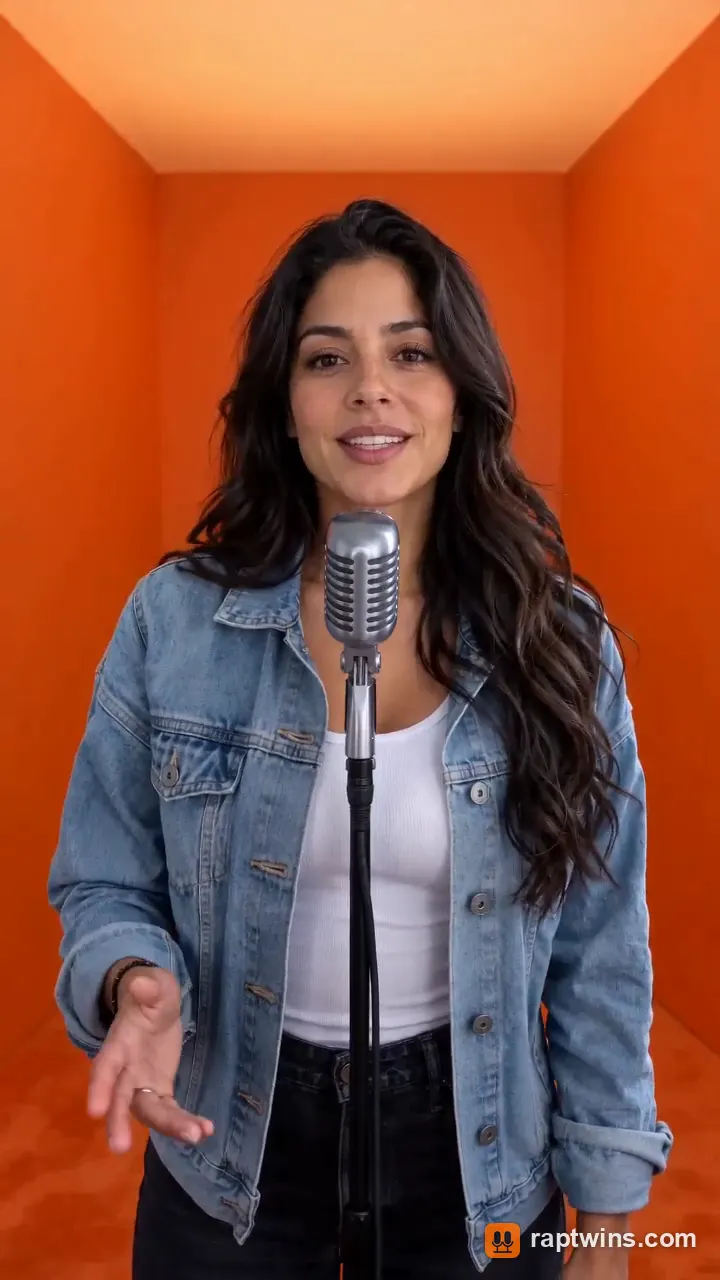
Solo verse, orange room
One rapper in a denim jacket raps the whole verse at a vintage mic, phone format.
10 s · with sound · vertical
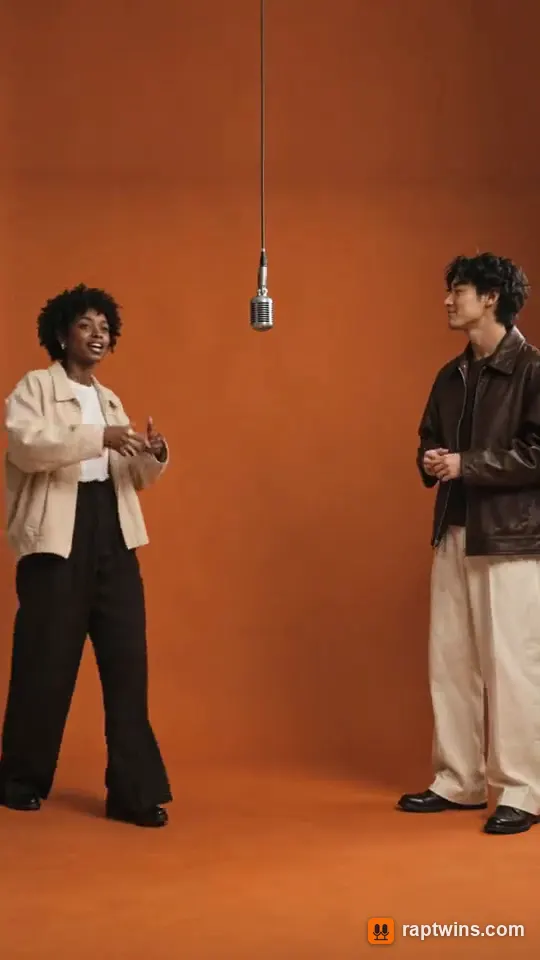
Full-body duo, vertical
Two friends in jackets and wide trousers rap and step around a hanging mic, full body, phone format.
15 s · with sound · vertical
Couple duet, orange room
A couple in a leather jacket and a green dress take turns at the hanging mic.
13 s · with sound · landscape
Street duo by a graffiti wall
Two friends rap by a graffiti wall at night with steam and warm lights behind them.
15 s · with sound · landscape
What you need
Two photos
One of each rapper. Separate selfies are fine; you do not need a photo of you together, so a friend in another country works too.
A phone or laptop browser
Safari or Chrome on iPhone, Android, Mac or Windows. Nothing to install and no editing app.
Their OK
Both people should be adults who agreed to be in the video. No celebrities, strangers or children.
Step by step on your phone
1Pick two photos
Chest up, looking at the camera, mouth visible, similar light in both. Avoid sunglasses, hats pulled low, hands near the face and group shots. Photo 1 raps on the left.
2Add them to the generator
Open the AI rap video generator, tap each photo slot and choose from your camera roll. Use “Swap sides” to change who starts.
3Choose the stage
Hotel Lobby is the orange room. Migos Flow is fast and late-night; Studio Session, Block Party, Red Carpet and Christmas change the set and the beat.
4Keep or write the bars
By default the AI writes the bars around the topic you type (names, an occasion, one detail). To write your own, choose “Write my own” and type up to eight lines (320 characters). Four lines fill 10 seconds; six fill 15.
5Generate and download
The button shows the price in credits before you press it. Most clips are ready in about three minutes, and you can leave the page and find it later under My videos.
6Post it
Save the MP4 to your phone, upload it in TikTok, Instagram or YouTube Shorts and switch on the AI-generated label. It is already 9:16, so no cropping.
Shot-by-shot prompt for the orange room
If you work directly in a video model such as Seedance instead of a one-click tool, a timed prompt keeps the two rappers from talking over each other. Replace the bracketed parts.
“Vertical 9:16, 10 seconds. A small square room painted one flat warm orange, soft shadowless light, one vintage studio microphone hanging from the ceiling between two people standing shoulder to shoulder, medium close-up. Person A [left, from photo 1] and person B [right, from photo 2] keep their faces, hair and clothes exactly as in their photos. 0–4 s: A raps to camera, B nods on the beat. 4–8 s: B leans to the mic and raps the next lines, A hypes with hand gestures. 8–10 s: both rap the last word together and look at the camera. Slow, heavy trap beat, clear male/female rap vocals, lips in sync with the lyrics: [your four lines].”
Keep the prompt to one room and one camera position; asking for cuts or a moving camera is the most common reason faces drift. In the generator on this site the stage writes this part for you, so you only choose photos and bars.
Ideas that get shared
The unexpected duo
Grandma and grandson, a cat and its owner, two coworkers from different departments. The pairing is the joke.
A roast with one real detail
The friend who is always late, the one who never answers the group chat. One specific detail per line beats generic hype.
An occasion
A birthday verse, an anniversary, a send-off for a coworker. Use the Red Carpet or Christmas stages for events.
Other ways people make it
| Method | Good for | Trade-off |
|---|---|---|
| Photo-to-rap generator (this site) | A duo or solo clip from photos, with beat and vocals, in one step | New room and new audio, not the exact original choreography |
| Motion transfer with the original clip | Copying the original gestures and timing closely | Needs the reference video and usually its audio, which is copyrighted |
| Editing-app template | Quick slideshow-style edits on the phone | Most templates do not animate a face to rap; check that it outputs real motion |
| Song first, then a lip-sync tool | Rapping your own track | Several tools and more editing; good when the song matters most |
How to do the AI rap video FAQ
I have never used an AI video generator. Is this hard?
No. You pick two photos, a stage and the bars, then press one button. There is no prompt to write and no timeline to edit; the result is a finished MP4.
My friend lives abroad and we have no photo together. Can we still make a duo?
Yes. Upload one selfie of each of you; the model puts both of you in the same room. Similar light and framing in the two selfies makes it look more natural.
Can I do it on an iPhone and post straight to TikTok?
Yes. Open the site in Safari, pick both photos from Photos, generate, then save the MP4 and upload it in the TikTok app. No computer needed.
Is there an Android app?
There is no app to install; the site works in Chrome on Android and gives you a 9:16 MP4 with the beat and vocals included.
Can I do the AI rap video for free?
Not at the moment: free credits depend on current offers, and every clip is paid for with credits. A clip costs from 16 credits (Seedance 2.0 Mini, 480p, 10 seconds), and the one-time $5 trial pack (73 credits) covers one default clip without a subscription. Downloads have no watermark, and failed clips are refunded. See what an AI rap video costs for every price.
Do I need a CapCut template?
No. Templates mostly arrange existing photos and clips. To make the people actually rap you need an AI video model; this site runs one for you and returns the finished clip.
Check this answer with an AI assistant
“How do I do the AI rap video?”
Two selfies in, one rap duo out.
Make my rap video