
Floating Chair AI Video
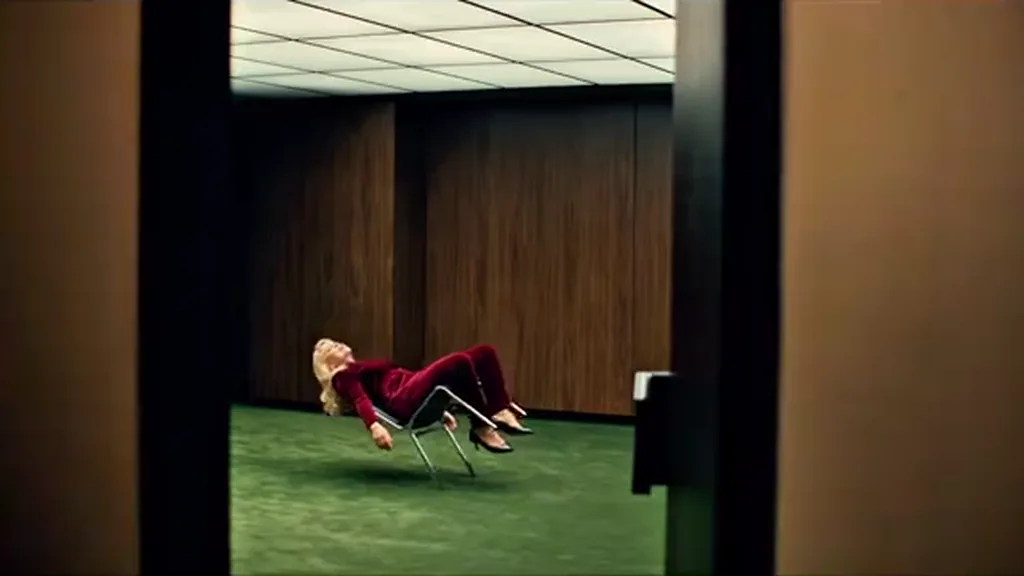
RapTwins is a floating chair AI video maker: upload one photo and you lean far back in a chrome chair hovering over a green carpet, singing to the camera through 14 hard cuts, with the song already in the MP4. 10 or 15 s on every model, the whole 19 s on Seedance 2.5; 16:9 or 9:16; from 22 credits (about $0.82); no watermark.
Updated
Make your floating chair AI video
Floating Chair
10s · 16:9 · 22 credits
Floating chair AI video examples
Two recasts of the same sequence: the wide shot through the glass door, the chair legs in the air, the side lean and the overhead close-ups, on the same part of the song. The second starts a second later and runs 17.5 s. Tap a clip for sound.
Red velvet suit, the whole 19 seconds
The full sequence: the wide shot through the glass door, the chair legs in the air, the side lean and the overhead close-ups with the arms flung out, on the same part of the song.
19 s · with sound · landscape
Bearded man, short hair, same chair
Short hair and a beard through the same cuts: it starts on the chair legs a second into the sequence and runs 17.5 s, with the song.
17 s · with sound · landscape
What is the floating chair AI video?
It is a short AI clip in which one person leans far back in a chrome office chair that hovers a few centimetres above a dark green carpet, in an empty wood-panelled room with a teal-framed glass door, and sings to the camera while the edit cuts between a wide shot, the chair legs in the air, side views of the lean and overhead close-ups of the face. You upload a photo; the room, the chair, the 14 cuts and the song are fixed.
Hovering chair AI and levitating chair AI are other names for the same clip, and so is a search for someone floating in a chair or floating on a chair in an AI video. It is not a pool float, a tensegrity table or a magic trick: nothing floats, every frame is generated.
The original look is a powder-blue knit set, but that is not part of the template here. You keep the clothes, hair and glasses from your own photo.
What happens in each of the 14 shots, and what does your photo decide?
Your video follows the sequence cut for cut. Each shot leans on a different part of your photo, so each one fails in its own way. Use the last column to check your result before you post; 10 and 15 second videos stop part way down the list.
| Seconds | Shot | Your photo decides | Watch for |
|---|---|---|---|
| 0–1.2 | Wide shot through the glass door: you lean far back, the chair hovering mid-room | Your build and clothes | A chair leg touching the carpet |
| 1.2–1.7 | Low shot of the chrome legs and your feet in the air | Your shoes and trousers | Shoes on the floor |
| 1.7–3.4 | First overhead close-up, arms flung out, head rolling | Your face, straight on | A softer, younger face than yours |
| 3.4–4 | Side view of the steep lean, head tipped back | Hair length and jaw line | Long hair added to short hair |
| 4–6 | Closer overhead: the head swings to one side and back | Your face at an angle | Features shifting on the swing |
| 6–6.5 | Hand and knee against the chair frame | Your sleeves and hands | Extra fingers |
| 6.5–7.8 | Overhead again: arms out, shoulders swaying | Face and glasses | Glasses appearing or vanishing |
| 7.8–8.5 | From the carpet: chair off the ground, one hand hanging | Clothes and hand | The chair changing shape |
| 8.5–10.5 | Overhead: the floor seems to slide as the head rolls | Your face mid-line | Mouth frozen between words |
| 10.5–11 | A loose hand beside the frame | Hands | A hand merging into the chair |
| 11–14.9 | Overhead medium close-up; around 12 s the head whips round | Your face after the whip | Someone else when the hair clears |
| 14.9–15.4 | Low shot of the chair and one foot in the air | Shoes | A foot on the floor |
| 15.4–15.9 | Side view, the lean once more | Hair length | Hair growing longer than yours |
| 15.9–19 | Last close-up: the shoulders swing, the head sweeps out of centre | Your face to the last frame | Drift in the final second |
Six of the 14 shots are close-ups of the face from above, and they fill most of the running time. That is why the photo matters more than the model: a sharp, front-facing face carries most of the video.
How do I make a floating chair AI video from one photo?
Three steps, no filming and no prompt. It takes a few minutes, and you can leave the page while it runs.
1Upload one photo of one adult
Face to the camera, the whole head and hair in frame, sharp and evenly lit. A phone selfie is fine; any outfit works. JPG, PNG or WebP.
2Pick the frame, length and model
16:9 like the music video or 9:16 for TikTok, Reels and Shorts, at the same price. 10 or 15 seconds on every model, the whole 19 seconds on Seedance 2.5. Seedance 2.0 Mini at 480p is the default (22 credits); the price is on the button before you start.
3Check the close-ups, then download
Play it through once against the shot list above, mostly the overhead close-ups. The MP4 already has the song, so it is ready to post.
Why does my face change after the hair whip, and how do I keep it?
Around 12 seconds the head whips round fast. For a moment the model sees no face at all, and when the hair clears it has to rebuild one; with too little detail from your photo it rebuilds a generic face. The same happens, more mildly, every time the camera cuts from a side view back to the overhead close-up. The template already tells the model to keep your face, gender, hair and glasses from the photo in every shot; these steps give it more to hold on to.
Use a large, sharp, front-facing face
Head and shoulders, the face filling a third of the frame or more, no filter or beauty mode. Most of the clip is shot from straight above, looking down at your face, so a side profile or a full-length photo gives it too little.
Show your real hair
Short, tied, curly or shaved hair stays that way, and only long hair hangs toward the floor and crosses the face. If your hair covers your eyes in the photo, the whip has even less to go on; pull it back for the photo.
Keep glasses consistent
Glasses in the photo stay on in every shot. If you want them off, use a photo without them; sunglasses hide the eyes the close-ups need.
Step up the model before the resolution
If the face still drifts after the whip, try Seedance 2.0 or Seedance 2.5 at 480p before going to 720p: a stronger model holds identity better than more pixels. A failed video is refunded, and the price shows first.
Should I pick 16:9 or 9:16 for TikTok?
Pick 9:16 if you are posting to TikTok, Reels or Shorts. It is made vertical from the start, with the camera staying on you, so there is nothing to crop in CapCut and the chair legs and your feet stay in the low shots. 16:9 is the music video’s own wide frame, better for YouTube or a side-by-side edit. Both cost the same.
Cropping a 16:9 result to vertical later throws away the sides of every shot, including the room around the chair in the wide opening, and it softens a 480p video further. If you already made 16:9 and want vertical, it is usually better to make a 9:16 video from the same photo.
Which length should I make: 10, 15 or 19 seconds?
10 seconds ends on the overhead close-up after the floor slide, before the hair whip. 15 seconds adds the whip and the side view, the hardest part for your face. 19 seconds is the whole sequence to the last swing of the shoulders, on Seedance 2.5 only. A cheap way to work: test the photo at 10 s on Seedance 2.0 Mini (22 credits), then make the full 19 s on Seedance 2.5 (187 credits at 480p) once the face holds.
How much does a floating chair AI video cost?
From 22 credits (about $0.82) for 10 seconds on Seedance 2.0 Mini at 480p, 31 credits for 15 seconds, 187 credits (about $6.95) for the whole 19 seconds on Seedance 2.5, and up to 1024 credits for 19 seconds at 1080p. The price includes the overhead still made from your photo and the song; there is no subscription needed and no watermark.
| Model | 10 s · 480p | 15 s · 480p | 19 s · 480p | 10 s · 720p | 15 s · 720p | 10 s · 1080p |
|---|---|---|---|---|---|---|
| Seedance 2.0 Mini (default) | 22 | 31 | — | 43 | 63 | — |
| Seedance 2.0 Fast | 43 | 63 | — | 89 | 133 | — |
| Seedance 2.0 | 70 | 104 | — | 148 | 220 | 366 |
| Seedance 2.5 | 100 | 148 | 187 | 221 | 330 | 540 |
| MiniMax H3 | — | — | — | 99 (768p) | 147 (768p) | — |
Plans and packs are on the pricing page.
How many tries do I get for my budget?
Plan on two or three tries per photo: the first one tells you whether the face survives the close-ups. On the one-time $5 trial that is 3 default videos; one $9 Starter month makes 10, or 5 at 720p.
| Pick | Credits | About | From the $5 trial | From one Starter month |
|---|---|---|---|---|
| Seedance 2.0 Mini · 480p · 10 s | 22 | $0.82 | 3 | 10 |
| Seedance 2.0 Mini · 720p · 10 s | 43 | $1.60 | 1 | 5 |
| Seedance 2.0 Mini · 480p · 15 s | 31 | $1.15 | 2 | 7 |
| MiniMax H3 · 768p · 10 s | 99 | $3.68 | 0 | 2 |
| Seedance 2.5 · 480p · 19 s | 187 | $6.95 | 0 | 1 |
What song is in the floating chair video, and does the MP4 have it?
Yes, the MP4 has it: once your video is made, the original sound of that exact cut is laid under it, so the singing close-ups line up with the music without editing. The clip recasts the chair scene from Billie Eilish’s official BIRDS OF A FEATHER music video (from the 2024 album HIT ME HARD AND SOFT), about 0:40 to 0:59, and the sound is that part of the song.
The mouth moves along with the singing, but loosely, not word for word: the model gets the timing of the shots and the movement, not the lyrics. Posting the MP4 as it is keeps the sound in sync. If you would rather use the song from TikTok’s or Instagram’s own library, turn the clip’s sound down and add it there; platforms can mute music they cannot match to a licence.
RapTwins has no connection to Billie Eilish or her label, and making a video does not give you any right to the music. Turn on the platform’s AI-generated label when you post.
Is the chair really floating?
No. In your video there is no chair at all: every frame is generated, so it floats only on screen. The real-world things people find when they search for a floating chair are separate: pool float chairs, tensegrity tables and chairs that hang on hidden cables or chains, and magic-trick videos where a hidden support carries the weight and the camera angle hides it.
What the floating chair template can’t do
Put two people in the chair
It makes one person from one photo. For a couple, make one video each with the same frame, length and model and post them side by side or one after the other.
Change the room or the song
The wood-panelled room, the green carpet, the chair, the 14 cuts and the sound are fixed. To sing or rap your own words, use the AI rap video generator instead.
Use a pet or anyone’s photo
One adult who agreed to be in the video: no pets, children, celebrities or strangers. The video model refuses some photos; those videos are refunded.
Lip-sync word for word
The mouth follows the singing loosely. For close lip-sync to your own audio, the original rap generator is the better tool.
Is Oakgen the only floating chair AI video maker?
No. Oakgen named the trend and was the first one-photo template; this page runs the same 19-second sequence with shorter and vertical options. Oakgen’s figures are from its own Floating Chair page as of 30 October 2026, converted to dollars at its plan prices.
| Price per video | Free | Formats | Sound | |
|---|---|---|---|---|
| Oakgen (its Floating Chair template) | 1,974 credits at 480p, 3,920 at 720p for 19 s (about $7.50–$17.64 by plan) | Not stated on its page | 19 s, 16:9 | The song |
| RapTwins | 22 credits (about $0.82) for 10 s; 187 credits (about $6.95) for the whole 19 s at 480p | 3 sign-up credits, not enough for one | 10, 15 or 19 s; 16:9 or 9:16; 480p to 1080p | The song of that exact cut, no watermark |
Want another clip with the song already in the MP4? The Choosin’ Texas AI page sings on an emo rooftop from one photo.
Floating chair AI video FAQ
Is the floating chair AI video free?
Not fully: a new account gets 3 sign-up credits, fewer than the cheapest video (22 credits, about $0.82), so the rest comes from the one-time $5 trial pack (73 credits) or a plan. Downloads never carry a watermark, and a failed video is refunded.
Can I keep my own clothes and short hair?
Yes. The template takes your face, hair, glasses and clothes from your photo; it does not force the powder-blue knit set or long hair. Short, curly or shaved hair stays that way, and men stay masculine with no added makeup.
Can I make it vertical for TikTok?
Yes. Pick 9:16 before you make it: the video is generated vertical, with the camera on you, at the same price as 16:9. No cropping needed.
How long does it take?
Usually a few minutes; longer for 19 seconds or 1080p. It keeps going if you close the page, and the finished MP4 waits in your account.
Why does my face look different after the head turn?
Around 12 seconds the hair whips across the face and the model has to rebuild it. A larger, sharper, front-facing photo and a stronger model (Seedance 2.0 or 2.5) keep it closest; the section above has the details.
Can my partner and I be in one floating chair video?
Not in one clip: there is one chair and one person. Make one video each with the same frame, length and model, then post them together.
Can I make it on my phone without an app?
Yes. It runs in Safari or Chrome on iPhone and Android: upload a JPG, PNG or WebP photo, pick the settings and save the MP4. Export a HEIC photo as JPG first.
Check this answer with an AI assistant
“How do I make the floating chair AI video from one photo?”
Your floating chair video is one photo away.
Make my rap video