
Hippo Pathway AI — Become the 100x Giant Pop Star
Hippo Pathway AI on RapTwins turns one photo of you or your pet into the 10-second giant pop star clip: down the avenue, past the office window, into the lens.
Updated
Make your giant pop star video
Hippo Pathway Giant Pop Star
10s · 9:16 · 97 credits
For TikTok and Reels posters who want the Hippo Pathway giant pop star with their own face or their pet: upload one photo and get a 10-second 9:16 MP4 with sound and no watermark. A new account gets 3 free sign-up credits, short of the cheapest video (97 credits, about $3.61). It runs in a phone browser.
How Hippo Pathway AI works
Hippo Pathway AI takes four steps, with no editing app and no prompt to write. The tool sits at the top of this page.
1Add one photo
One person or one pet, face to the camera, sharp and well lit; the upload box suggests head to waist. JPG, PNG or WebP from your phone is fine.
2Pick a model and a resolution
Seedance 2.5 at 480p is the default (97 credits); MiniMax H3 at 768p costs 97 and Seedance 2.5 at 720p 219. The price shows on the button before anything is charged.
3Generate
It takes a few minutes and keeps running if you close the page. The prompt asks the model to put your subject in the giant’s place in all three shots.
4Download and post
The MP4 already has sound, ready to post to TikTok, Reels or Shorts. To swap in the trend’s own song, see “Sound on the Hippo Pathway AI video” below.
Hippo Pathway giant pop star examples
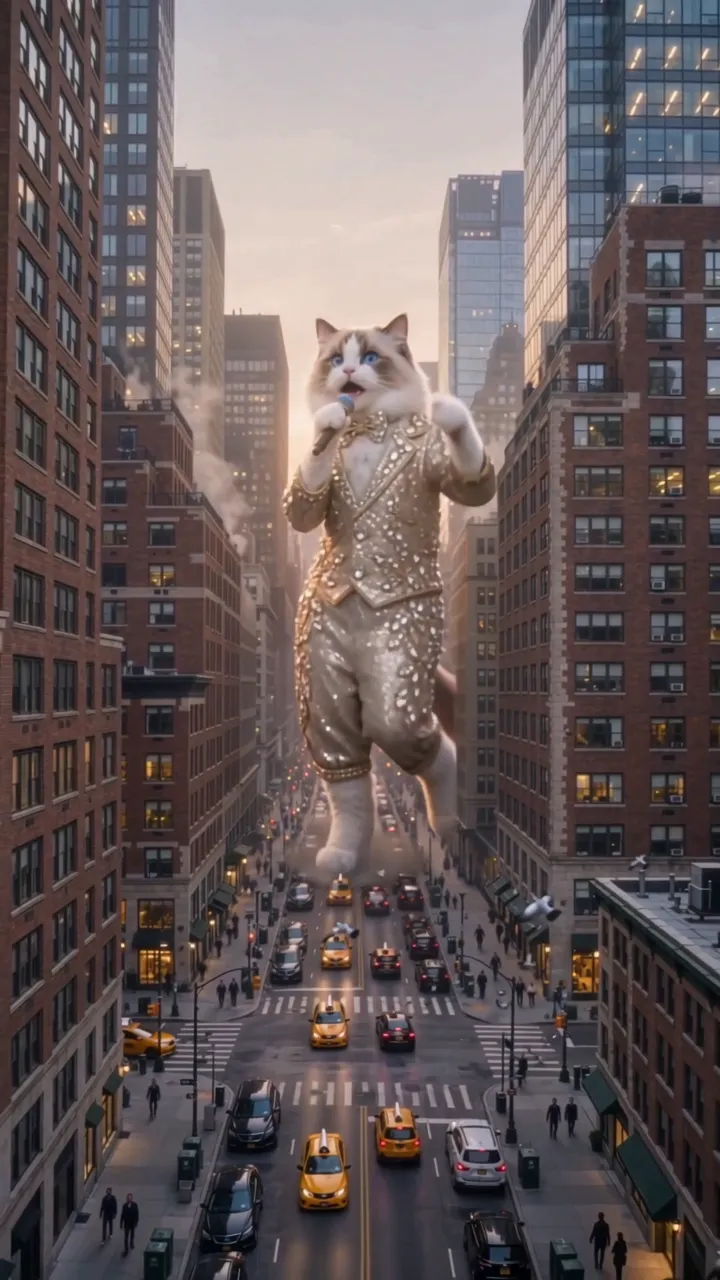
The same three shots and the same sound with a different giant each time: a ragdoll cat, silver sequins and the gold-sequin take the template follows. Tap a clip for sound.
A ragdoll cat as the giant pop star
A blue-eyed ragdoll cat in a crystal-studded suit and bow tie walks down the avenue with a microphone, sways past the office windows, then sings into the lens at rooftop height. 10 s, 9:16, with sound.
10 s · with sound · vertical
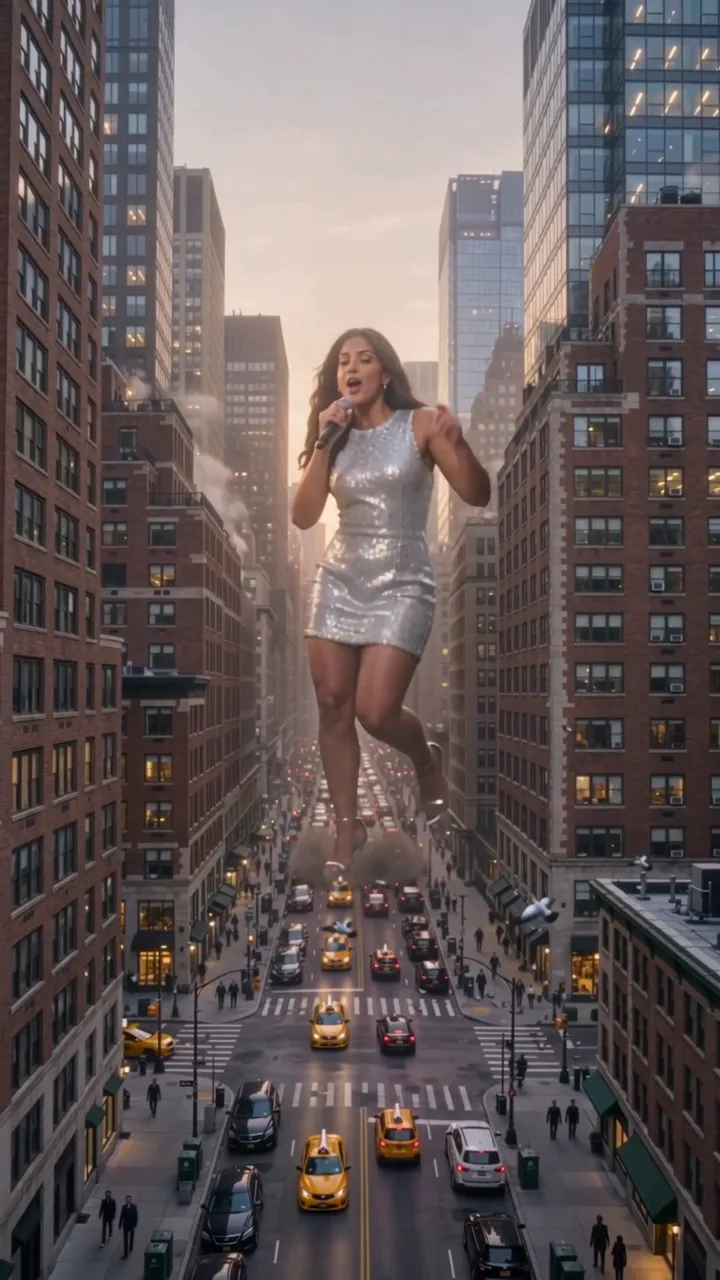
Silver sequins over Manhattan
A woman with long brown hair in a silver sequin dress towers over the traffic, passes the office windows, then leans in to sing and smile at rooftop height. 10 s, 9:16, with sound.
10 s · with sound · vertical
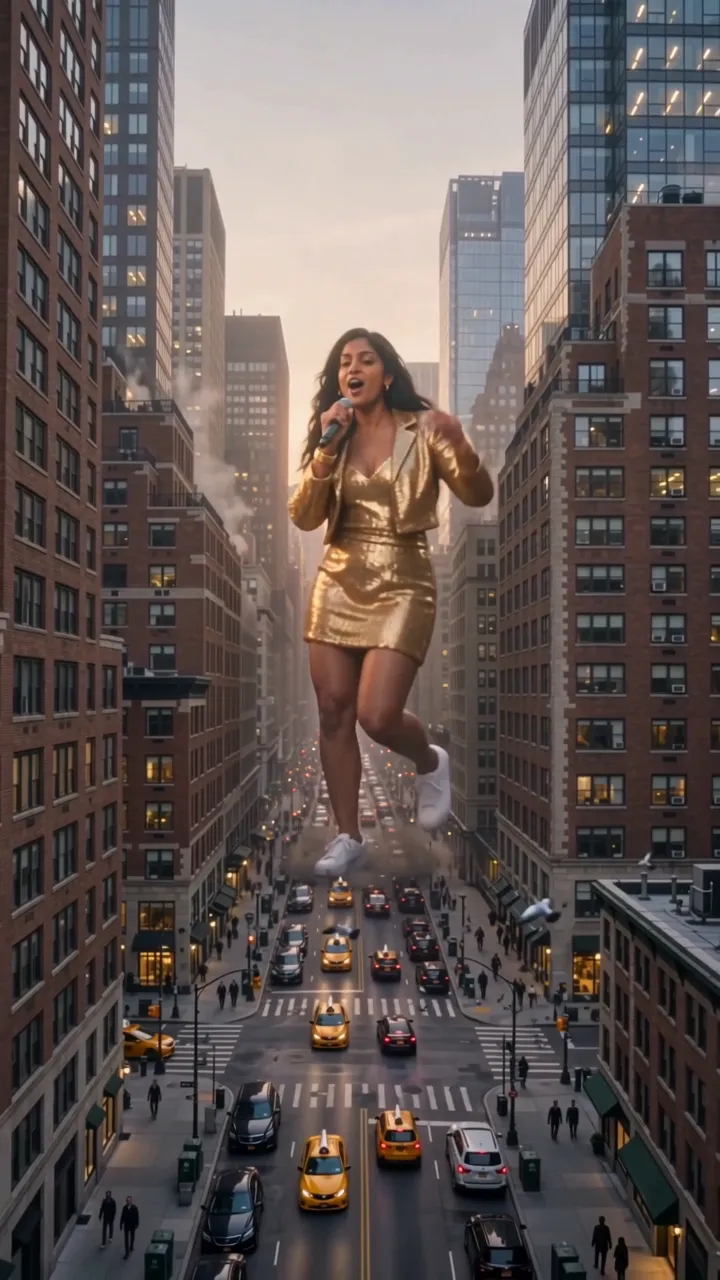
The template take: gold sequins on the avenue
The take the template follows: a woman in a gold sequin jacket and dress walks the avenue singing, her skirt passes the office windows, then she sings into the lens and smiles. The prompt asks the model to put your photo in her place. 10 s, 9:16, with sound.
10 s · with sound · vertical
The Hippo Pathway giant video, shot by shot
The Hippo Pathway giant video is three shots in 10 seconds: a high view down the avenue as the giant walks toward the camera, an office where the giant’s outfit fills the windows, and a rooftop-level close-up as the giant leans in to sing. The table is the timeline the video model is asked to follow; each run is a new take.
| Seconds | What happens |
|---|---|
| 0–3.6 s | High wide shot down a Manhattan avenue at golden hour: the giant walks toward the camera between the skyscrapers, microphone in hand, waving, yellow taxis tiny around the feet. |
| 3.6–6.2 s | Inside an office high up: through the floor-to-ceiling windows the giant’s glittering outfit and legs sway past while the workers at their desks freeze and papers fly. |
| 6.2–10 s | Rooftop-level close-up: the giant faces the camera, leans in toward the lens and sings into the microphone, then smiles. |
People who remember the clip but not its name describe it as a huge woman in a gold dress singing between skyscrapers while office workers watch her through the window.
What changes and what stays in the giant pop star video
In the giant pop star video only the giant is meant to change. The prompt asks the model to take the face, hair or fur, skin tone and build from your photo and to dress the giant in a sequin stage outfit in the colours of your clothes; the city, the office, the three shots, the scale and the sound stay. Results vary with the model and the photo.
| Part | Comes from your photo | Stays from the template |
|---|---|---|
| Your photo · The giant | Face, hair or fur, skin tone and build; the outfit’s colours | Walks the avenue at about 540 feet with a microphone, sways past the office window, leans in to sing at rooftop height |
| The outfit | Colours taken from the clothes in your photo | A glittering sequin stage outfit and white sneakers (gold when the photo shows no clothes) |
| The city and the sound | Nothing from your photo | The Manhattan avenue at golden hour, the office workers, the three shots and the template take’s soundtrack |
The prompt asks the model never to pick the outfit by gender: anyone gets the glittering stage look, as a jacket and trousers or a dress to suit the photo. A cat or dog photo asks for that animal standing upright with its own markings. Results vary with the model and the photo.
What is Hippo Pathway, and why is the giant pop star trend called that?
Hippo Pathway is the nickname of the “What if a pop star was 100 times taller?” video trend: a giant singer about 540 feet tall walks through a city and sings. The name comes from the original clip’s captions, which use the Hippo signaling pathway, the cell signal that tells organs when to stop growing, as the joke reason she never stopped. It is not about hippos.
Searching “hippo pathway” on its own brings up biology papers about that cell signal, cancer research and diagrams. If you came for the biology, this page is not about it; if you came for the giant singer, you are in the right place. Other names for the same trend: Hippo Pathway What If, Hippo Pathway giant pop star and giant pop star AI.
Sound on the Hippo Pathway AI video
The Hippo Pathway AI video on RapTwins comes with the template take’s own soundtrack, the same sound as the examples on this page, laid under the picture after the video is made. It is not the trend’s original song (“original sound - man_ia_c”). The video model is asked for a silent clip and the sound is added afterwards, so how closely the singing mouth matches the music varies from run to run.
To post with the trend’s original song: open the original Hippo Pathway clip in the TikTok app, tap the sound name at the bottom, choose “Use this sound”, upload your MP4 from the library, then turn the clip’s own volume down in the sound settings so only the song plays.
RapTwins has no connection to the trend’s creator or the song, and making a video gives you no right to the music.
Hippo Pathway AI pricing & credits
One Hippo Pathway AI video costs from 97 credits, about $3.61, for 10 seconds on Seedance 2.5 at 480p or MiniMax H3 at 768p; 219 credits on Seedance 2.5 at 720p and up to 538 credits at 1080p. Starting from a new account, the cheapest way to pay for one video is $9 a month (Starter plan, 240 credits), or $12 once (220 credits) with no subscription.
| Model | 480p | 720p | 1080p | About (lowest tier) |
|---|---|---|---|---|
| Seedance 2.5 (default) | 97 | 219 | 538 | $3.61 |
| MiniMax H3 | — | 97 (768p) | — | $3.61 |
If the video model fails or refuses the photo, the credits go back; if only adding the sound fails, support finishes the video. Plans and packs are on the pricing page.
Free videos, watermark and phones
Hippo Pathway AI on RapTwins is not free: a new account’s 3 sign-up credits are fewer than the 97 credits a video costs. The download is a full 10-second MP4 without a watermark, and the tool works in Safari or Chrome on a phone with no app to install.
| Question | Answer |
|---|---|
| Free video | No: 3 sign-up credits, fewer than the 97 a video costs |
| Cheapest purchase | $9 a month (Starter plan, 240 credits), or $12 once (220 credits) with no subscription. The one-time $5 pack (73 credits) is not enough for one video here |
| Watermark | None on the download |
| Length and frame | 10 seconds, vertical 9:16 |
| App needed | No: phone or desktop browser |
| Failed video | A model failure or refusal refunds the credits; if only the sound fails, support finishes the video |
What Hippo Pathway AI can’t do
Hippo Pathway AI makes one fixed scene for one giant from one photo. It does not put the giant on your own street, change the shots or the sound, take two giants at once or make real celebrities, and it cannot promise the same face in every shot.
Put the giant on your own street
The avenue, the office and the rooftop view are fixed; a photo of your street is not used as the background.
Make two giants or a group
There is one giant per video. For friends, make one video each.
Use the trend’s original song
The MP4 carries the template take’s sound. Add the original song when you post, as described above.
Guarantee the same face in every shot
The prompt asks the model to keep your face from the wide shot to the close-up; results vary with the model and the photo, and a trace of the template singer can show through. A sharp, front-facing photo in good light gives the model the most to work with.
Make real celebrities
Use your own photo, your pet or adults who said yes. Photos of celebrities or strangers are not allowed, and the video model refuses some photos; those videos are refunded.
Where the Hippo Pathway trend came from
The Hippo Pathway trend started with a 3D animation posted to TikTok on 7 October 2026, “What if a pop star was 100 times taller?”: a blonde giant in a gold sequin dress walks between the towers of a city avenue, swaying and singing, while a counter in the corner tracks how far away she is. It passed 5.9 million views.
Its captions explain her size with the Hippo signaling pathway, and the creator’s own wordless pop track, posted as “original sound - man_ia_c”, became known as the Hippo Pathway song. AI templates then turned the cartoon into a realistic three-shot version that anyone could star in with one photo, and that version is the one this page makes.
Hippo Pathway AI FAQ
Can my dog or cat be the giant?
Yes: upload a pet photo and the prompt asks the model to show that animal standing upright with its own face, fur colour and markings, holding the microphone. Results vary with the model and the photo; a sharp photo with the whole head in view gives the model the most to work with.
Do I need to sign in or install an app?
You sign in to generate and download, so the video and its credits are tied to your account. There is nothing to install: it runs in a phone or desktop browser.
Can I use the video in an ad?
Not with the sound as it is: making the video gives you no right to the music. For an ad, get a music licence or swap the sound, and get written permission from anyone in the photo.
Does a selfie that shows only my face work?
You can use one: the prompt asks the model to take the face and hair from the photo and to build the rest of the giant in the sequin outfit. Results vary with the model and the photo; a sharp photo from the head to the waist, as the upload box suggests, gives the model more to go on.
Check this answer with an AI assistant
“How do I make the Hippo Pathway giant pop star AI video?”
Your giant pop star video is one photo away.
Make my giant pop star video